
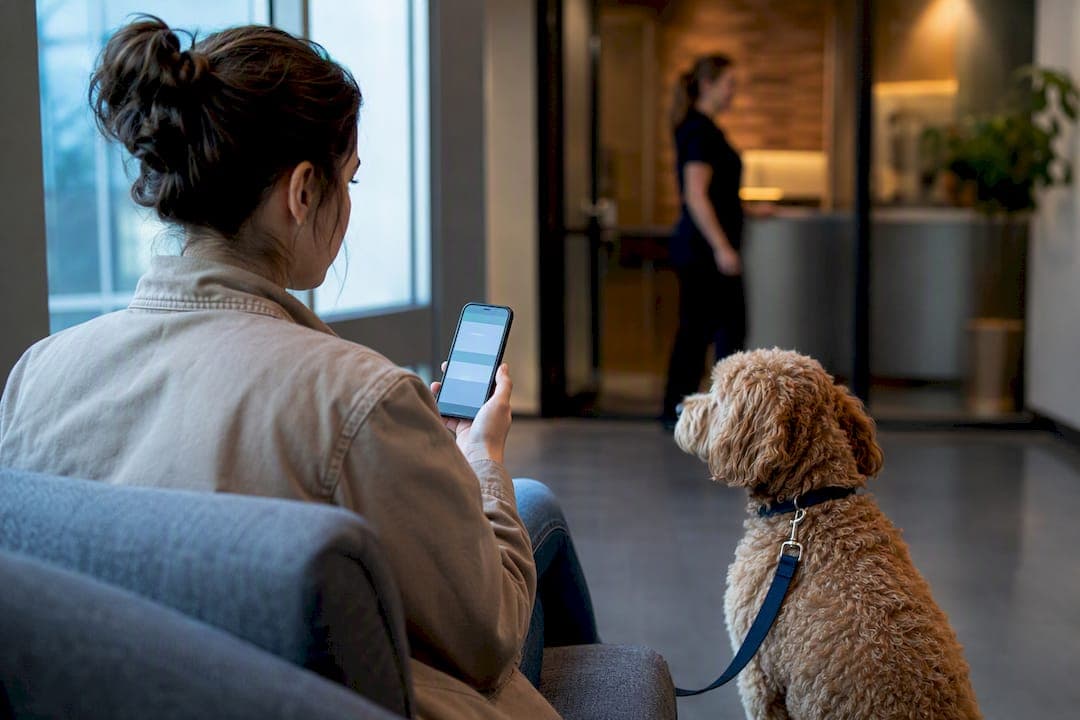
Every effective running late message does three things in one breath: gives a real time, states what's happening, and reassures the owner their pet is fine. A workable example: "Hi Sarah, we're running about 15 minutes behind schedule today. Bella's next in line and doing great. New pickup time is 3:15 PM. Thanks for your patience!" Automate that exact structure through a scheduling platform and you rarely need to write it twice.
TL;DR:
- Sending delay notifications within 15 minutes of a confirmed delay is crucial, with follow-ups at 30 minutes or more requiring escalation to a phone call.
- SMS remains the most reliable channel, while WhatsApp offers read receipts; email is only suitable for follow-up, not initial alerts.
- Use specific revised times, brief reassurance, and avoid sharing confidential details or naming other clients in delay messages.
- Escalate to a staff member immediately if delays exceed 45 minutes or if a client exhibits pushback or health concerns.
- Automate delay messages with tools like AnimalBooking to reduce manual work, ensure consistent timing, and verify message delivery.
Table of Contents
- Ready-to-use running late text templates for pet services
- When should you send a delay notification?
- Which channels work best for delay messages?
- How do you word a delay message without breaching confidentiality?
- What are the escalation rules for delay messages?
- How do you measure whether your delay messages work?
- Adjusting tone for different client relationships
- Common mistakes in delay notifications
- Cultural considerations in delay communication
- What should you send after the first delay alert?
- Legal and privacy rules for automated delay messages
- What we've learned from watching automated reminders work
- Automate your running late messages with AnimalBooking
- Sources
- FAQ
Ready-to-use running late text templates for pet services
The right late arrival notification depends entirely on how long the delay is and what's causing it. Here's a working set, organised by delay length and situation.
Short delay (5 to 15 minutes)
- SMS: "Hi [Name], quick heads up: we're running about 10 minutes behind. [Pet]'s all good, just a short wait. See you around [time]!"
- WhatsApp: "Hey [Name] 👋 Small delay today, roughly 10 minutes. [Pet] is happy and settled. New time: [time]."
Medium delay (15 to 45 minutes)
- "Hi [Name], we're running later than planned, about 30 minutes behind. [Pet] is comfortable and being looked after. Revised time: [time]. Sorry for the wait!"
- "[Name], apologies for the delay. An earlier appointment ran long. [Pet]'s fine and next up. We expect to be ready by [time]."
Extended delay or reschedule
- "Hi [Name], we're significantly behind today (over 45 minutes) due to an unexpected situation. We can either keep [Pet]'s slot with a new time of [time], or reschedule to [alternative date]. Reply and let us know what suits, or call us on [number]."
Health or clinical update (staff escalation required)
- "Hi [Name], could you give us a call when you get a moment? We'd like to update you on [Pet]." This one should never carry detail by text. It's a trigger for a phone call, not a message in itself.
Pickup-waiting variation
- "Hi [Name], thanks for waiting! [Pet]'s finishing up now, ready in approximately [X] minutes. We'll message the moment they're set to go."
Pro Tip: Keep a locked master copy of each template in your booking system rather than in a staff member's phone. When someone edits a template on the fly during a busy morning, that version often becomes the one that gets reused, typos and all.
When should you send a delay notification?
Timing decides whether a late running message reads as considerate or as an afterthought. Three common triggers set off the need for one:
- Staff running behind schedule — a groomer, vet, or trainer clocks visibly behind their booked slots.
- Mobile travel delays — traffic, parking, or a longer previous job pushes a mobile groomer or vet off route.
- Emergency insertions — an urgent case gets slotted in ahead of scheduled appointments.
As a starting rule, send the first alert at the 5 to 10 minute mark, once a delay is confirmed rather than just suspected. Send a follow-up ETA update around the 15 minute mark if the wait stretches on. Escalate to a phone call, not a text, once you hit 30 to 45 minutes, adjusting these windows for your specific service (a boarding pickup delay tolerates more patience than a vet appointment with a sick animal waiting in the car).
Avoid notification fatigue by setting a minimum 15 minute gap between automated messages on the same booking, and keeping the trigger rules identical across every staff member so owners get a consistent experience regardless of who's working the desk that day.
Which channels work best for delay messages?
SMS remains the most reliable late arrival notification for pet businesses, largely because it doesn't need an app or a saved contact to land in front of someone. WhatsApp offers richer formatting and read receipts, which help confirm a message actually got seen. Email is too slow for anything time-sensitive; use it only for follow-ups, not the initial alert. In-app push notifications work well if your customers already use a booking app daily, but they're useless for anyone who hasn't opened it in a week.
Mapping this to your booking calendar is straightforward once you see it laid out:
- Tag each booking with an expected start time and a "running behind" flag staff can trigger manually or that the system flags automatically when a prior appointment overruns.
- Connect that flag to a messaging trigger so the client gets notified within minutes, not after someone remembers to do it.
- Track delivery status so you know a message actually sent rather than assuming it did.
Automated systems that synchronise scheduling with proactive delay notifications cut down on the manual interruptions staff otherwise deal with when owners call to ask "where are we at?" Before going live, run an integration checklist: confirm contact preferences per client, get explicit opt-in for SMS and WhatsApp, check delivery tracking is switched on, and test the whole chain with a dummy booking before trusting it with real customers.
Pro Tip: Test your automated running late message on a slow Tuesday, not your busiest Saturday. You want to catch a broken trigger before it fires wrong 40 times in one morning.
How do you word a delay message without breaching confidentiality?
Good wording follows a simple pattern: state the new time, say what's being done, reassure the owner about their pet's welfare. Skip everything else.
Do:
- Give a specific revised time, not a vague "shortly."
- Name the action taken ("moved you to the next slot," "vet is finishing an earlier consult").
- Reassure briefly about the pet's condition or comfort.
Don't:
- Mention another client by name, breed, or condition, even in passing.
- Include clinical detail ("the dog ahead of you needed stitches") that belongs to someone else's appointment.
- Overexplain. A rambling apology reads as less professional than a short one.
You can shift tone without changing the facts. "We apologise for the inconvenience and any disruption this may cause" becomes "Sorry about the wait, we know it's annoying." Same message, friendlier register, same amount of information given away (none that shouldn't be).
If a situation calls for a photo update or a clinical detail beyond "your pet is fine," get verbal or written permission first and log that consent against the booking record. This matters more for veterinary and boarding clients than for a quick groom, since the information at stake tends to be more sensitive.
What are the escalation rules for delay messages?
Automation should hand off to a human the moment a situation gets serious. Three triggers demand escalation every time:
- Health concerns — anything beyond routine, hand it to a staff member for a phone call immediately.
- Delay beyond your threshold — once a wait crosses 30 to 45 minutes, a text stops being enough.
- Client pushback on a callback — if someone sounds upset on the phone, that's a cue for a manager, not another automated message.
For sensitive updates, structure the conversation with the S.T.A.T. framework: state the situation, tell the truth plainly, explain the action being taken, then transition to next steps. Your handoff checklist should record who made the call, what was said, and when a follow-up is due, all logged against the pet's file.
How do you measure whether your delay messages work?
Three numbers tell you whether your late arrival notifications are earning their place: delivery rate (did the message actually reach the client), read or open rate where your platform supports it, and no-show rate on the appointments that followed. Owner callback volume is worth tracking too. A rising number of "just checking in" calls usually means your messages aren't reassuring people enough.
Run a simple test: rotate two versions of your medium-delay template across similar appointment types for four to eight weeks, then compare no-show rates and any satisfaction feedback between the two groups. Facilities running automated client communication systems report meaningful drops in the manual admin time spent chasing status calls, freeing staff for the conversations that actually need a human.
- Delivery rate: did it land?
- Open/read rate: did they see it?
- No-show rate: did it change behaviour?
- Callback volume: did it actually reassure them?
Audit failures using timestamps and delivery confirmations rather than relying on staff memory of what was sent when.
Adjusting tone for different client relationships
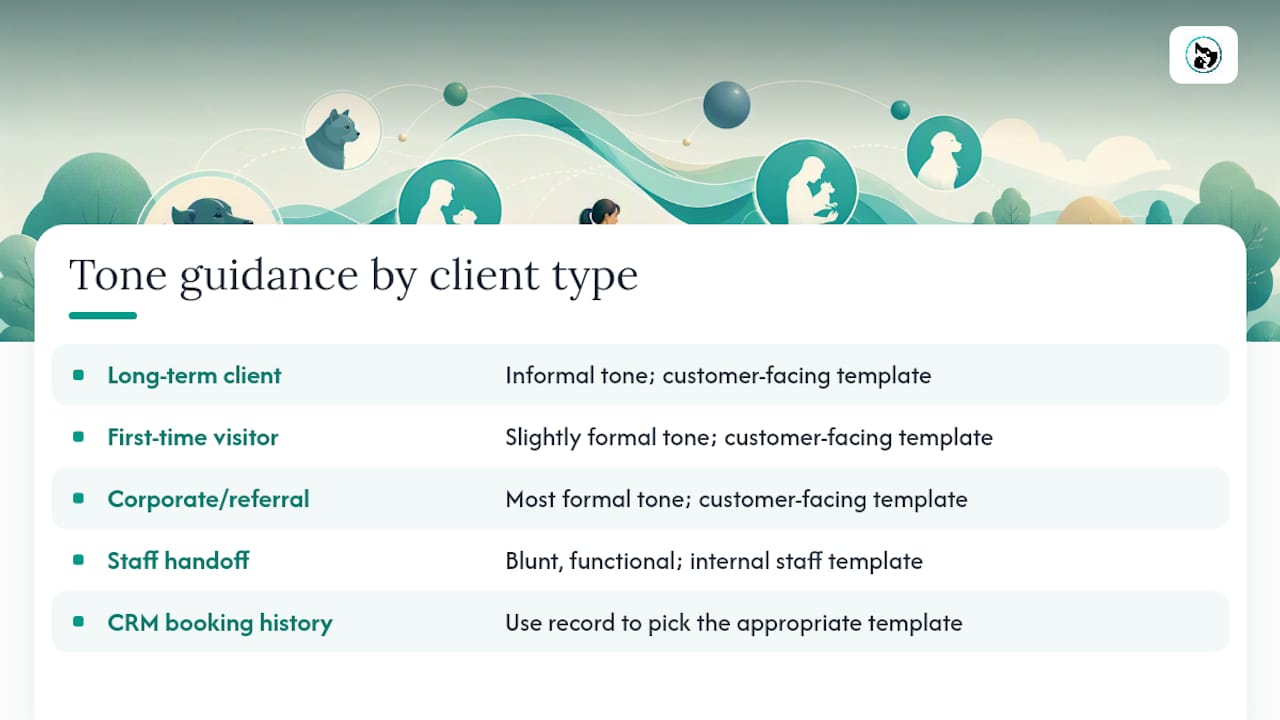
A running late message to a long-term client who books weekly reads differently to one sent to a first-time visitor, even though the facts are identical. Regular clients tolerate more informal phrasing ("Running about 15 behind again, sorry!") because there's an existing relationship carrying the tone. New clients need a slightly more formal structure, since they haven't yet learned to trust that a delay doesn't mean disorganisation.
Corporate or referral clients, such as a vet referring a boarding client, warrant the most formal register of the three, closer to "We apologise for the delay to your appointment" than "Running a bit late, sorry!" The stakes of a poor first impression are higher when a third party's reputation is attached to the interaction.
Staff-to-staff handoffs (a groomer texting a receptionist to flag a delay before it reaches a customer) can be blunt and functional. There's no need for pleasantries between colleagues coordinating a schedule; save the warmth for the customer-facing version.
The practical fix is building two or three tone variants of each template rather than one universal version, and letting staff pick based on the client's history in your CRM. Businesses using pet client notes already have the context needed to make that call quickly, since a client's booking frequency and past interactions usually sit right there in the record.
Common mistakes in delay notifications
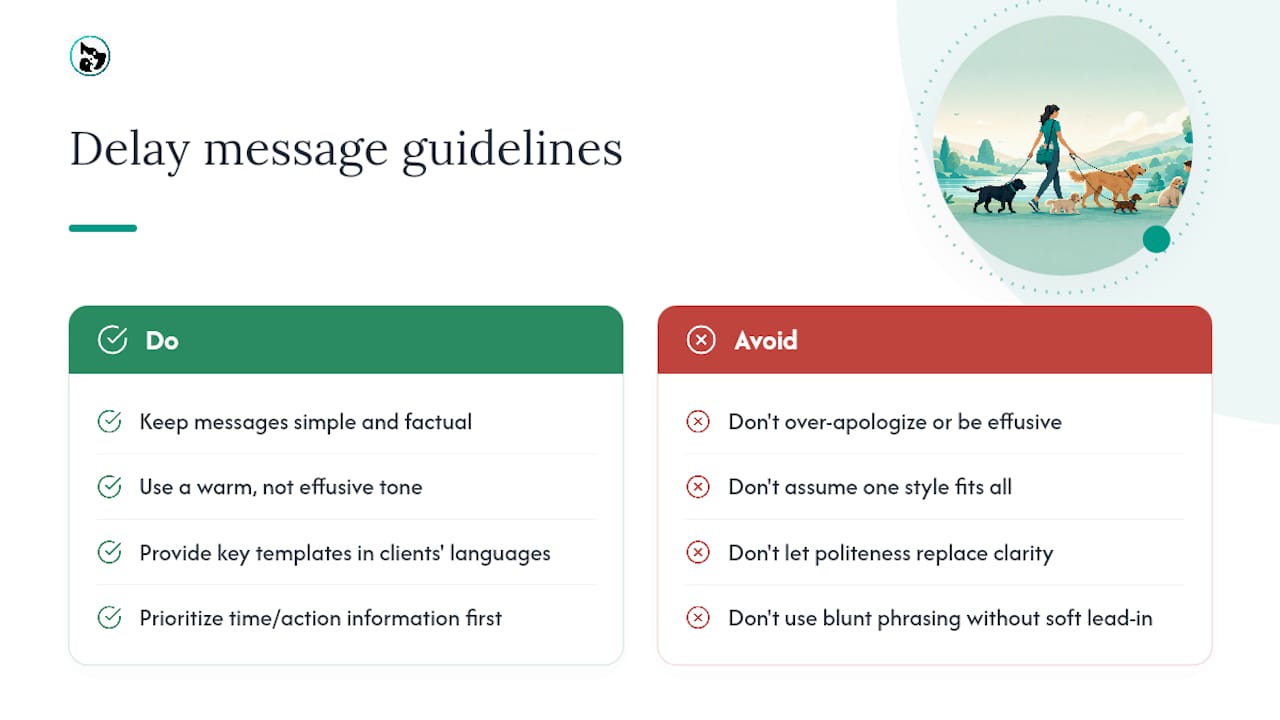
The most frequent error is vagueness. "We're running a bit late" tells an owner nothing they can plan around. Always attach a number, even an estimate.
Over-apologising is the second trap. Three sentences of sorry before getting to the actual update makes a short delay sound like a crisis. State the fact, apologise once, move on.
Silence is worse than either. Sending nothing until an owner calls to ask what's happening erodes trust faster than a delay itself ever does. A five-minute wait handled well builds more goodwill than a delay that never gets a text at all.
Sending the same message twice, word for word, within a short window reads as a broken system rather than a considerate one. If nothing has changed, don't re-send the identical line; either update the ETA or hold off until you have something new to say.
Finally, disclosing information about another client to explain a delay is a mistake that's hard to walk back once sent. "We're running behind because the dog before yours had a reaction" tells the recipient exactly what happened in someone else's appointment. Keep the reason generic: "an earlier appointment ran longer than expected" covers the same ground without naming anyone.
Cultural considerations in delay communication
Expectations around lateness and apology vary more than most pet businesses assume, particularly in cities with diverse client bases. Some cultures treat a formal, detailed apology as a sign of respect; a message that feels appropriately humble to one owner can feel oddly heavy to another who'd prefer a brief, matter-of-fact update.
Directness also reads differently depending on background. A blunt "we're 20 minutes late" lands as efficient and honest for some clients, and as slightly abrupt for others who expect a softer lead-in. There's no single correct version, which is exactly why keeping your core template simple, factual, and warm without being effusive tends to travel best across a mixed client base.
Language matters practically, not just tonally. If a meaningful share of your clients speak a language other than English at home, offering key templates in that language, even a simple one, often prevents confusion that a perfectly worded English message won't fix. This is less about translation for its own sake and more about making sure the actual information (time, action, reassurance) actually gets through.
Time perception itself differs too. What counts as "running late" is loosely defined and shaped by local norms, prior experience with your business, and how tightly a client's own day is scheduled around the appointment. Treat the message as an information delivery problem first, and let politeness norms follow from there rather than lead.
What should you send after the first delay alert?
A single running late text rarely closes the loop on its own, especially if the delay stretches. Once the initial notice is out, a short follow-up when the situation resolves matters just as much as the first message did.
If the wait ends on time or early: "Good news, [Pet] is ready now, right on the revised schedule." If it drags further: "Update: we're still catching up, new estimate is [time]. Appreciate you sticking with us." A brief thank-you after pickup, particularly following an extended delay, costs nothing and tends to smooth over any lingering frustration: "Thanks for your patience today, hope [Pet] settles in well tonight."
For clinical situations, the follow-up should generally come by phone rather than text once the appointment concludes, giving staff a chance to answer questions in real time rather than leaving an owner to interpret a short message alone.
Legal and privacy rules for automated delay messages
Automated messaging touches consent and privacy rules the moment it involves a client's phone number or health information about their pet. Most jurisdictions require explicit opt-in before sending marketing style SMS or WhatsApp messages, and while a transactional running late message about an existing booking generally sits in a different category, mixing operational and promotional content in the same channel is worth avoiding to stay clearly inside that exemption.
Veterinary and clinical settings carry an extra layer. Any message referencing a pet's health status should stick to general reassurance and avoid detail that could reasonably identify another patient or disclose diagnostic information over an unsecured channel. Store consent records for photo sharing or detailed updates against the booking, not in a separate spreadsheet that's easy to lose track of.
Keep a record of what was sent, when, and through which channel. If a dispute ever arises over what a client was or wasn't told about a delay, a timestamped message log is the difference between a five-minute resolution and a drawn-out argument. This isn't a substitute for proper legal advice on your specific obligations, but it's the baseline most pet service businesses should have in place regardless of jurisdiction.
What we've learned from watching automated reminders work
Businesses that switch from manual text-and-call updates to automated systems consistently report the same pattern: fewer interruptions during busy periods, and clients who feel informed rather than ignored.
Our advice for anyone starting out: begin with short-delay templates only, and require staff sign-off before any health-related message goes out. Test the whole workflow during a quiet week, not your busiest Saturday, so the first real failure happens somewhere you can afford it.
— AnimalBooking
Automate your running late messages with AnimalBooking
AnimalBooking is the direct alternative to typing out the same delay text by hand fifteen times a week. Every plan includes auto-reminders that trigger on your schedule, not your memory, with built-in WhatsApp support alongside SMS and email so clients get updates on the channel they actually check.

Delivery tracking confirms a message actually reached the client rather than vanishing into a dead number, and setup takes minutes rather than a full afternoon of configuration. The auto-reminders feature plugs straight into your existing calendar, so a delay flag on a booking triggers the right template automatically instead of relying on someone to remember. Plans start at $49 per month for an intermediate tier, with higher tiers available at increased monthly rates and varying platform fees. Check the pricing page for full details and pick the plan that matches how many bookings you're running each week. Check the pricing page for the full breakdown and pick the plan that matches how many bookings you're running each week.
Sources
- Automating Client Communication in Pet Boarding & Grooming with AI | OS For Your Business
- How to Communicate Difficult Updates | Hands N Paws
FAQ
What should a running late message always include?
A time, an action, and reassurance. Give a specific revised ETA, state briefly what's causing the wait or what's being done about it, and confirm the pet is safe and comfortable.
How late is too late for a text instead of a call?
Most pet businesses treat 30 to 45 minutes as the point where a text stops being enough and a phone call becomes necessary, especially for veterinary or health related situations. Adjust the threshold down for anything involving a sick or anxious animal.
Can AnimalBooking send these messages automatically?
Yes. AnimalBooking's auto-reminders feature connects to your booking calendar and can trigger SMS or WhatsApp delay notifications based on schedule changes, with delivery tracking so you know each message actually sent.
Do delay messages need client consent under privacy rules?
Operational messages about an existing booking generally fall outside strict marketing consent rules, but SMS and WhatsApp still typically require opt-in, and any health-related content should stay general enough to avoid disclosing sensitive clinical detail over text.
How much does AnimalBooking cost?
AnimalBooking's Independent plan runs $49 per month, Teams is $149, and Pro is $299, each with a platform fee that drops as you move up tiers. Full current pricing is available on the pricing page.