
Yes, WhatsApp appointment reminders work, and they cut no-shows when set up properly. WhatsApp has no built-in scheduler, though, so you need either a booking platform with reminders baked in or the WhatsApp Business API through an authorised provider. Manual sending suits a sole trader with a handful of daily bookings; anything bigger needs automation triggered by your calendar or booking system.
TL;DR:
- Automated triggers from booking systems or calendars are essential for reliable WhatsApp appointment reminders; manual or browser-based methods are unreliable and risky.
- Sending approved Utility templates requires customer opt-in and careful wording, with templates needing Meta approval, which can delay deployment.
- Using low-code connectors or a Business Solution Provider for the WhatsApp Business API ensures scalable, compliant, and two-way communication for high-volume needs.
- Testing reminder workflows with small batches helps identify template rejections and formatting issues before full rollout, reducing rework.
- Integrating reminders within booking flows, like Animalbooking does, reduces no-shows and maximizes revenue by automating reschedule prompts and reclaiming slots.
Table of Contents
- How WhatsApp appointment reminders actually work
- Which sending method actually fits your business?
- Setting up WhatsApp appointment reminders step by step
- What good reminder copy and timing look like
- Where businesses get this wrong
- Why Animalbooking treats reminders as a booking problem, not a marketing one
- Stop chasing no-shows manually
- Where to check the details yourself
- Sources
How WhatsApp appointment reminders actually work
WhatsApp was built for conversations, not campaigns. There's no dashboard where you queue up a message to fire automatically three days from now — that capability doesn't exist in the consumer app or the free Business app. To send a reminder without typing it manually every time, you need something else doing the scheduling and pushing the message through on your behalf.
That "something else" is usually your calendar or booking system. When a client books a grooming slot or a vet appointment, that event becomes the trigger. Google Calendar, a booking tool, or a platform like Animalbooking's Smart Calendar watches for upcoming appointments and fires the reminder at the right moment.
Where that message actually gets sent from matters just as much as when. Your options split into a few tiers:
- The personal WhatsApp app — fine for one-off manual messages, not built for scale
- WhatsApp Business app — free, adds basic automation like greeting messages, but still no proactive scheduled sends
- Web-based schedulers and browser extensions — bolt-on automation, often fragile
- WhatsApp Business API via a Business Solution Provider (BSP) — the production-grade route, built for triggered outbound messages
Whichever channel you choose, two operational realities don't go away: your reminders need to be sent as approved Utility templates, and the customer needs to have opted in first.
Which sending method actually fits your business?
Picking the right method comes down to volume, risk tolerance, and how much manual admin you're willing to tolerate. A groomer doing eight appointments a day has very different needs to a multi-vet clinic running sixty.
Manual scheduling through WhatsApp Business works if you're a sole trader with a light book. You type the message, you send it, done. It costs nothing and takes minutes to learn, but it doesn't scale past a certain point without eating your evenings.
Browser-based WhatsApp Web schedulers and extensions promise automation without the paperwork. They're quick to install and cheap, but they typically run outside WhatsApp's official terms. That's a real liability, covered in more detail below.
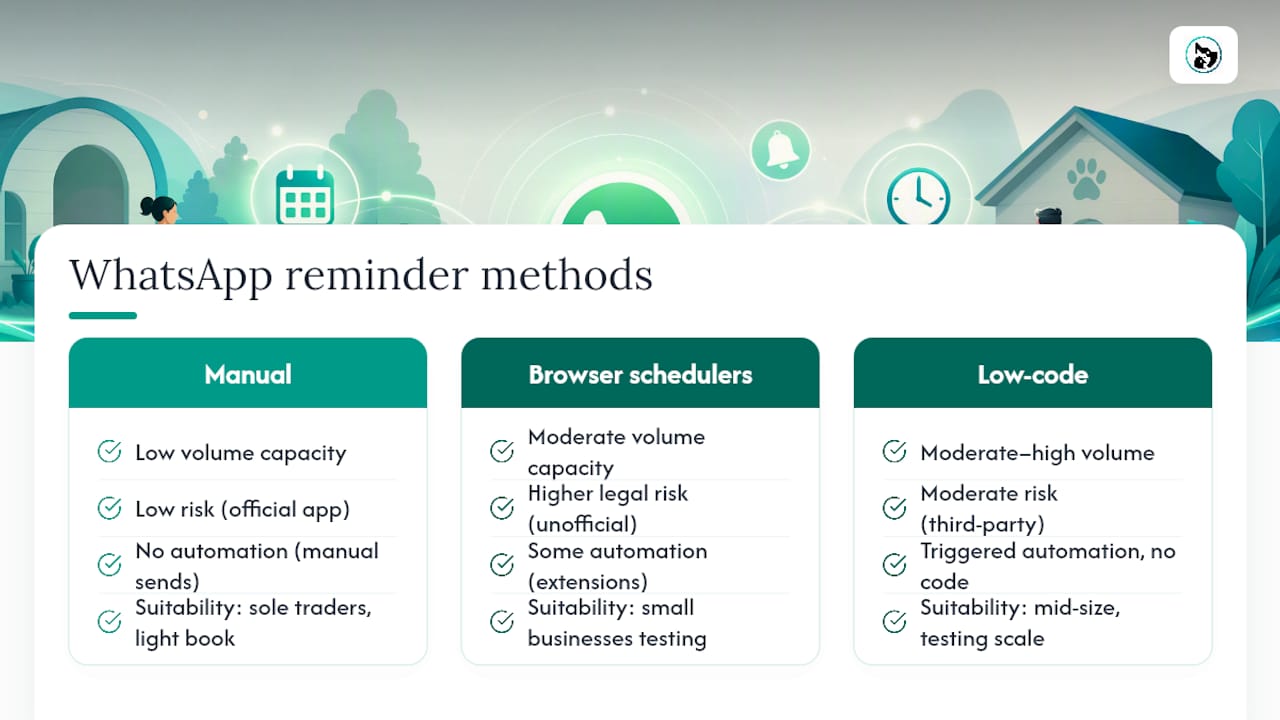
Low-code connectors link your calendar to WhatsApp through webhook-style automation tools. These give you genuine triggered sends without writing code, and they're a reasonable middle step for businesses testing the waters.
A Business Solution Provider running the WhatsApp Business API is the option built for sustained volume. This is the only route that reliably supports approved templates, two-way replies, and programmatic triggers at scale, because the app and API are architecturally different tools for different jobs.
Pro Tip: Test your reminder flow with a small batch of real appointments before rolling it out to your whole client list. Template rejections and formatting issues show up fast, and it's far less painful to fix on ten bookings than two hundred.
Setting up WhatsApp appointment reminders step by step
Getting this right the first time saves you from re-doing consent collection or losing your number to a compliance flag later. Work through these in order.
- Capture opt-in at the point of booking. Add a checkbox or a spoken confirmation when the appointment is made, and store the timestamp against the client record.
- Choose your send channel based on volume. Under a dozen appointments a day, the Business app might suffice. Above that, move to a BSP or an integrated booking platform.
- Connect your calendar or booking system so it can trigger each reminder window automatically, rather than relying on someone remembering to send them.
- Draft Utility templates and submit them for Meta approval. Keep the wording transactional. Test that a client reply opens the 24-hour service window correctly.
- Build confirm and reschedule buttons into the template, or use a Date Picker flow, so a cancellation frees the slot without a phone call.
- Track delivery rates, reply rates, and your no-show percentage for the first month, then adjust timing and copy based on what the numbers show you.
Most of the friction in this process sits in step four. Template approval can take anywhere from a few hours to a couple of days, and rejected templates almost always come down to promotional language sneaking into what should be a purely functional message.
What good reminder copy and timing look like
Short wins. A reminder template should carry the client's name, the date, the time, the location or provider, and nothing else. Every extra line of marketing copy risks the template being reclassified and rejected, since Utility templates exist specifically for transactional, non-promotional messages.
Timing follows a fairly consistent pattern across service businesses: a first reminder 24 to 48 hours before the appointment, then a second, shorter one an hour or two out, or first thing that morning for early bookings. Two touches beats one, but three starts to feel like nagging.
The real value shows up when the reminder is a two-way conversation, not a broadcast. A confirm button or a reply that says "running late" opens the 24-hour service window, letting you follow up on the same thread without triggering another paid template. Building your flow to encourage a quick reply isn't just good customer experience, it's also a way to keep your monthly messaging costs down.
WhatsApp messages consistently see far higher open rates than email for time-sensitive updates like appointment reminders, which is the main reason engagement improves when businesses switch channels.
Once it's running, track four numbers: open rate, confirmation rate, reschedule rate, and no-show rate. Set a baseline in week one and revisit it monthly. If confirmations are low but opens are high, the problem is usually your call-to-action, not your timing.
Where businesses get this wrong
The biggest mistake is reaching for an unofficial scheduler or a browser extension because it's the fastest thing to set up. These tools sit outside WhatsApp's terms, and Meta can restrict or ban a number without much warning if it detects automated behaviour outside approved channels. For a business that lives or dies on client communication, that's not a risk worth taking to save a setup step.
A few habits keep you well clear of trouble:
- Record who opted in, when, and how, tied to the specific booking or client record
- Include a clear way to opt out in your reminder messages
- Keep Utility templates strictly transactional. No offers, no upsells, no "while you're here"
- If you operate in healthcare or another regulated sector, check your BSP's guidance on data handling before you go live, since reminder content can touch health information
None of this is complicated once it's set up. It just needs to be set up properly the first time, on infrastructure that isn't going to disappear the day Meta tightens its rules.
Why Animalbooking treats reminders as a booking problem, not a marketing one
Most reminder tools bolt WhatsApp onto a system that wasn't built with appointments in mind. Animalbooking flips that — reminders, opt-in, and rescheduling all live inside the same booking flow, because that's the problem pet service providers actually have.
Auto Reminders and Smart Calendar handle the trigger logic automatically: a booking comes in, consent is captured at that moment, and the reminder fires on schedule without anyone touching a spreadsheet. Providers using this approach report significantly fewer no-shows and increased revenue per booking, largely because missed slots get reclaimed through reschedule prompts instead of sitting empty. For a mobile groomer or a single-vet clinic, that's the difference between chasing bookings all week and contacting and booking a dog groomer to let the calendar do it.
— AnimalBooking
Stop chasing no-shows manually
If you've been sending reminders by hand, or patching together a calendar and a browser extension, there's a simpler route. Animalbooking's Auto Reminders and Smart Calendar work together out of the box, capturing opt-in at booking and firing reminders and reschedule prompts without a separate tool in the mix.
It's built for groomers, boarders, vets, trainers, and mobile pet businesses who'd rather spend their evening off the phone. Setup takes minutes, not weeks, and you can see the plans that fit your business size on the pricing page. If you're ready to stop losing slots to forgotten appointments, start a free trial and have your reminders running before your next booking comes in.
Where to check the details yourself
For template rules, approval steps, and API specifics, go straight to WhatsApp Business's own documentation. For calendar integration examples in a live booking context, Animalbooking's Bookings Dashboard shows how triggers and reminders connect in practice. High-volume operations should also consult their BSP's own onboarding guidance before going live.
Sources
- WhatsApp Business — docs and platform information
- WhatsApp appointment booking: Benefits, setup & how it works | Zoho Bookings
- WhatsApp appointment reminders 2026: Setup, Costs, Templates | Chatarmin