
Use SMS for time-sensitive reminders and confirmations, email for detailed messages and receipts, and WhatsApp for two-way support conversations. Before sending a single message, lock in two things: documented opt-in consent from every recipient and a verified sender identity. Skip either step and carriers will block your messages before clients ever see them.
TL;DR:
- Use verified sender identities like short codes, toll-free numbers, or local long codes to ensure carrier trust and high delivery rates for bulk messages.
- Prioritize explicit opt-in consent and provide easy opt-out options to maintain compliance and prevent message blocking or account suspension.
- Automate booking confirmations, reminders, and follow-ups to reduce no-shows by up to 80% and increase revenue per booking by around 30%.
- Match message channels to content: SMS for urgent alerts, email for detailed info, WhatsApp for two-way conversations, and MMS for images.
- Focus on compliance discipline over content creativity, as adherence to consent and verification rules guarantees message deliverability over time.
Table of Contents
- What's the best way to send mass messages to clients?
- What sender type should you use for bulk texts?
- How do you stay compliant when messaging clients in bulk?
- How should you plan a mass messaging campaign?
- What should mass messaging templates actually say?
- Which metrics actually tell you if a campaign worked?
- How does automated messaging cut no-shows for pet businesses?
- Why compliance beats clever copywriting every time
- A simpler alternative to running a separate messaging platform
- Where to go for deeper technical and legal detail
- Sources
What's the best way to send mass messages to clients?
Every channel has a job it does well and a job it does badly. Matching the message to the right channel is the difference between a client who reads your reminder and one who reports you for spam.
SMS wins on speed and attention. Open rates dwarf email, which makes it the obvious choice for appointment reminders, last-minute cancellations, and anything time-critical. The catch is relevance: SMS only stays effective when messages feel personal and necessary — generic blasts push people straight to the opt-out link.
Email carries the weight SMS can't. Booking confirmations with full details, invoices, receipts, newsletters, and anything with images or attachments belongs in an inbox, not a text thread. It's also cheaper per message at volume and gives you more room to explain policies or promotions.
WhatsApp and other messaging apps suit ongoing, two-way conversations, particularly where clients already expect to message the business directly, such as WhatsApp appointment reminders for pet groomers and vets. It's less useful for cold outreach since most platforms require the recipient to message first or opt in explicitly.
MMS earns its place when a picture matters. Think before/after grooming photos or a map to a mobile pet-transport pickup point.
Decide upfront whether a channel is broadcast-only or two-way. Reminders and alerts can be one-way. Anything asking for a reply, a reschedule, or a question needs a routing plan so replies land with a real person, not a dead inbox.
What sender type should you use for bulk texts?
The sender identity you pick determines how fast you can send, how much it costs, and whether carriers trust your messages enough to deliver them.
- Short codes (five or six digit numbers) handle the highest throughput and suit businesses sending thousands of messages a day.
- Toll-free numbers offer solid throughput with a friendlier, more recognisable identity, and usually cost less to set up than a short code.
- A2P 10DLC long codes look like ordinary local numbers, which works well for appointment-based businesses that want texts to feel personal rather than corporate.
Each type comes with different registration steps and cost structures, and provider documentation from Twilio walks through the trade-offs in detail before you commit to one.
Sending mass texts from a personal mobile number is the option to avoid entirely. Personal numbers aren't built for volume, carriers flag the pattern quickly, and you lose every compliance safeguard that a registered sender identity provides.
Some platforms scale from a handful of messages up to over one million in a single campaign, with entry-level pricing often starting around US$25 a month depending on volume and features.
Whichever sender type fits your volume, register it before you send anything at scale. Verification with carriers or through your platform's built-in tools is what keeps your messages out of the spam folder and off the block list.
How do you stay compliant when messaging clients in bulk?
Compliance isn't a box you tick once. It's the ongoing discipline that keeps your sender number working.
- Get explicit, documented opt-in before the first message. A signature on a booking form, a checked box at checkout, or a confirmed reply to a keyword campaign all count. A purchased list does not.
- Give every message a clear way to opt out, and action those requests immediately. "Reply STOP to unsubscribe" isn't optional legal fine print. It's the mechanism that keeps your number in good standing with carriers.
- Register your sender identity under A2P frameworks where required, particularly if you're sending from a long code at meaningful volume.
- Keep consent records for every contact, noting when and how they opted in, and match the type of message to the level of consent you actually have. Someone who agreed to appointment reminders hasn't agreed to promotional offers.
The single most common reason accounts get suspended or blocked is sending to purchased or unverified lists without documented consent. Carriers treat this as a reputation risk for their whole network, not just your account, so the penalties land fast and hard.
Pro Tip: Run a small seeded send to a handful of verified contacts before any full-scale campaign. It catches broken links, bad merge tags, and content that trips spam filters before your entire client base sees the mistake.
Booking forms are one of the easiest places to capture proper consent at the point of contact, and tools like a QR code booking setup can fold opt-in language directly into the sign-up step, so you're never scrambling to prove consent after the fact.
How should you plan a mass messaging campaign?
Every campaign needs one job before it needs one word of copy. Are you confirming a booking, chasing a no-show, or promoting a slow Tuesday? The objective decides the channel, the tone, and the timing.
Segmentation is what separates a campaign clients appreciate from one they mute. Group contacts by:
- Recent activity — active clients versus lapsed ones need different messages entirely.
- Booking date or service type — a groomer's client and a vet's client don't want the same content.
- Client value or frequency — your regulars can handle more promotional contact than a first-time booker.
Cadence matters as much as content. Appointment reminders work best sent once, roughly 24 to 48 hours ahead, with a same-day follow-up for high-value bookings. Promotional messages should stay under a handful per month. Operational alerts (cancellations, weather closures) go out only when something's actually changed.
Personalisation tokens, first names, service type, appointment time, lift response rates without extra effort once your data is clean. Run simple A/B tests on send time and subject lines rather than guessing.
Pro Tip: Throttle large sends into smaller batches over a few hours rather than firing everything at once. It protects deliverability and gives you a chance to catch a broken template before it reaches your whole list.
Retention tactics beyond the message itself, like the ones covered in this client retention strategy guide, compound the value of a well-planned campaign over months, not just one send.
What should mass messaging templates actually say?
Good templates follow rules, not inspiration. Here's what works across SMS and email.
SMS reminder template: "Hi [Name], reminder: your appointment with [Business] is on [Date] at [Time]. Reply C to confirm or call [Number] to reschedule. Reply STOP to opt out."
Promotional SMS template: "Tap [Link] to book. Reply STOP to unsubscribe."
Confirmation email subject line formula: "[Business Name]: Your booking is confirmed for [Date]" consistently outperforms vague subject lines like "Booking update." Full confirmation email templates cover the structure for receipts and detailed policy information.
Keep SMS under 160 characters where possible to avoid multi-part billing, shorten links so they don't eat your character count, and steer clear of words like "free," "urgent," or excessive punctuation, which trip spam filters on both SMS and email.
| Test element | What to try | What to watch |
|---|---|---|
| Send time | Morning vs afternoon | Open/click rate |
| Subject line | Direct vs curiosity-led | Open rate |
| SMS CTA | "Reply C" vs "Tap link" | Response rate |
| Frequency | Weekly vs fortnightly | Opt-out rate |
Which metrics actually tell you if a campaign worked?
Four numbers matter more than any others: delivery rate (messages that reached a device), click-through rate (recipients who acted), conversion rate (recipients who booked or bought), and opt-out rate (recipients who left).
A dropping delivery rate is the earliest warning sign of a sender reputation problem, often long before opt-outs spike. If it falls below what you're used to seeing, check your sender registration status and content before you send anything else.
- Delivery rate below expectations — sender reputation or carrier filtering issue.
- High opens, low clicks — the message got through, but the offer or CTA didn't land.
- Rising opt-out rate — you're messaging too often or the content isn't relevant enough.
Unified dashboards that combine SMS and email data make attribution far easier when a client responds to one channel after seeing a message on another. CPaaS platforms built for this purpose pull metrics from every channel into one view, which matters once you're running SMS and email side by side rather than guessing which one drove a booking.
How does automated messaging cut no-shows for pet businesses?
Manual reminders eat hours every week, and they're the first task to slip when a grooming salon or vet clinic gets busy. Automating messages around booking events removes that risk entirely.
The platform ties messages directly to what's happening on the calendar: a confirmation the moment a client books, a reminder ahead of the appointment, an alert if something's cancelled, and a follow-up afterwards. That sequence, confirmation through to follow-up, is where the biggest operational payoff sits for appointment-driven businesses, because it removes the manual step at every point clients are most likely to forget or ask questions.
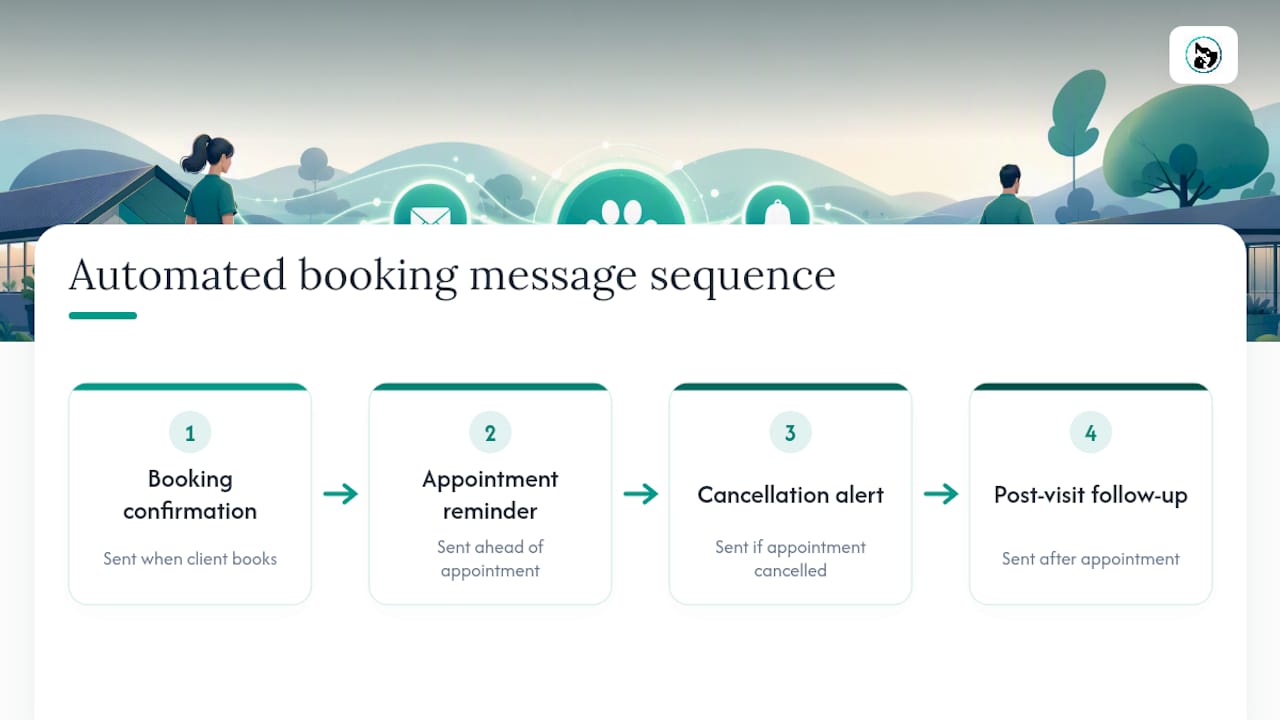
Businesses using automated reminders built into their booking system report no-shows dropping by up to 80%, with revenue per booking rising by roughly 30% once fewer slots go empty. For a mobile groomer or a solo vet, that's the difference between a fully booked week and a diary full of gaps nobody chased up.
Why compliance beats clever copywriting every time
Most advice on this topic obsesses over subject lines and send times. That's backwards. A brilliant SMS template sent to a purchased list gets your number blocked before anyone reads it, and a mediocre reminder sent to a properly consented client base still gets opened and acted on.
The conventional wisdom treats compliance as a legal chore to handle once and forget. It's actually the foundation your entire deliverability rests on, carriers track sender reputation continuously, not just at sign-up. Businesses that treat opt-in and sender verification as ongoing habits, not paperwork, are the ones still getting messages delivered a year from now.
If you're starting from scratch, prioritise in this order: get consent right, register a proper sender identity, then worry about copy and timing. Skipping straight to templates because they feel like the fun part is how businesses end up locked out of their own contact list. The tools matter less than the discipline behind how you use them.
— AnimalBooking
A simpler alternative to running a separate messaging platform
If you're running an appointment-based business, mass messaging clients doesn't have to mean adding another platform to your stack. The platform automates the message the moment the booking event happens: confirmation, reminder, cancellation alert, and follow-up without you writing a single campaign.

A standalone SMS or email tool makes sense for broad promotional blasts across a large customer base. But for reminders, confirmations, and the day-to-day messages that keep appointments on the calendar, a separate platform means duplicate contact lists, duplicate consent tracking, and one more login to manage. This type of system keeps bookings, client details, and messaging in one system, so a reminder sent at 24 hours out and a follow-up sent the next day are already tied to the correct appointment, with no manual list upload required.
For dog groomers, boarding facilities, vets, and mobile pet services, that means less admin and fewer missed appointments without ever touching a separate messaging dashboard. Check out Animal Booking's auto reminders and see how quickly you can get automated messaging running on your own bookings.
Where to go for deeper technical and legal detail
For the technical side of sender registration and carrier rules, Sinch's guidance on SMS compliance and sender ID registration covers what carriers expect before they'll deliver your messages at volume.
If you're building or scaling a sending platform yourself, Twilio's mass texting documentation explains sender types, APIs, and rate limits in more depth than any single article can.
For the case on why SMS earns a place in your channel mix at all, Hyperweb's explainer on SMS marketing lays out the open-rate advantage and where personalisation makes or breaks a campaign.
Sources
- sinch — SMS compliance & sender id guidance
- Twilio — mass texting explainer
- Hyperweb — why SMS marketing is essential