
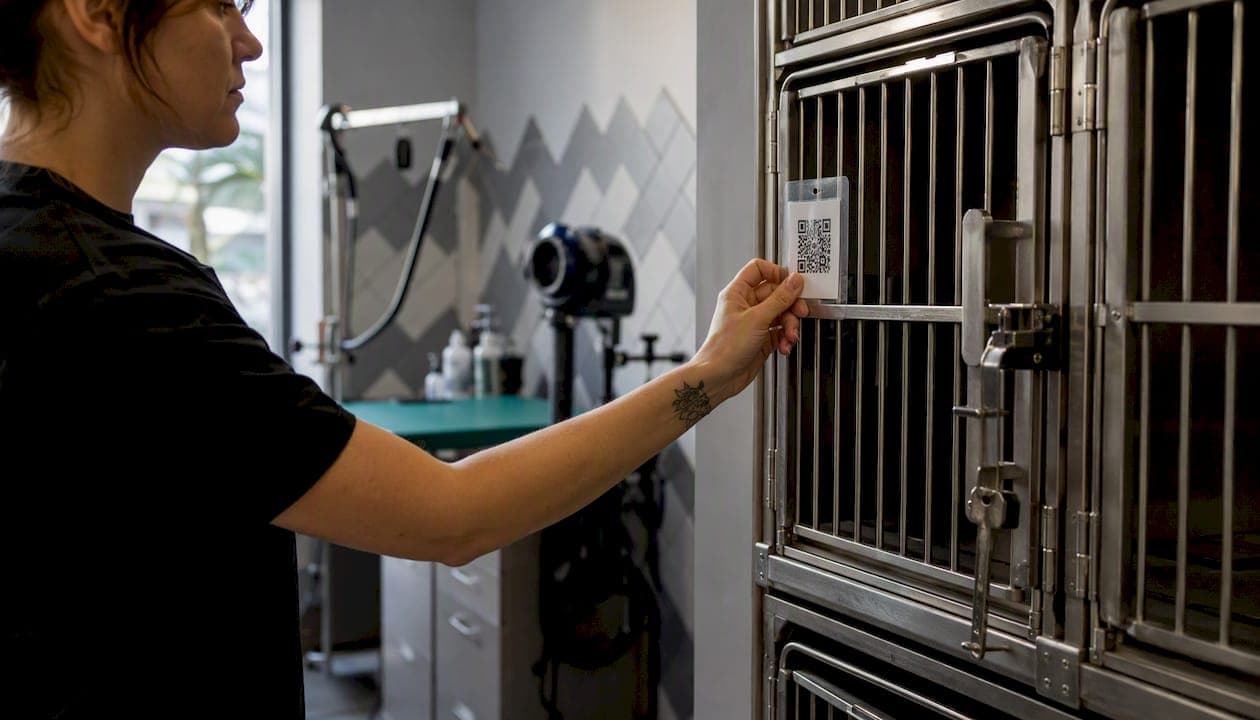
Yes, a booking QR code can turn a sticker on a kennel door into a confirmed appointment in under a minute. Link the code to your mobile-ready booking page, and customers skip the phone tag entirely.
What to do right now:
- Copy your Animalbooking provider link or booking page URL
- Decide between a dynamic QR (editable destination, trackable) or a static QR (fixed URL, simpler)
- Generate the code using your scheduling platform's built-in tool or a free QR generator
- Test the full scan-to-confirmation flow on at least two phone types before printing
- Print, laminate, and display at every high-intent touchpoint
Animalbooking supports QR-linked booking pages with integrated payments and deposits, so the entire flow from scan to confirmed reservation stays on one platform. According to vendor-provided performance data, automation and payments features can significantly reduce no-shows and increase revenue per booking, according to vendor reports.
Key Takeaways
A booking QR code works when it links directly to a mobile-ready booking step, uses a dynamic format for printed assets, and connects to a platform that handles payments and reminders automatically.
| Point | Details |
|---|---|
| Link to the booking step | Send scanners to the time-selection page, never a homepage, to maximize completion. |
| Use dynamic QR for print | Dynamic codes let you update the destination and track scans without reprinting signage. |
| Test before deploying | Scan on two phone types and two network conditions before any code goes on a physical surface. |
| Track scans to bookings | Monitor scan count, booking starts, and completions to find which placements actually convert. |
| Animalbooking for pet businesses | Animalbooking offers built-in payments, reminders, and multi-staff booking pages suited to QR workflows, with a free tier to start. |
Table of Contents
- What is a booking QR code and how does it work?
- Why booking QR codes pay off for pet service businesses
- Where to place booking QR codes in a pet service business
- How to create a booking QR code step by step
- Key customization settings to configure before you publish the QR
- Printing and technical best practices for reliable scanning
- How to measure QR booking performance and fix common problems
- Why Animalbooking works well for pet service QR workflows
- Small experiments to improve QR booking results over time
- A practical note on running QR booking in a busy pet shop
- Animalbooking makes QR booking fast to set up
- Sources
What is a booking QR code and how does it work?
A booking QR code is a scannable image that encodes a URL pointing directly to a reservation or scheduling interface. When a customer holds their phone camera over the code, it opens that URL instantly without any app required.
The typical flow: camera detects the code → browser opens the booking page → customer selects a date and time → enters contact details → pays a deposit if required → receives a confirmation. The whole sequence can take under 90 seconds on a well-configured mobile page.
A few QR types exist, but for bookings, URL QR codes are the right choice. Phone-number or vCard QR codes route customers to a dialer or contact card, which adds friction and loses the booking intent entirely. The destination matters as much as the code itself: send scanners to the time-selection step, not your homepage.
Worth clarifying: a booking code (the alphanumeric string like "GRMBK2026" used in hotel and airline engines) is a different thing. That identifies an existing reservation. A booking QR code creates one.
Pro Tip: Always link the QR directly to the booking form, not to a general "contact us" or homepage. Every extra tap between the scan and the calendar costs you a booking.
Why booking QR codes pay off for pet service businesses
The core business case is simple: fewer steps between intent and confirmation means more bookings. A customer standing at your grooming counter, reading a receipt, or scrolling past your Instagram post has a booking impulse that lasts seconds. A QR code captures it before it evaporates.
Concrete benefits:
- Faster conversions from print. A printed flyer that opens directly to your booking calendar converts better than one that asks customers to call or search.
- Less phone and email back-and-forth. Customers self-select their slot, reducing the scheduling calls that eat into your day.
- Contactless experience. Particularly relevant for waiting rooms and kennels where hygiene matters.
- Impulse capture. A QR on a van, a cage card, or a post-visit receipt catches the customer while the experience is fresh.
- Free generation. Major reservation platforms report no additional fee for generating or scanning QR codes when QR generation is built into the scheduling tool.
| Benefit | What it means in practice |
|---|---|
| No-show reduction | Vendor data: a substantial reduction with automated reminders and deposit requirements |
| Revenue per booking | Vendor data: a notable increase tied to payments and upsell features |
| Setup time | A working QR-to-booking flow can go live in minutes on most scheduling platforms |
| Cost to generate | Typically $0 when using a platform with built-in QR tools |
Figures in the table above are vendor-provided performance signals from Animalbooking and should be interpreted as platform claims, not guaranteed outcomes.
Where to place booking QR codes in a pet service business
Location determines whether a QR code gets scanned or ignored. The best placements share one trait: the customer already has booking intent when they see the code.
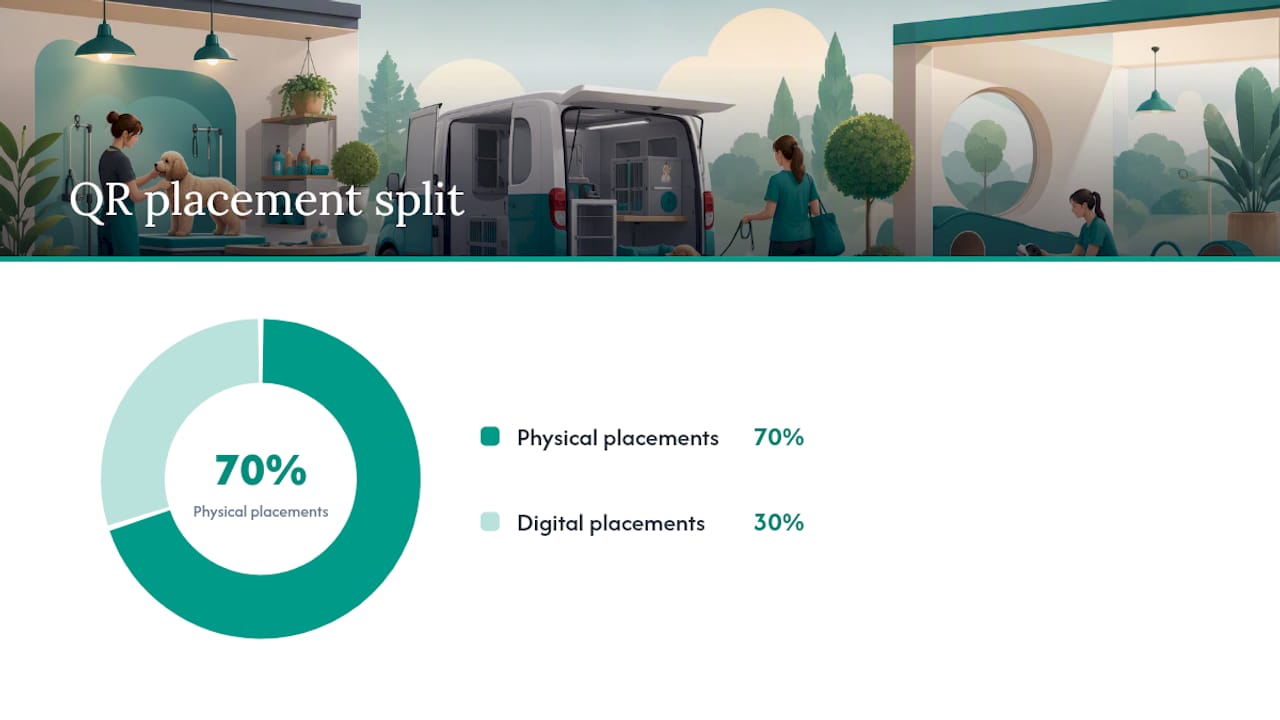
High-impact physical placements:
- Reception counter and front desk (customers waiting to check in or out)
- Individual kennel and cage doors for boarding facilities (owners dropping off pets)
- Grooming station cards (clients watching their dog get trimmed)
- Treatment room posters in veterinary clinics
- Mobile service vans and trailers (visible when you're parked at a client's home)
- Post-visit receipts and invoices
- Appointment reminder cards handed out at checkout
Digital placements:
- Instagram and Facebook bio links paired with a QR in Stories
- Email newsletter footers
- Event banners at pet expos or local markets
For multi-resource deployments, use resource-specific short links so each kennel run, grooming station, or staff member has its own stable QR. If you rename a station, the link stays valid and you avoid a reprint.
Pro Tip: Match the call to action on the print material to the destination. "Scan to book Max's next bath" outperforms a generic "Scan here" every time. Specificity converts.
How to create a booking QR code step by step
Step 1: Get your booking page URL
Log into Animalbooking and copy your provider booking link or the URL for a specific service page. If you use an embeddable widget, grab the standalone booking page URL instead, since widgets don't work inside a QR destination.
Step 2: Choose dynamic or static
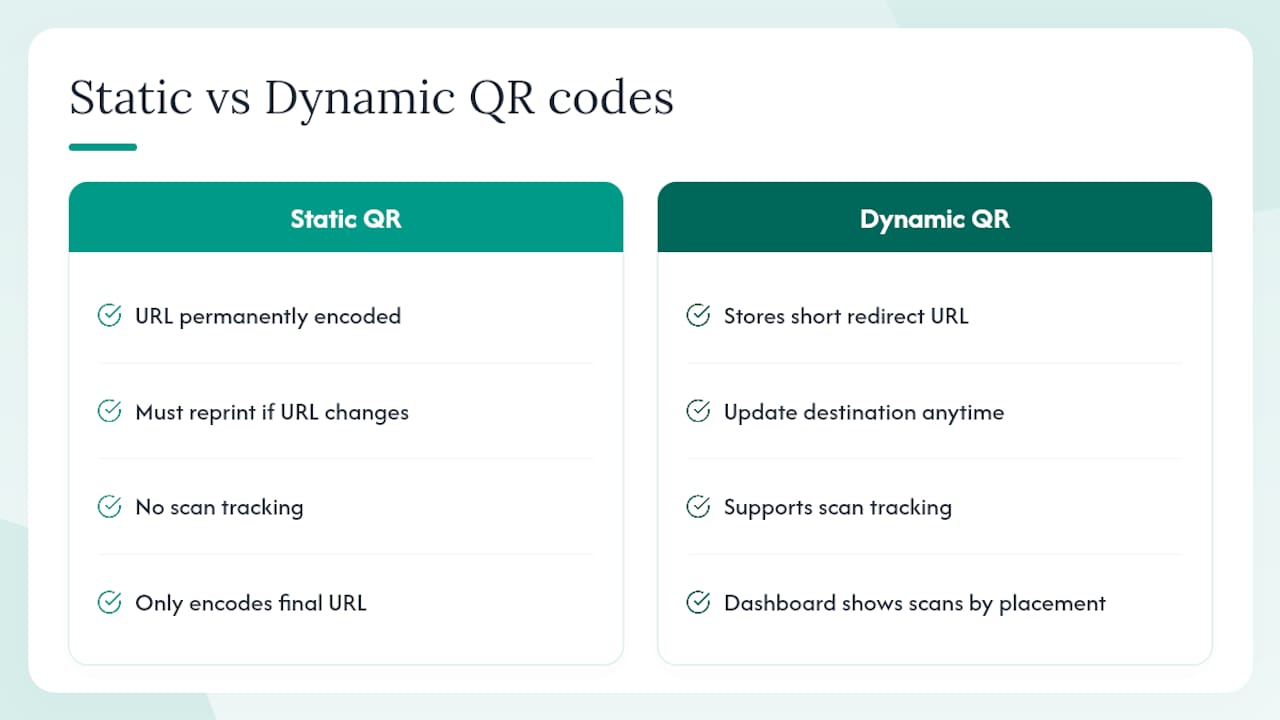
A static QR encodes the URL permanently. Change the destination and you need a new code. A dynamic QR stores a short redirect URL; you can update the destination anytime without reprinting. Dynamic codes also support scan tracking through a dashboard, showing which placements drive the most booking attempts. For anything printed at scale (laminated signs, stickers, business cards), dynamic is the safer choice.
Step 3: Generate the code
Use your scheduling platform's built-in QR tool if one exists. Otherwise, a reputable free generator works fine for static codes. For dynamic codes with tracking, most QR management tools offer a free tier sufficient for small businesses.
Step 4: Test before you print
Scan the code on an iPhone and an Android device. Walk through the full flow: scan → booking page loads → select a time → enter details → confirm. Check both on WiFi and on cellular. If the page forces a login before showing availability, fix that first.
Step 5: Export and prepare for print
Export as SVG for any signage larger than a business card; SVG scales without pixelation. PNG works for quick digital use. Set a minimum print size of 1 inch × 1 inch for close-range scanning, larger for anything mounted above eye level.
Pre-launch checklist:
- URL points to the booking step, not the homepage
- Dynamic QR selected for printed assets
- Tested on two phone types, two network conditions
- Exported in SVG or high-resolution PNG
- Short link and human-readable URL printed near the code
- Call to action text included ("Scan to book a grooming slot")
Pro Tip: Print the short link in small text below the QR. Customers who can't scan (older phones, cracked cameras) can still type it. You lose zero bookings.
Key customization settings to configure before you publish the QR
Getting the QR live is step one. Getting the booking flow right is what determines whether customers complete the reservation or abandon it.
Booking page settings to check:
- Mobile layout renders correctly on small screens (test at 375px width)
- Required fields are minimal: name, phone or email, and service selection are enough
- Guest booking is enabled so customers don't need an account
- Payment or deposit settings match your cancellation policy
- Cancellation policy is visible before the customer confirms
Staff and location handling:
Animalbooking's smart calendar supports multi-staff and multi-location setups. Each staff member or location can have its own booking link, which means its own QR. A groomer's personal page QR and a general salon QR serve different purposes; both are worth deploying.
Branding and trust:
Add your business name, logo, and a one-line description to the booking landing screen. A customer who scans a QR on a kennel door and lands on a blank white form with no branding will hesitate. One that shows "Paws & Claws Grooming — Book your appointment below" converts immediately.
Static vs. dynamic QR comparison:
| Feature | Static QR | Dynamic QR |
|---|---|---|
| Editable destination | No | Yes |
| Reprint required on URL change | Yes | No |
| Scan tracking | No | Yes |
| Setup complexity | Minimal | Slightly more |
| Best for | One-off digital use | Printed signage, stickers |
Printing and technical best practices for reliable scanning
A QR code that doesn't scan in real-world conditions is worse than no QR code. It frustrates the customer and reflects on your business.
Size and contrast:
- Minimum 1 inch × 1 inch for counter cards and cage signs scanned at arm's length
- At least 2 inches × 2 inches for wall-mounted signs scanned from 18 inches away
- High contrast: black on white is the standard; avoid dark codes on dark backgrounds
- Maintain a quiet zone (white border) of at least four modules wide around the code
Surface and placement:
- Avoid curved surfaces (water bowls, cylindrical containers) that distort the grid
- Avoid reflective laminate that creates glare under fluorescent lighting
- Never fold printed QR codes; a crease through the data area breaks scanning
- Mount at eye level or slightly below for standing customers
File formats:
- SVG for all signage (scales to any size without quality loss)
- PNG at 300 DPI minimum for print; 72 DPI is screen-only
Pro Tip: Add a one-line instruction and the short URL directly below the code: "Scan to book — or visit book.yourbusiness.com." The instruction removes hesitation; the URL is a fallback.
How to measure QR booking performance and fix common problems
Metrics worth tracking
- Scan count (requires dynamic QR with tracking enabled)
- Booking starts from scan (sessions that reach the time-selection step)
- Completed bookings from scan (confirmed reservations)
- Conversion rate (completed bookings ÷ scans)
- No-show rate for QR bookings vs. phone bookings (a useful comparison once you have volume)
Platforms that issue stable short links with unique resource codes make tracking per-placement straightforward. Without dynamic links, you're estimating.
Common problems and fixes
- Low scan rate: Check placement height, lighting, and whether the CTA is visible. Move the code to a higher-traffic surface.
- High abandonment after scan: The most common cause is a forced login wall before the booking form. Disable mandatory account creation. Linking directly to the booking form and removing login requirements cuts abandonment significantly.
- Broken QR: The destination URL changed or was deleted. Dynamic QR codes let you fix this by updating the redirect without reprinting. Static codes require a new print run.
- "Page not found" errors: Check that the booking page is published and publicly accessible. Test in an incognito browser window to simulate a new visitor.
Note that QR codes themselves do not expire. A code that stops working has a broken destination link, not a dead code.
Why Animalbooking works well for pet service QR workflows
Animalbooking is built specifically for pet service providers, and its feature set maps directly to the QR booking workflow described above.
Core features relevant to QR deployment:
- Payments and deposits to collect money at booking and reduce no-shows
- Automated reminders that follow up on QR-originated bookings without manual effort
- Customer CRM that stores client and pet profiles from the first booking
- Embeddable booking forms and provider pages that serve as stable QR destinations
- Marketplace exposure that gives new clients a way to find the business before they even scan a code
These are platform-provided figures, not third-party audited results, and actual outcomes vary by business type and volume.
A free tier is available, and setup takes minutes. The provider onboarding flow walks through connecting a booking page, configuring services, and enabling payments before you generate your first QR.
Small experiments to improve QR booking results over time
Three tests worth running, each requiring only two to four weeks of data:
1. CTA copy test Print two versions of the same sign: one says "Scan to book" and one says "Scan to book Max's next grooming slot." Track which placement generates more completed bookings. Specificity usually wins.
2. Placement swap Move a QR from the reception counter to the individual kennel door (or vice versa). Measure scan rate and booking completion for two weeks at each location. The kennel door placement catches owners at peak emotional engagement.
3. Destination test Send one QR to your general booking page and another to a service-specific page (grooming only, boarding only). Compare booking completion rates. Service-specific pages typically convert better because they reduce decision fatigue.
For each experiment, track scan count, booking completion rate, and revenue per QR booking. Two weeks gives enough signal for most pet businesses with moderate traffic.
Pro Tip: Run one experiment at a time. Changing CTA copy and placement simultaneously makes it impossible to know which variable drove the result.
A practical note on running QR booking in a busy pet shop
The setup that works in practice is simpler than most guides suggest. Reception staff print a laminated card, attach it to the kennel door or counter, and test it with their own phone before the first client arrives. That's the entire deployment for a single location.
Two operational points worth flagging. First, if you run a busy boarding facility with multiple staff, configure your pet boarding booking flow to prevent double-booking before the QR goes live. A QR that lets two clients book the same kennel run on the same night creates a problem no reminder can fix. Second, if you collect deposits through the QR booking flow, brief your front desk on the policy before clients start asking questions at pickup. Customers who paid a deposit online and then see a different total at checkout will push back, and staff need a clear answer ready.
Animalbooking makes QR booking fast to set up
Pet businesses that want a working scan-to-book flow without stitching together separate tools get the most from Animalbooking. Your booking page is the QR destination, your payment processor is built in, and your reminders go out automatically.

The relevant features for a QR workflow are all in one place: a smart booking calendar, deposit collection to cut no-shows, automated client reminders, and a CRM that builds a client profile from the first scan. A free tier covers the basics, and paid plans add analytics, multi-staff support, and priority onboarding.
To get started, visit the provider get-started page, connect your services, and copy your booking URL. Your first QR code can be live and tested within the same session.
Sources
- Humly Reservations - QR Code Booking
- QR Code for Bookings — Instant Reservations from Print | Qrinly
- QR code for booking pages | QRViz