

A booking confirmation email does one job above everything else: it tells the customer their booking is locked in and shows them exactly what happens next. Send it the moment a booking is created, automatically, with no manual step in between.
Every confirmation needs these fields before anything else:
- Booking reference number (the customer's anchor for any future query)
- Customer name (personalised, not "Dear Customer")
- Service, date, and time (with timezone if you serve multiple regions)
- Location or access link
- Payment status (paid in full, deposit taken, or balance due)
- Cancellation and reschedule instructions with a direct link
Get those six things right and you cover the majority of what customers actually need.
Key takeaways
A complete, instantly sent booking confirmation email with a booking reference, calendar link, and automated reminders is the single most effective way to reduce no-shows and cut inbound support contacts.
| Point | Details |
|---|---|
| Send instantly | Trigger the confirmation the moment a booking is created — never manually. |
| Include the booking reference | Every confirmation needs a unique reference number so customers and staff can locate the booking quickly. |
| Add calendar links | Include Google Calendar and .ics links to reduce no-shows by making it easy to save the appointment. |
| Automate reminders | Schedule reminders at 2 days and 2 hours before the appointment across email and SMS. |
| Animalbooking automation | Animalbooking's platform automates confirmations, reminders, and payments, reporting up to 80% fewer no-shows. |
Table of Contents
- Why booking confirmation emails matter for your operations
- The essential fields every booking confirmation must contain
- When to send confirmations and how to schedule reminders
- Subject line formulas and tone that improve open rates
- Ready-to-use booking confirmation templates
- Design and deliverability essentials for transactional confirmations
- How to automate booking confirmations: systems, triggers, and a quick checklist
- Evidence and client impact: automation and channel choices that reduce no-shows
- How recipients should reply, reschedule, or cancel
- Automating confirmations for pet service providers
- Sources
Why booking confirmation emails matter for your operations
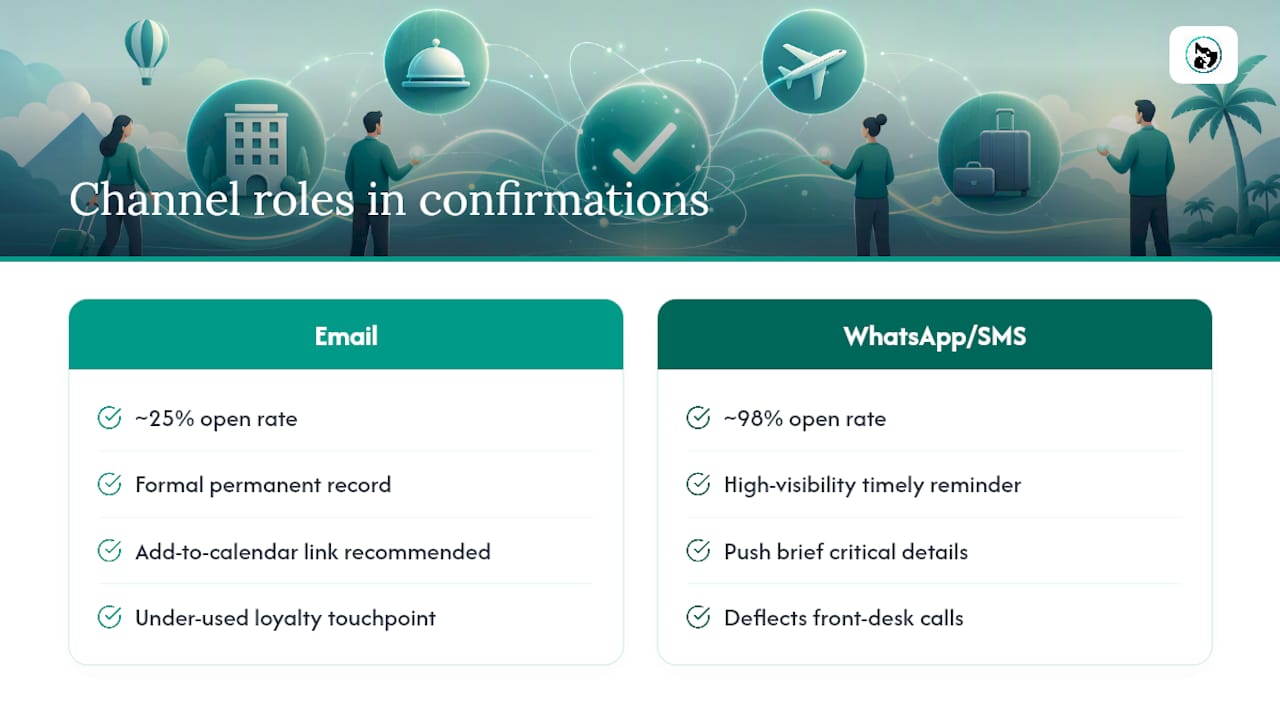
The most underrated function of a confirmation email is not reassurance. It is call deflection. Every customer who receives a clear, complete confirmation is one fewer person ringing your front desk to ask "Did my booking go through?" or "What time was it again?"
Viqal's research puts typical email open rates for confirmations at around 25%, while WhatsApp messages can approach 98%. That gap is the practical case for a dual-channel approach: send the formal email as the permanent record, then push a brief SMS or WhatsApp message with the critical details so the customer actually sees them before the day.
Stat to know: Email confirmation open rates are often around a quarter, while WhatsApp open rates can be very high. Sending both is not redundant — it ensures both a record and a timely reminder.
Beyond call volume, confirmations reduce no-shows. A customer who has the date in their calendar, the address in their inbox, and a reminder two days out is far less likely to forget. Mews recommends including add-to-calendar links specifically because they make it frictionless for customers to save the appointment, which measurably cuts no-show rates.
Mailchimp notes that confirmation emails are also an under-used loyalty touchpoint. A single, low-key suggestion ("What to bring to your appointment" or "Add a bath to your dog's groom") fits naturally in a transactional message without tipping it into promotional territory.
The essential fields every booking confirmation must contain
A complete confirmation email is not a long email. It is a complete one. The goal is that a customer can answer every practical question about their booking without contacting you.
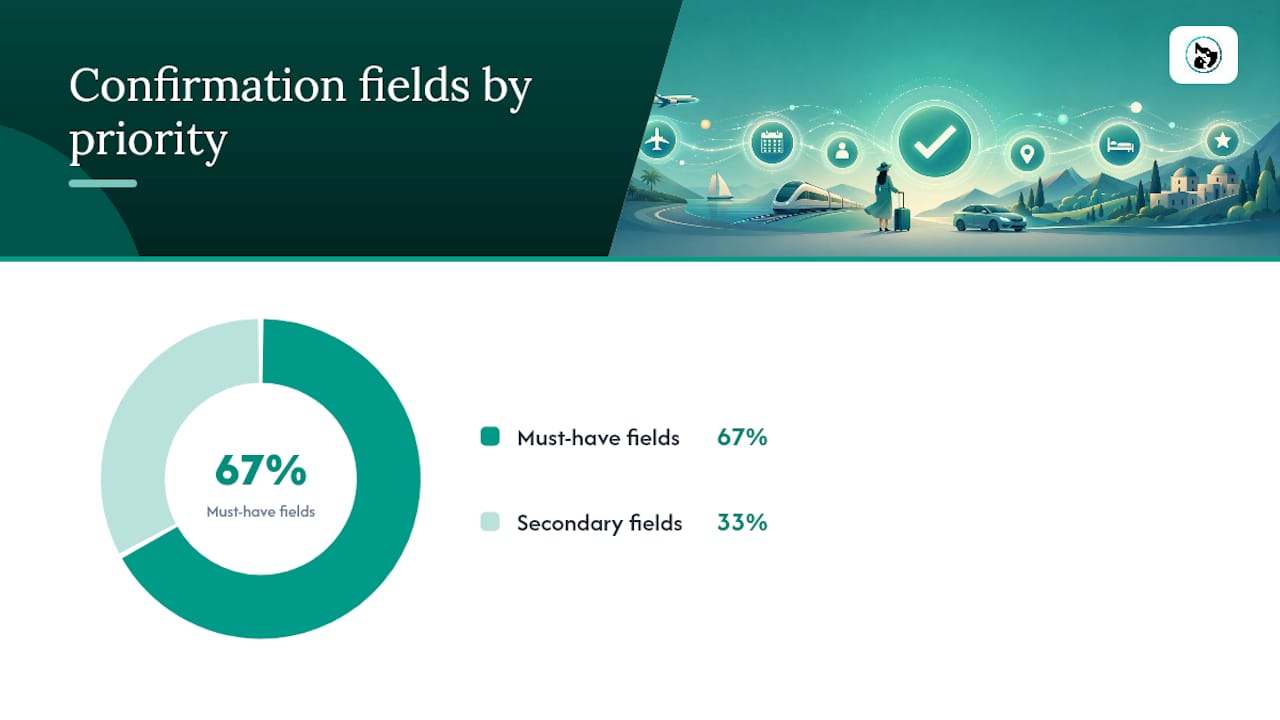
Must-have fields (show prominently, above the fold):
- Booking reference or confirmation number
- Customer name
- Service name and description
- Date, time, and duration
- Location (full address, parking notes, or video call link)
- Payment summary: amount paid, deposit amount, or balance outstanding
- Add-to-calendar link (Google Calendar, Apple Calendar, or .ics file)
- Cancellation and reschedule link or instructions, including any deadline
Secondary fields (footer or collapsible section):
- Provider contact details (phone, email)
- What to bring or how to prepare
- Terms and conditions summary or link
- Privacy notice or data handling statement
The distinction matters because customers scan, not read. If your cancellation policy is buried in paragraph four, they will not find it until they need it, and then they will call you.
Pro Tip: For tentative or held bookings, change the subject line and opening line to reflect the status clearly: "Your booking is held — action required by [date]." Never send a "confirmed" subject line for a booking that still requires payment or approval. The mismatch creates support tickets.
Mews also recommends offering both a direct Google Calendar link and a downloadable .ics file in the same email. This covers virtually every recipient regardless of their calendar app.
When to send confirmations and how to schedule reminders
Send the initial confirmation instantly. Not within the hour, not at the end of the business day. The automation trigger should fire the moment a booking record is created in your system. SendSquared's reservation confirmation docs describe this as the standard pattern: booking created → populate template → send transactional email → optional SMS action.
A practical reminder schedule for most service businesses:
| Trigger | Channel | Content |
|---|---|---|
| Booking created | Email + SMS | Full confirmation with all fields |
| — | Reminder with date, time, location, what to bring | |
| 2 days before | Email + SMS | Short reminder with date, time, and reschedule link |
| 2 hours before | SMS only | Ultra-short: time, address, contact number |
The 2-hour SMS is optional for low-stakes appointments but worth adding for anything with a no-show cost: pet boarding drop-offs, veterinary procedures, or multi-hour grooming sessions.
Stat to know: Businesses using automated reminders across email and SMS report significantly lower no-show rates than those relying on email alone. The Viqal dual-channel model is the practical reason: email creates the record, SMS creates the visibility.
Subject line formulas and tone that improve open rates
The subject line of a confirmation email serves a different purpose than a marketing subject line. It needs to be findable later, not clever now. Customers search their inbox for "booking" or "appointment" weeks after receiving the email. Write for the search, not the open.
Proven subject line formulas:
Booking confirmed — [Service] on [Date] #[Ref]Your [Service] appointment is confirmed for [Date][Business Name]: [Service] booked for [Date, Time]Reservation confirmed — [Guest Name], [Date] #[Ref][Pet Name]'s grooming appointment: [Date] at [Time]
Tone rules:
- Use the booking verb: "confirmed," "booked," or "reserved" — not "scheduled" or "arranged," which feel softer
- Include the customer or pet name in the subject when your platform supports it
- Keep it under 50 characters so it displays fully on mobile
- Never use urgency language ("Act now," "Don't miss") in a transactional subject line
Pre-header text (the grey line after the subject in most inboxes) should carry the booking reference and date. Example: Ref #12345 · Tuesday 14 January · 10:00 AM
Dos and don'ts:
- ✅ Use the exact service name the customer booked
- ✅ Include the booking reference in both subject and pre-header
- ❌ Use emoji in transactional subjects (fine for marketing; looks wrong for a confirmation)
- ❌ Write "Your booking is confirmed!" without any identifying detail — it is unsearchable
Ready-to-use booking confirmation templates
These templates are paste-ready. Swap the bracketed fields for your system variables.
Appointment confirmation (clinic, salon, or studio)
Subject: Appointment confirmed — [Service] on [Date] #[Ref]
Hi [Customer Name],
Your appointment is confirmed. Here are the details:
Service: [Service Name] Date: [Day, Date Month Year] Time: [Start Time] — [End Time] Location: [Full Address] Booking ref: #[Reference Number]
Payment: [Paid in full / Deposit of $X received / Balance of $X due on arrival]
What to bring: [Relevant preparation notes]
To reschedule or cancel, use this link: [Reschedule/Cancel Link] (changes accepted up to [X hours] before your appointment).
Questions? Call us on [Phone] or reply to this email.
Pet grooming or boarding confirmation
Subject: [Pet Name]'s grooming confirmed — [Date] at [Time] #[Ref]
Hi [Owner Name],
[Pet Name]'s [grooming/boarding] is confirmed with [Business Name].
Service: [Service Name] Date: [Day, Date Month Year] Drop-off time: [Time] Pick-up time: [Time] (boarding: [Date]) Location: [Address] Booking ref: #[Reference Number]
Payment: [Paid / Deposit of $X received / $X due at drop-off]
Please bring: [Vaccination records / food / medication / favourite toy — edit as relevant]
For boarding stays, this packing guide covers everything your dog needs for a comfortable stay.
To change or cancel: [Link] (please give us [X hours] notice).
We look forward to seeing [Pet Name]!
[Business Name] · [Phone] · [Email]
Event or tour confirmation
Subject: Booking confirmed — [Event Name], [Date] #[Ref]
Hi [Customer Name],
You are booked for [Event/Tour Name]. Here is everything you need.
Event: [Event Name] Date: [Day, Date Month Year] Time: [Start Time] (doors open [X] minutes earlier) Venue: [Full Address] Tickets: [Number] × [Ticket Type] Booking ref: #[Reference Number]
Payment: [Paid in full — $X]
Cancellation policy: [Policy summary]. To cancel or transfer: [Link].
· [View booking online]
Mobile service confirmation (home visit)
Subject: Mobile service confirmed — [Service] on [Date] #[Ref]
Hi [Customer Name],
Your [service] home visit is confirmed.
Service: [Service Name] Date: [Day, Date Month Year] Arrival window: [Start Time] — [End Time] Address: [Customer Address] Booking ref: #[Reference Number]
Payment: [Paid / $X due on completion]
Our team will call [X] minutes before arrival. If you need to reschedule: [Link].
[Business Name] · [Phone]
Adaptation notes: For multi-guest bookings, list each guest's name and ticket type in a summary table rather than repeating the block. For formal contexts (legal, medical), use "Dear [Title] [Surname]" and avoid contractions. For friendly service brands (pet grooming, dog walking), first names and a warm closing line work well.
Design and deliverability essentials for transactional confirmations
A confirmation that lands in spam is worse than no confirmation. These are the non-negotiable technical and design steps.
Design checklist:
- Mobile-first layout: single column, minimum 16px body text
- Booking reference and date/time in a visually distinct block at the top
- Buttons for "Add to calendar" and "Manage booking" — not text links
- 60:40 text-to-image ratio (more text keeps you out of spam filters)
- No background images behind critical text
Technical hygiene:
- Use a recognisable sender name: "Pawfect Groom" not "noreply@pawfectgroom.com.au"
- Set up SPF, DKIM, and DMARC records on your sending domain
- Separate your transactional and marketing sends — different subdomains, ideally different sending IPs
Twilio's guidance is direct on this: mixing promotional and transactional emails on the same infrastructure risks your confirmations being classified as marketing mail. When a promotional campaign earns spam complaints, those complaints can drag down deliverability for your confirmations too. Separate infrastructure protects the emails that matter most.
Minimising spam risk inside the email:
- No promotional banners or sale announcements in the header
- One optional low-key upsell suggestion in the footer only (per Mailchimp's recommendation)
- No "Unsubscribe" link required for transactional emails, but include a contact preference link for GDPR compliance
How to automate booking confirmations: systems, triggers, and a quick checklist
The automation setup is simpler than most businesses expect. The core pattern is four steps:
- Booking created → system fires a webhook or internal trigger
- Template populated → customer name, service, date/time, reference, and payment status pulled from the booking record
- Transactional email sent → via your email provider (Mailchimp, or a dedicated transactional service)
- Optional SMS push → short message with date, time, and contact number
Halaxy's support documentation shows the common editing pattern in practitioner systems: set the "from name," subject line, body content, and optional SMS action as discrete fields in the automation settings. Most booking platforms follow this same structure.
What to look for in a provider:
- Reliable webhooks or native booking triggers (no manual export/import)
- Tokenised templates (merge fields that pull live booking data)
- Add-to-calendar support built in
- Audit logs so you can confirm a message was sent and opened
Testing checklist before going live:
- Make a test booking end-to-end and receive the confirmation yourself
- Check all merge fields populate correctly (especially timezone handling)
- Click every link: reschedule, cancel, add-to-calendar, payment
- Test on mobile and desktop
- After any change to payment provider, cancellation policy, or timezone settings, run the test again
Booked.Life recommends treating any workflow change as a trigger for a full re-test, not just a spot-check of the changed field.
Evidence and client impact: automation and channel choices that reduce no-shows
The case for automating confirmations is not theoretical. Viqal's data shows email confirmation open rates near 25% versus WhatsApp open rates approaching 98%. That is not a marginal difference. A customer who never opens the email does not know their appointment time, does not add it to their calendar, and is far more likely to miss it.
Stat to know: WhatsApp open rates can approach 98% versus roughly 25% for email. Sending both channels is not duplication — it is the practical minimum for high-stakes bookings.
| Metric | Email only | Email + SMS/WhatsApp |
|---|---|---|
| Typical open rate | ~25% | Email ~25% + SMS/WhatsApp ~98% |
| No-show risk | Higher | Lower |
| Customer support contacts | Higher | Lower |
| Calendar save rate | Lower | Higher (with add-to-calendar link) |
Animalbooking's platform reports that automating confirmations, reminders, and payments can reduce no-shows by up to 80% and increase per-booking revenue by around 30%. The mechanism is straightforward: fewer missed appointments, more completed payments, and less time spent on manual follow-up.
To measure your own improvement, track three numbers before and after implementing automated confirmations: no-show rate, inbound support contacts about bookings, and payment completion rate at time of booking.
How recipients should reply, reschedule, or cancel
Every confirmation email should make the next action obvious. If a customer needs to change their booking, the path should take one click, not a phone call.
Standard CTA buttons to include:
- Change booking (links to self-service reschedule page)
- Cancel booking (links to cancellation flow with policy reminder)
- Contact us (links to contact form or phone number)
Short reply scripts to include in the email body:
- To reschedule: "Use the link above to choose a new time, or reply to this email with your preferred date."
- To cancel: "Cancel via the link above at least [X hours] before your appointment to receive a full refund."
- Deposit or partial payment queries: "Your deposit of $[X] is non-refundable within [X hours] of your appointment. The remaining balance of $[X] is due on arrival."
Staff response scripts (for when customers reply directly):
- Reschedule request: "Thanks for getting in touch. I have moved your booking to [New Date/Time]. Your updated confirmation is on its way."
- Cancellation request: "Your booking has been cancelled. [Refund details per policy.] We hope to see you again soon."
For bookings with outstanding payments, include a direct payment link in the confirmation. Animalbooking's payment completion flow handles this automatically, prompting customers to pay any outstanding balance before their appointment.
The practical trade-off between brevity and completeness
The most common mistake in confirmation emails is not missing a field. It is including every field at equal visual weight, so nothing stands out.
A confirmation email should answer three questions in the first three seconds: When? Where? What do I need to do? Everything else — terms, privacy notices, upsell suggestions — belongs below the fold or in the footer. The booking reference and date/time block should be impossible to miss.
The second trade-off is between a rich, detailed email and a short one with links to more. For simple appointments (a 30-minute groom, a single vet check), the full details fit comfortably in one screen. For complex bookings (multi-day boarding, group events, equine procedures), link out to a booking summary page rather than cramming every detail into the email. The email becomes the signpost; the page becomes the record.
Review your confirmation templates every time you change a policy, a payment provider, or a service offering. A confirmation that still references your old cancellation window after you have updated it is not just confusing — it is a liability.
Automating confirmations for pet service providers
Pet service businesses face a specific version of this problem: clients are emotionally invested, bookings often involve preparation (vaccinations, packing, drop-off logistics), and a missed appointment has a real welfare cost, not just a revenue one. A generic confirmation template does not cover that.

Animalbooking is built for exactly this. Dog groomers, boarders, vets, equine professionals, and mobile pet services can set up automated confirmations, reminder sequences, and payment collection in a single platform, with templates that include pet name, service details, and preparation notes as standard. The platform's bookings dashboard gives providers a live view of every confirmation sent, opened, and actioned.
For providers who want a turnkey setup without building automation from scratch, Animalbooking's onboarding process takes minutes. Pricing starts with a free tier; full plan details are here.
Sources
These are the primary sources used to compile this guide:
- Booking confirmation email | Mailchimp
- Appointment confirmation email examples | Twilio
- Hotel reservation confirmation email | Viqal Blog
- How to create the best hotel booking confirmation email | Mews