
The single most effective way to stop a missed vaccination is an automated reminder that includes a direct booking action, sent by SMS or app push. A 2024 meta-analysis of 25 studies covering 64,536 patients found text reminders modestly but reliably lift vaccination uptake. Clinics should turn on automatic reminders tied to patient records now; owners should opt into text or app alerts and act on the first one they get, rather than waiting for a second.
TL;DR:
- Sending multiple SMS reminders, especially one close to the due date, significantly improves on-time pet vaccination, with an average increase of around 5 to 6 percentage points.
- Automating reminders with direct booking links and real-time scheduling reduces missed vaccinations and staff workload more effectively than manual or generic methods.
- Accurate, confirmed contact details at intake and a system that syncs vaccination records with reminders are essential to avoid silent failures and redundant messages.
- Two well-timed reminders—one 14 days before and another 24 to 48 hours prior—are recommended; adding more can increase opt-out rates due to reminder fatigue.
- Online booking integrated within reminders, combined with quick pilot testing, can dramatically cut missed appointments and streamline vaccination workflows.
Table of Contents
- Which pet vaccination reminder channels actually work?
- What does the evidence say about reminder timing and wording?
- How do you set up a vaccination reminder workflow at your clinic?
- What can owners and clinics do in the next two weeks?
- Manual reminders versus automated systems: what's the real difference?
- How do you keep vaccination records accurate enough to trust the reminders?
- What privacy rules apply to storing pet owner contact details?
- How do you choose the right vaccination reminder software?
- What do clinics that got this right actually do differently?
- How do you handle opt-outs without losing the client?
- Is the cost of automated reminders worth it for a small clinic?
- AnimalBooking's take on fixing the reminder-to-booking gap
- Get automated vaccination reminders running this week
- Sources
Which pet vaccination reminder channels actually work?
Not all reminder channels perform equally, and picking the wrong one for the wrong job wastes effort on both sides of the counter.
- SMS: Highest open rates, fastest response, works on any phone. Best for time-sensitive nudges close to a due date.
- App push notifications: Nearly as immediate as SMS when the owner has the clinic's app installed, and cheaper to send at volume.
- Email: Poor for urgency (open rates lag well behind text) but useful for detailed vaccine due dates, records, and receipts an owner might want to search for later.
- Automated phone calls: Effective for owners who don't respond to text, but costlier per contact and easy to overuse.
- Printed reminders or postcards: Still relevant for owners without reliable mobile coverage, though slow and hard to track.
For most practices, SMS or in-app push should carry the primary vaccination reminder, with email running in parallel as a paper trail. Deliverability matters more than people expect. A mistyped mobile number or an unconfirmed opt-in silently kills the whole reminder before it starts, so consent capture at intake needs to be treated as seriously as the message content itself. Running two channels for the same reminder, rather than picking one, builds in redundancy against exactly that failure.
What does the evidence say about reminder timing and wording?
The research on vaccination reminders is more specific than most clinics assume. A systematic review and meta-analysis pooling results across 25 studies found mobile text reminders produced a pooled relative risk of roughly 1.09 for improved uptake compared with usual care. That's a modest lift, but consistent across a large combined sample.
In numbers: A systematic review of low- and middle-income country trials found sending multiple SMS reminders, including one close to the due date, produced a significant improvement in on-time vaccination compared to fewer reminders.
Australia's own evidence adds nuance the global averages miss. The AuTOMATIC trial, a Bayesian adaptive randomised trial, found SMS reminders lifted on-time vaccination by around 5 to 6 percentage points, and persuasive message framing (explaining why the vaccine matters) generally outperformed neutral, purely informational text. No single send time was universally best. What mattered was sending more than one reminder rather than nailing the perfect hour.
Practical cadence worth adopting:
- A first reminder around 14 days before the due date.
- A second reminder 24 to 48 hours before due.
- One overdue follow-up if no booking follows.
Watch opt-out rates as a signal of reminder fatigue. If unsubscribes climb after adding a third or fourth message, drop back to two. A separate Australian study found SMS reminders improved on-time vaccination among Aboriginal and Torres Strait Islander infants by a notably larger absolute percentage at some schedule points, well above the average effect seen elsewhere. That gap suggests reminder systems do the most good precisely where access barriers are highest, which matters for any clinic serving a mixed community.
How do you set up a vaccination reminder workflow at your clinic?
Most practices lose more vaccinations to workflow gaps than to owner forgetfulness. Fixing the process matters more than picking a fancy tool.
- Lock down contact details at intake. Every pet intake form should capture a mobile number, confirm SMS consent, and note a backup email. A vaccination reminder sent to a disconnected number is worse than no reminder at all, since it creates a false sense that the system is working.
- Choose your triggers. Decide whether reminders fire from an expiry window on the last recorded dose, a fixed booster due date, or a flag for missing records altogether. Most clinics need all three running simultaneously.
- Write short templates with one clear action. State the vaccine, the due date, and a single booking link. Skip the paragraph of clinic history and hours; that belongs on the website, not the reminder.
- Connect reminders to the booking system. An owner who has to call during business hours to act on a text will often just... not. A reminder with a working booking link converts before the moment passes.
- Track delivery, click, and booking rates weekly. If click-through is high but bookings are low, the friction is in your booking flow, not your messaging.
Pro Tip: Before switching on automated reminders across your whole client list, run it against 50 patients for two weeks. You'll catch bad phone numbers, broken links, and confusing wording before they cost you a real vaccination.
What can owners and clinics do in the next two weeks?
Two weeks is enough time to close most of the gaps that cause missed vaccinations, provided both sides move on it now rather than filing it under "later."
For pet owners:
- Check your pet's current vaccination record for the next due date.
- Opt into SMS or app-based reminders if your vet offers them.
- Update your mobile number and email with the clinic if either has changed in the past year.
- Act on the first reminder you receive rather than waiting for a follow-up.
For clinics and pet-service providers:
- Audit client contact data for obvious errors (missing digits, duplicate records).
- Turn on automated reminders linked to vaccination due dates in your records system.
- Add a direct booking link to every reminder template.
- Run a two-week pilot on a small client segment and measure booking conversion before rolling it out fully.
Pro Tip: The most common failure isn't a missing reminder. It's a reminder that arrives with no way to act on it. If a client has to search for your phone number to book, you've already lost the moment.
Manual reminders versus automated systems: what's the real difference?
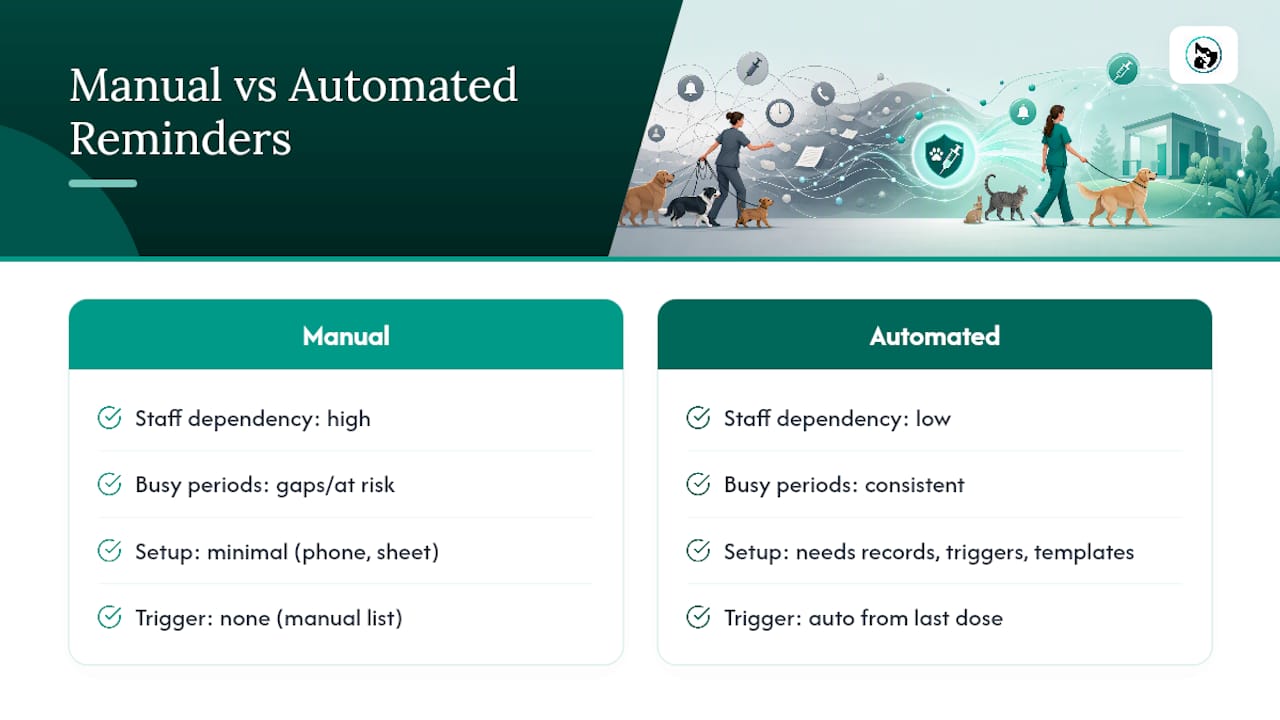
Manual reminders (a receptionist calling down a list, or a staff member texting owners individually) work, but they don't scale, and they depend entirely on someone remembering to run the list that week. Practices relying on manual reminders tend to see gaps appear during busy periods, staff turnover, or holidays, which is exactly when missed vaccinations tend to cluster.
Automated workflows remove that dependency. A trigger based on the last recorded dose fires the reminder regardless of how busy the front desk is. Templates stay consistent, which matters because message framing affects response rates, and a rushed staff member typing a quick text under pressure won't reliably use the persuasive framing that performs better in trials.
The trade-off is setup time. Manual reminders need no infrastructure beyond a spreadsheet and a phone. Automated systems need accurate records, defined triggers, and a template library built once and refined over time. For a single-vet clinic with a small client base, manual reminders might genuinely be enough. For anything larger, or any practice managing multiple vaccine types across different species with different schedules, automation stops being a convenience and becomes the only realistic way to avoid dropped cases. Most clinics land on a hybrid: automated reminders as the default, with a manual follow-up call reserved for overdue, high-risk, or unresponsive clients.
How do you keep vaccination records accurate enough to trust the reminders?
A reminder system is only as good as the records feeding it. If a vaccine gets administered but never logged, the system either stays silent when it should nudge, or worse, sends a reminder for a shot the pet already had.
Every completed vaccination needs to be recorded the same day, ideally by the person who administered it rather than passed along for later data entry. Delays are where records drift out of sync with reality. Reminder triggers should also respect minimum-interval rules between doses. A booster reminder firing before the medically appropriate window has passed doesn't just annoy an owner. It risks encouraging an unnecessary or premature vaccination if nobody double-checks the system's suggestion.
For practices managing horses, livestock, or multiple species with different schedules, record tracking gets more complex fast. A guide to equine medical records management covers how larger-animal practices structure vaccination history alongside other treatment records, which is worth a look if your reminder system needs to handle more than cats and dogs.
The practical fix is simple even if it's tedious: build a habit of reconciling reminder triggers against actual administered doses at least monthly. Catching a mismatch early costs a few minutes. Catching it after a client complains about a wrong reminder costs trust.
What privacy rules apply to storing pet owner contact details?
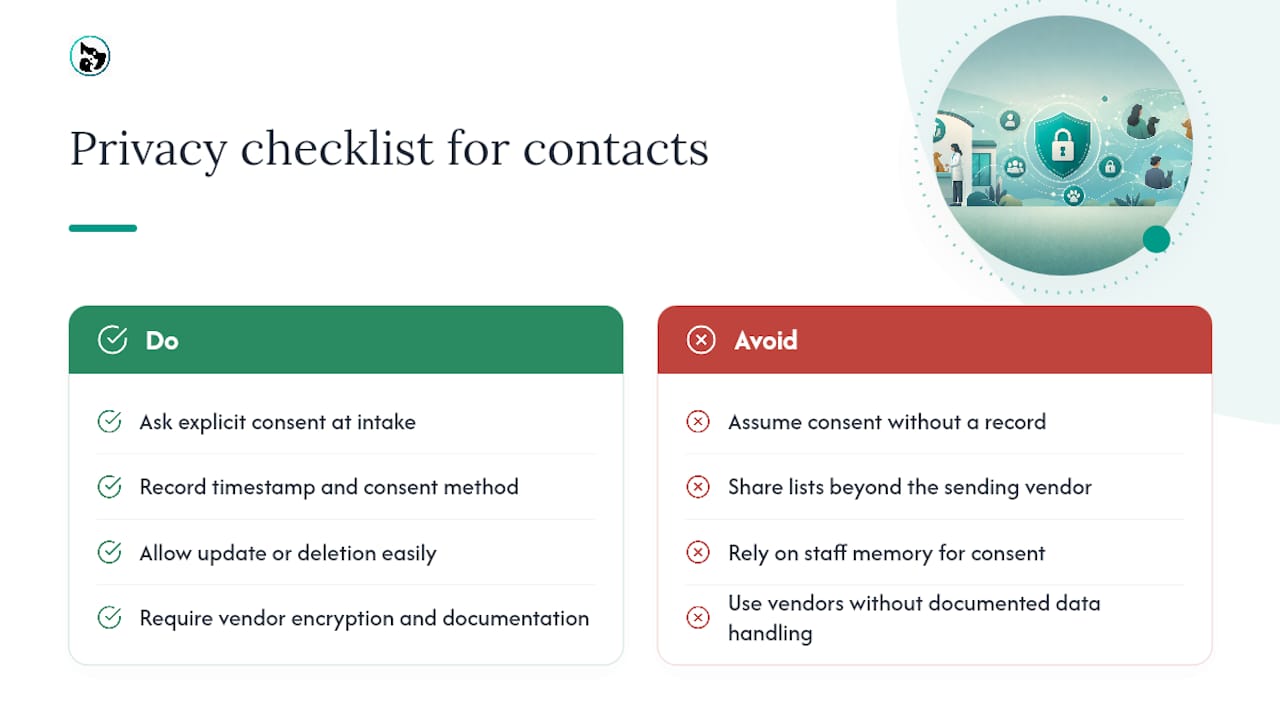
Pet owner contact information, mobile numbers, emails, addresses, is personal information under Australia's Privacy Act, and clinics handling it need explicit, recorded consent before sending marketing-style messages, which most vaccination reminders technically are.
Consent should be captured at intake, not assumed. A pet intake form asking simply "may we send you SMS reminders about your pet's health?" with a clear yes/no, is enough to establish that record. Keep a timestamp and method of consent on file, because if a client disputes receiving unwanted messages, you'll want to show exactly when and how they opted in.
Store contact data only as long as it's needed for active client relationships, and give clients a straightforward way to update or delete their details. Avoid sharing contact lists with third parties beyond the software vendor actually sending the reminders on your behalf, and check that any vendor you use has its own data handling documented, since you remain responsible for how client data is treated even when a platform sends the message. Encryption in transit and at rest should be a baseline expectation of any reminder software, not a premium feature you have to ask for.
None of this needs to slow a clinic down. It needs a five-minute conversation at intake and a system that logs consent automatically rather than trusting memory.
How do you choose the right vaccination reminder software?
Reminder tools vary enormously in what they cost, how much setup they demand, and how far they scale, so it's worth judging any option against the same criteria rather than picking whichever one a colleague mentioned.
| Evaluation criterion | What to check |
|---|---|
| Channels supported | Does it send SMS, email, and push, or just one? |
| Booking integration | Does the reminder carry a direct booking link, or does the owner have to call in? |
| Customisation | Can templates and cadence be adjusted by vaccine type, species, or pet age? |
| Admin effort | How long to set up, and how much ongoing maintenance does it need? |
Cost matters, but not as a standalone number. A cheap tool that requires an hour of manual list-building each week costs more in staff time than a slightly pricier platform that runs itself. Ease of use matters more for smaller practices without dedicated admin staff; scalability matters more for multi-location practices or those managing several species with different vaccine schedules. A platform built specifically for pet service providers, rather than a generic marketing SMS tool repurposed for the job, will usually have vaccine-specific triggers and species-aware templates already built in, which saves the setup work of building that logic yourself.
What do clinics that got this right actually do differently?
Clinics that see real reductions in missed vaccinations tend to share a specific pattern, not a specific software choice. They record every administered dose the same day it happens, they run automated reminders as the default rather than the exception, and every reminder they send carries a booking link the owner can act on immediately.
The practices that struggle usually have working reminder software but a broken link between reminders and records. Reminders fire off a fixed calendar date regardless of whether the pet was already vaccinated elsewhere, which trains owners to ignore messages because half of them turn out to be wrong. Fixing that mismatch, syncing the reminder trigger to the actual record rather than a static date, is consistently the change that produces the biggest jump in accurate, acted-upon reminders.
Smaller mobile and multi-species providers see a different pattern. A dog grooming contact and booking page shows the kind of low-friction booking flow that reminder links need to point to: one click from message to confirmed slot, no phone tag required. That principle holds whether you're reminding about a vaccine, a grooming appointment, or a farrier visit. The reminder does the work of remembering; the booking link does the work of converting that memory into an actual appointment.
How do you handle opt-outs without losing the client?
Every reminder channel needs an easy, working opt-out, and every opt-out request needs to be honoured immediately, not just because privacy obligations demand it, but because an ignored opt-out is one of the fastest ways to burn client goodwill.
Give owners a choice beyond all-or-nothing. Some will want SMS but not email; some will want fewer reminders per year but not zero. A preference centre, even a simple one, where clients can pick channel and frequency, keeps more people opted in overall than a blunt subscribe/unsubscribe toggle. Clinics that only offer "unsubscribe from everything" tend to lose owners who would have happily kept one reminder type.
Track opt-out rates by message type and cadence. A sudden spike after adding a third reminder in a sequence is a clear signal you've tipped into reminder fatigue, and the fix is usually to drop back to two well-timed messages rather than abandon reminders altogether. Keep the record of who's opted out and from what searchable, so a staff member manually following up on an overdue vaccine doesn't accidentally re-trigger a channel that client has already declined.
Is the cost of automated reminders worth it for a small clinic?
The direct cost of automated reminders is usually small: SMS platforms typically charge per message or per client seat, and most practice management software bundles reminders into an existing subscription rather than charging separately. The real cost comparison isn't reminder software versus no software. It's automated reminders versus the staff hours currently spent manually tracking, calling, and rebooking missed vaccinations.
A missed vaccination doesn't just cost the missed appointment revenue. It costs the follow-up call, the rebooking admin, and in some cases the client who quietly moves to another practice because nobody chased them. Even a modest uptick in on-time vaccination, consistent with the roughly 5 to 6 percentage point improvement seen in the AuTOMATIC trial, compounds across a full client base into meaningfully fewer overdue patients and fewer staff hours spent chasing them down.
For most practices, the return shows up fastest in reduced no-show and missed-appointment rates rather than in new client acquisition. That's worth tracking explicitly: compare missed-appointment rates for the month before automated reminders go live against the month after. If bookings from reminders are converting but the missed-appointment rate hasn't moved, the problem usually sits in scheduling friction rather than the reminders themselves.
AnimalBooking's take on fixing the reminder-to-booking gap
Most vaccination reminder failures aren't messaging failures. They're gap failures, the reminder goes out, the owner means to book, and then the booking never happens because it required a phone call during business hours. That gap is where AnimalBooking's auto reminders feature earns its place: it pairs the reminder with an instant booking link, a smart calendar that reflects real availability, and a customer CRM that keeps contact details and vaccination history in one record rather than scattered across a spreadsheet and a filing cabinet.
The gains show up where clinics feel them most: less front-desk time spent on manual follow-up calls, and fewer no-shows because the booking action sits inside the reminder itself rather than a step removed from it. A short pilot on a slice of your client list is usually enough to see whether the fix is in the reminder or the booking flow behind it.
— AnimalBooking
Get automated vaccination reminders running this week
AnimalBooking gives clinics the piece most reminder tools leave out: a booking link that actually works the moment an owner taps it. Between Auto Reminders, a Smart Calendar that keeps availability accurate, Online Booking embedded directly in the message, and a Customer CRM that keeps vaccination history and contact details in one place, the whole reminder-to-booking chain runs without a staff member touching it.

Clinics using this setup typically see fewer missed appointments and less time spent chasing overdue vaccinations by phone, freeing front-desk staff for the work that actually needs a human. Vaccination records stay current because the booking and the record update live in the same system rather than two separate tools that never quite sync. If you run a veterinary practice, mobile grooming service, or boarding facility juggling vaccination schedules across dozens or hundreds of clients, set up online booking with automated reminders today and see your first reminder-driven booking land within the hour.
Sources
- Mobile Phone Text Message Reminders to Improve Vaccination Uptake: A Systematic Review and Meta-Analysis
- Short message service (SMS) reminders for childhood immunisation in low-income and middle-income countries: a systematic review and meta-analysis
- SMS reminders increase on-time vaccination in Aboriginal and Torres Strait Islander infants