
Automatic round robin scheduling rotates incoming appointments evenly among your available staff so every booking gets confirmed instantly without anyone touching it manually. When a client books a nail trim or a vaccine consult and has no preference for a specific provider, the system filters your roster, checks real-time availability, and assigns the next qualified person in the rotation. For pet service businesses dealing with high booking volume, that means fewer manual assignments, faster confirmations, and a workload that stays balanced across your team. Animalbooking's smart calendar with multi-staff support and two-way calendar sync makes this the recommended approach for any service where the client just needs someone good, not someone specific.
Key Takeaways
Automatic round robin scheduling is the fastest way for pet service businesses to eliminate manual assignment, balance staff workload, and confirm bookings instantly without adding admin overhead.
| Point | Details |
|---|---|
| Use it for low-preference bookings | Round robin works best for first-time clients and routine services where no specific provider is requested. |
| Two-way calendar sync is required | Without it, the system risks double-booking; test sync before going live by blocking a slot and attempting a test booking. |
| Start simple, add complexity later | Enable basic equal distribution first; add weights and skill tags only after one week of live data. |
| Track fairness and no-show rate | Aim for less than 10% variance in assignments and below 10% no-show rate once automated reminders are active. |
| Animalbooking for pet providers | Animalbooking's smart calendar, auto reminders, and per-staff filters support full round-robin rotation with minimal setup time. |
Table of Contents
- What does round robin scheduling look like in a pet business?
- How does automatic round-robin assignment actually work?
- How to set up round robin in your booking software
- Best practices by service type
- Handling no-shows, cancellations, and reassignments
- Which metrics tell you if round robin is working?
- Common problems and how to fix them
- How long does setup take, and what does it cost?
- What switching to automatic rotation actually feels like
- Animalbooking makes round-robin setup straightforward for pet providers
- Sources
What does round robin scheduling look like in a pet business?
From a client's perspective, it's invisible. They click a shared booking link, pick a time, and get a confirmation. They never see which staff member was assigned or why. Behind the scenes, the circular scheduling logic has already filtered your roster, checked who's available, and written the appointment to that person's calendar.
Where it fits naturally:
- First-time grooming appointments (no established relationship yet)
- Routine nail trims, ear cleanings, and bath-only visits
- Vaccine walk-ins and wellness check-ins at vet clinics
- Intake consultations for new boarding clients
- Callback slots and follow-up calls
- Group training classes where any certified trainer can lead
Where it doesn't fit: ongoing relationships where the client expects the same provider every time. A dog who's been seeing the same trainer for six months, or a cat whose owner trusts one specific vet, should stay on manual or recurring booking. Forcing those into a rotation creates friction and cancellations. The round robin method works best for high-volume, low-preference appointments where speed and fairness matter more than continuity.
How does automatic round-robin assignment actually work?
The decision flow inside booking software follows four steps, every time a booking request comes in.
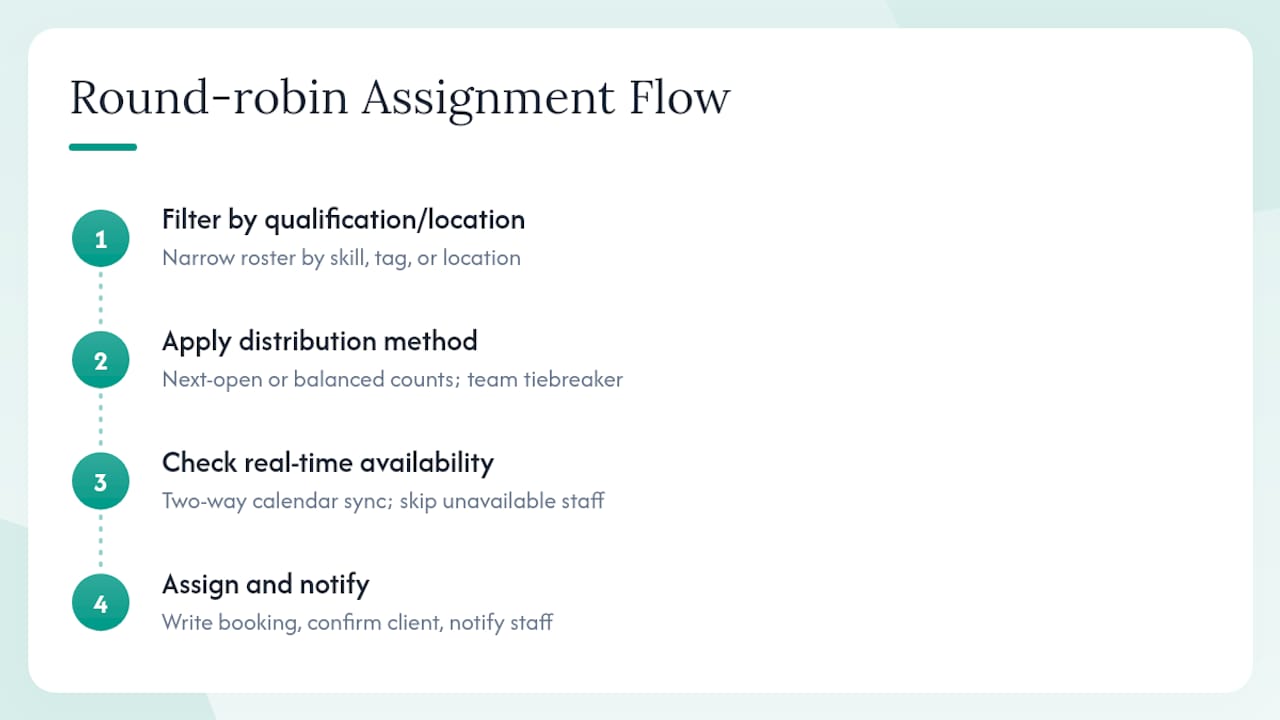
Step 1: Filter by qualification or location. The system narrows the roster to staff who can actually do the job. A senior groomer tag, a vaccine-certified flag, or a specific clinic location all act as filters before any assignment logic runs.
Step 2: Apply the distribution method. Inside the qualified group, the system picks who gets the booking. There are three common modes. "Optimize for availability" assigns whoever has the next open slot, regardless of total count. "Optimize for equal distribution" tracks assignment counts over a set period, often a month, and routes to whoever has the fewest, using team order as a tiebreaker when counts are tied.
Step 3: Check real-time availability. This is where two-way calendar sync becomes non-negotiable. If a groomer blocked Tuesday afternoon for a personal appointment in Google Calendar, the system needs to see that block before assigning. Without two-way sync, you get double-bookings. With it, the system skips unavailable staff and moves to the next qualified person.
Step 4: Assign and notify. The booking writes to the staff member's calendar, a confirmation goes to the client, and a notification goes to the staff member. Done in seconds.
Practical implementations often combine both filters and distribution: skill-based filtering runs first, then weighted or equal distribution applies inside that qualified group. That combination handles specialist routing without sacrificing fairness.
How to set up round robin in your booking software
This checklist gets you from zero to live. Follow it in order and you'll avoid the most common configuration mistakes.
- List your rotation roster. Write down every staff member who will receive auto-assigned bookings, their working hours, and their maximum appointments per day. Don't add anyone whose calendar isn't connected yet.
- Connect calendars and test sync. Require two-way Google or Outlook calendar sync for every staff member before enabling rotation. Block a test slot in one person's personal calendar, then attempt a test booking for that time. If the system offers it, the slot should be unavailable.
- Choose your distribution method. Start with "optimize for availability" if your team has very different schedules. Switch to "equal distribution" if hours are similar and fairness is the priority. Add weights only when you have a documented reason (seniority, specialty, capacity difference).
- Add skill tags and location filters. Tag staff with their qualifications: groomer-senior, groomer-junior, vaccine-certified, surgery-qualified. For multi-site businesses, add location filters so a client booking at your north location doesn't get assigned to someone at your south location.
- Set buffers and daily caps. Add prep and cleanup buffers between appointments (15 minutes for grooming, 10 for a vet consult). Set a hard daily cap per staff member so the rotation can't overload one person when others are out.
- Disable manual staff selection on shared links. If you want pure automatic assignment, turn off the option that lets clients pick their provider. Leave it on only for services where client preference is part of the value.
- Run test bookings and check notifications. Book through the shared link as a test client. Confirm the assignment landed on the right calendar, the staff member received a notification, and the confirmation email went to the "client." Then test a decline and verify the system reassigns automatically.
- Train staff on accept/decline flow. Make sure every team member knows how to accept, decline, or flag a booking from their notification. A staff member who ignores a notification is a gap in your coverage.
Pro Tip: Start with the simplest config: one distribution method, no weights, no skill tags. Go live for one week, then add complexity only where you see actual problems. Adding weights and filters before you understand your real booking patterns usually creates more confusion than it solves.
Best practices by service type
Dog groomers do best with equal distribution for walk-in volume, since most grooming clients at the walk-in stage don't have a preference. Add a 15-minute buffer between appointments for prep and cleanup, or your groomers will run late by noon. Animalbooking's groomer-specific calendar setup supports per-staff buffers so you configure this once and forget it.

Boarding and daycare operations should use availability-first with a hard capacity limit per kennel run or daycare slot. Equal distribution doesn't apply the same way here because you're managing physical space, not just time. Set the max capacity per slot and let the system fill to that limit before offering the next.
Vet clinics need skill filters more than any other service type. Vaccination appointments, surgery consults, and wellness exams require different qualifications. Use weighted shares to give senior vets a proportionally larger share of complex cases, and use location filters if you run multiple clinic sites. The vet practice scheduling page covers qualification-based routing in detail.
Mobile services carry a cost that desk-based businesses don't: travel time. Add a travel buffer between appointments based on your typical service radius, and use location-based filtering to cluster bookings geographically when possible. Assigning a mobile groomer to back-to-back clients on opposite sides of town eats the margin on both jobs.
Pro Tip: For mobile services, sort your rotation by geography first, then by availability. Grouping nearby appointments into one staff member's day cuts drive time and lets you fit one more booking in the same hours.
Handling no-shows, cancellations, and reassignments
No-shows are the biggest threat to a fair rotation because they skew assignment counts without producing revenue. The fix is layered.
Automated SMS and email reminders are the first line of defense. Animalbooking reports that providers using automated reminders significantly reduce no-shows and see notable revenue improvements per booking. Requiring a deposit at booking is the second layer. A client who has paid $25 toward a grooming appointment is far less likely to ghost than one who hasn't.
When a no-show does happen, the system should automatically release the slot back into the available pool or place it on a waitlist. Don't let it sit as a ghost appointment that blocks future assignments.
For reassignments, the flow should be: staff member declines or is unavailable → system automatically routes to the next qualified person in the rotation → both the original and new staff member receive notifications. Keep a short manual override window (15–30 minutes) for urgent situations where you need to step in directly.
Pro Tip: Set a no-show threshold: after two no-shows without notice, require a deposit for all future bookings from that client. Your customer CRM can flag these clients automatically so the policy applies without manual tracking.
Which metrics tell you if round robin is working?
| Metric | How to calculate it | Target |
|---|---|---|
| Assignment fairness | Variance in bookings assigned per staff member over 30 days | Aim for low variance |
| Utilization rate | Booked hours ÷ available hours per staff member | Target a healthy utilization rate for most services |
| No-show rate | No-shows ÷ total bookings | Aim for a low no-show rate with reminders active |
| Time-to-confirm | Minutes from booking request to confirmation sent | Target a fast automated confirmation time |
| Revenue per booking | Total revenue ÷ completed bookings | Track trend, not absolute |
Measure a baseline week before enabling automatic rotation. Check again at 30 days for confirmation speed and no-show rate improvements. Workload balance and revenue per booking changes typically take 60–90 days to stabilize, especially if you're adjusting weights or filters along the way.
Common problems and how to fix them
- Staff calendar shows wrong availability. Verify two-way sync is active, not just one-way. Open the staff member's personal calendar, block a new slot, and attempt a test booking for that time. If the slot appears available, sync is broken. Reconnect the calendar integration and retest.
- One staff member gets far more bookings than others. Check whether weights are set unevenly or whether that person has more open availability. If it's a weight issue, adjust gradually (5–10% at a time). If it's an availability issue, switch from equal distribution to availability-first.
- Overlapping appointments appear on one staff member's calendar. Buffer settings are either missing or not applying. Confirm buffers are set at the service level, not just the staff level, and that the system enforces them before assigning.
- Rotation seems stuck after adding a new staff member. Some systems reset rotation counts when the roster changes. Document the change date, then run a rotation reset and do three test bookings to confirm the new member is entering the cycle correctly.
- Staff member reports unexpected assignments. Run through this short check: Is their calendar connected and synced? Are their working hours set correctly? Do their skill tags match the service type? Is their daily cap set too high? Fix whichever of these is off.
How long does setup take, and what does it cost?
The basic configuration, connecting calendars and enabling a shared booking link with automatic rotation, takes minutes. Animalbooking is built for minimal setup time, and most providers are live with a working rotation the same day they sign up.
Full configuration with skill tags, weighted distribution, multi-location filters, and staff training typically takes one to two days. That's not a software limitation; it's the time needed to document your roster, decide on weights, and walk your team through the accept/decline flow.
Cost considerations:
- Free or entry-level tiers usually cover basic rotation with equal distribution
- Weighted routing and multi-location support are often premium features
- Staff training is the real time cost, not the software configuration itself
Pro Tip: Go live with the minimal config first. You'll learn more about your actual booking patterns in one week of live operation than in hours of planning. Add premium routing features only when a specific problem appears.
What switching to automatic rotation actually feels like
The first week after enabling automatic round robin, the thing you notice most isn't the technology. It's the silence. No texts from staff asking who's taking the 2 PM. No spreadsheet to update. No one calling in to say a booking landed on the wrong calendar.
The fear going in is usually that the system will make a bad assignment, that a junior groomer will get a complex doodle coat or a new vet tech will get a surgery consult. That's what skill tags and qualification filters are for, and once you've tested them, that fear mostly disappears. What stays is the occasional edge case, the staff member who forgot to block their lunch break, which is why the manual override window matters.
The measurable win that shows up fastest is confirmation speed. Clients get a confirmation in under two minutes instead of waiting for someone to check a paper calendar and text back. That alone tends to reduce the "did my booking go through?" follow-up calls that eat 20–30 minutes of a front desk day.
Animalbooking makes round-robin setup straightforward for pet providers
Pet service businesses that want automatic staff rotation without a complicated setup have a direct path with Animalbooking. The platform's smart calendar handles two-way sync, multi-staff support, and automatic assignment out of the box. Per-staff weights, skill and location filters, and a provider marketplace give you the routing controls that actually matter for grooming, boarding, vet, and mobile operations.

Setup takes minutes, not days, and Animalbooking's onboarding resources walk you through calendar connection, shared link creation, and your first test booking. When you're ready to see the pricing tiers and decide which features fit your operation, the provider pricing page lays out exactly what's included at each level. Start your free account at Animalbooking and have your first rotation live today.
Sources
- Round Robin Booking: A Practical Guide - Less Code