

Schedule by skills whenever a mismatch could hurt service quality, safety, or a client relationship, which in most staffed operations means always. Start this afternoon by drafting a skills matrix and setting minimum thresholds for each shift type. That single move fixes more coverage gaps than any roster software feature ever will.
TL;DR:
- Skills-based scheduling ensures shifts are filled by qualified staff, reducing rework, cancellations, and client complaints compared to reliance on availability alone.
- Building a dynamic skills matrix with specific thresholds and regular updates helps maintain accurate staffing capabilities and prevents data staleness.
- Running a pilot program for four to six weeks and tracking key KPIs like coverage compliance, reassignments, and overtime confirms improvements before full implementation.
- Over-constraining the roster with too many mandatory skills can lead to unfilled shifts, so prioritize soft constraints and flexible match logic.
- Legal requirements, including credential validity and fair workplace practices, remain critical when implementing skills-based rostering systems.
Table of Contents
- What is staff skills scheduling, and how does it differ from next-available rostering?
- What operational benefits come from scheduling by skills?
- How do you build and maintain a skills matrix?
- How do you match skills to shifts day to day?
- What tools and integrations make skills-based scheduling work?
- Which KPIs prove skills-based scheduling is working?
- What pitfalls trip up skills-based scheduling, and how do you avoid them?
- What legal and compliance issues affect skills-based scheduling?
- How Animal Booking approaches skill and client data in pet services rostering
- How Animal Booking supports skills-aware rostering
- Sources
What is staff skills scheduling, and how does it differ from next-available rostering?
Staff skills scheduling assigns work based on documented competencies, not just who is free next. It replaces the default "next available" logic, which fills a shift with whoever hasn't worked recently, regardless of whether they can actually do the job in front of them.
The core idea borrows from contact-centre practice: represent skills as either binary (a person has the skill or doesn't) or as proficiency-weighted ratings on a scale. A binary tag might be "certified in canine first aid: yes/no." A weighted rating might score someone 1 to 5 on senior dog handling, where a 5 means they can manage aggressive or anxious animals unsupervised. Skills-based routing systems typically use both, layering a minimum threshold on top so nobody under-qualified gets assigned just because they happened to be idle.
That threshold matters more than it sounds. Set it too low and you're pairing junior staff with jobs they're not ready for. Set it too high and you'll have empty shifts because nobody clears the bar. Most systems also let you define match kinds: MATCH_ALL for shifts where every listed skill is mandatory (a vet consult needing both a registered nurse and someone certified in animal restraint), and MATCH_ANY for shifts where a single relevant skill among several is enough.
Next-available rostering fails the moment your team isn't interchangeable, and in reality, almost no team is. A groomer who can handle a nervous rescue dog is not the same as one who can only manage calm, well-socialised pets. Scheduling by availability alone treats them as identical. Scheduling by skill doesn't.
What operational benefits come from scheduling by skills?
The gains show up in three places managers already track: quality, cost, and staff turnover.
Matching the right person to the right job on the first attempt cuts rework and reduces the number of jobs that get escalated, cancelled, or redone. Skills-based routing reduces queue escalation in customer service settings, and the same logic holds for field and appointment-based work: a specialist gets it right the first time, so there's no second visit, no refund, no awkward call to the client explaining why the job needs redoing.
- Fewer escalations and less rework — the right skill on the first assignment avoids callbacks
- Lower overtime — better-matched rosters need fewer emergency reshuffles
- Stronger retention — staff who rotate through varied, appropriately matched work stay engaged longer than staff stuck doing only the easy jobs
- Fewer single points of failure — when skills are documented, you can see exactly who else could step in
Pro tip: Run a four-week comparison between a skills-matched roster and your usual method, tracking reassignments and overtime hours side by side. The gap usually shows up faster than managers expect.
Coverage improves too, because you can see gaps before they become crises rather than after a client complains.
How do you build and maintain a skills matrix?
A skills matrix is a grid: roles or staff names down one side, skills across the top, ratings in the cells. It sounds simple because it is, but most managers skip the groundwork that makes it useful.
- List the critical skills first. Ask what actually drives safety, compliance, or client trust in your operation. For a boarding facility that might be medication administration and large-breed handling. For a grooming business it might be de-matting sensitive coats or managing anxious dogs without sedation.
- Pick a rating model. Binary tags work for certifications and pass/fail requirements. A 1 to 5 proficiency scale works better for judgement-based skills where competence is a spectrum, not a switch.
- Build the grid and assign an owner. Someone needs responsibility for keeping it current, usually the operations manager or a senior team lead, not whoever built the original spreadsheet.
- Set thresholds per shift type. Decide which skills are required (MATCH_ALL) and which are merely preferred (soft constraints that improve the assignment but don't block it), a distinction scheduling systems use to separate hard rules from optimisation preferences.
- Set an audit cadence. Quarterly reviews work for most teams. Combine a self-assessment (staff rate their own confidence) with a manager sign-off, because self-ratings alone tend to drift upward over time.
Treat the matrix as a living document, not a compliance form you fill in once. A rating from eighteen months ago tells you almost nothing about whether that skill has held up.
How do you match skills to shifts day to day?
Once the matrix exists, the workflow is about tagging shifts and handling the exceptions that inevitably show up.
Tag every recurring shift with its required skills and its preferred skills separately. A required skill blocks the assignment if missing. A preferred skill just nudges the system towards a better match when there's a choice. Apply MATCH_ALL logic to non-negotiable requirements, like a vet check needing a licensed technician, and MATCH_ANY where several people could reasonably cover the work.
For recurring clients, assign a primary staff member and a named secondary. Introducing that backup staffer in the first month of a new recurring booking avoids the scramble that happens when the primary calls in sick and nobody else knows the client's dog bites at the vet's office but not at home.
- Build small buffer slots into busy periods to absorb travel delays, add-on requests, or a job running long
- Define a clear escalation path for call-outs: who gets notified first, and within what timeframe
- Capture hand-off notes for every substitute, covering behavioural quirks, medical needs, and anything the regular staffer would just know from memory
- Review same-day changes against the skills matrix before confirming a swap, not after
The buffer slots matter more than they seem to on paper. A ten-minute cushion between appointments in a mobile grooming round is the difference between a smooth afternoon and a domino effect of late arrivals that annoys every client after the first delay.
What tools and integrations make skills-based scheduling work?
The feature set that matters is narrower than most software vendors suggest. You need skill fields on staff profiles, enforcement logic that respects required versus preferred skills, and a way to define coverage requirements per shift.
Behind the scenes, two broad engine types handle the matching. Rule-based engines apply straightforward if-then logic and suit smaller teams with a handful of skill categories. Solver-based engines, the kind used in workforce scheduling optimisation, accept skill IDs and coverage constraints and search for the best overall roster across dozens of variables at once, useful once you're juggling more staff and skill combinations than a person can mentally track.
Enterprise platforms like Microsoft's skill work distribution tools show how skill data can be shared across systems rather than re-entered everywhere, which matters once your scheduling tool needs to talk to your CRM.
That CRM link is where the real payoff sits. Client history tells you which staff member a particular dog trusts, whether a cat needs a quiet room, or whether a client always asks for the same groomer. Feeding that history into scheduling decisions reduces reassignments and client stress because you're not guessing at compatibility every time you build the roster.
- Skill fields tied directly to staff profiles, not stored in a separate spreadsheet
- Automated reminders that reduce no-shows before they disrupt a carefully matched roster
- Deposit collection that discourages last-minute cancellations on specialist bookings
Which KPIs prove skills-based scheduling is working?
Pick a small set of numbers you can track weekly, then commit to a pilot before rolling the approach out across the whole business.
- Coverage compliance — the percentage of shifts where every required skill was met
- Job completion or first-visit resolution — how often the job finishes correctly without a follow-up
- No-show and cancellation rate — tracked before and after the change
- Overtime hours — a proxy for how often the roster needed emergency fixing
- Reassignment count — how many shifts changed hands after the roster was published
Run the pilot over four to six weeks with one team or one service line, not the whole business at once. Set your baseline in week one using your current method, switch to skills-matched rostering in week two, and compare the same metrics at the end. Report weekly to whoever owns rostering decisions, and be honest if a metric doesn't move. Some improvements, particularly retention, take longer than a six-week window to show up. Coverage compliance and reassignment counts usually move fastest, often within the first fortnight.
Australian industry and occupation data can help you benchmark staffing patterns against your sector when interpreting whether your pilot numbers are genuinely unusual or just typical for the industry.
What pitfalls trip up skills-based scheduling, and how do you avoid them?
The most common failure isn't the system, it's what happens after the launch enthusiasm fades.
Skill-fade and siloing. Staff who only ever get assigned their strongest skill stop developing anything else, and the business ends up with three people who can do the hard jobs and everyone else stuck on the easy ones. Rotate deliberately, even when it's slightly less efficient in the short term, and always maintain a trained backup for anyone whose skill set is genuinely rare in your team.

Over-constraining the roster. Marking too many skills as mandatory (MATCH_ALL) leaves shifts unfillable. Push more requirements into "preferred" territory and use MATCH_ANY logic wherever the job genuinely doesn't need every box ticked.
Data staleness. A matrix nobody updates is worse than no matrix, because it creates false confidence. Assign a named owner and stick to the audit cadence you set, even when things get busy.
Fairness risk. If the same two or three people always get the best shifts because they hold the top ratings, resentment builds fast. Publish the rotation policy and the thresholds so staff understand why assignments happen the way they do.
Pro tip: Ask staff to flag skills they want to develop during the next audit cycle, not just the ones they already hold. It turns the matrix into a career tool instead of a compliance checklist.
What legal and compliance issues affect skills-based scheduling?
Changing how you build rosters doesn't exempt you from standard workplace obligations, and a few points deserve specific attention.
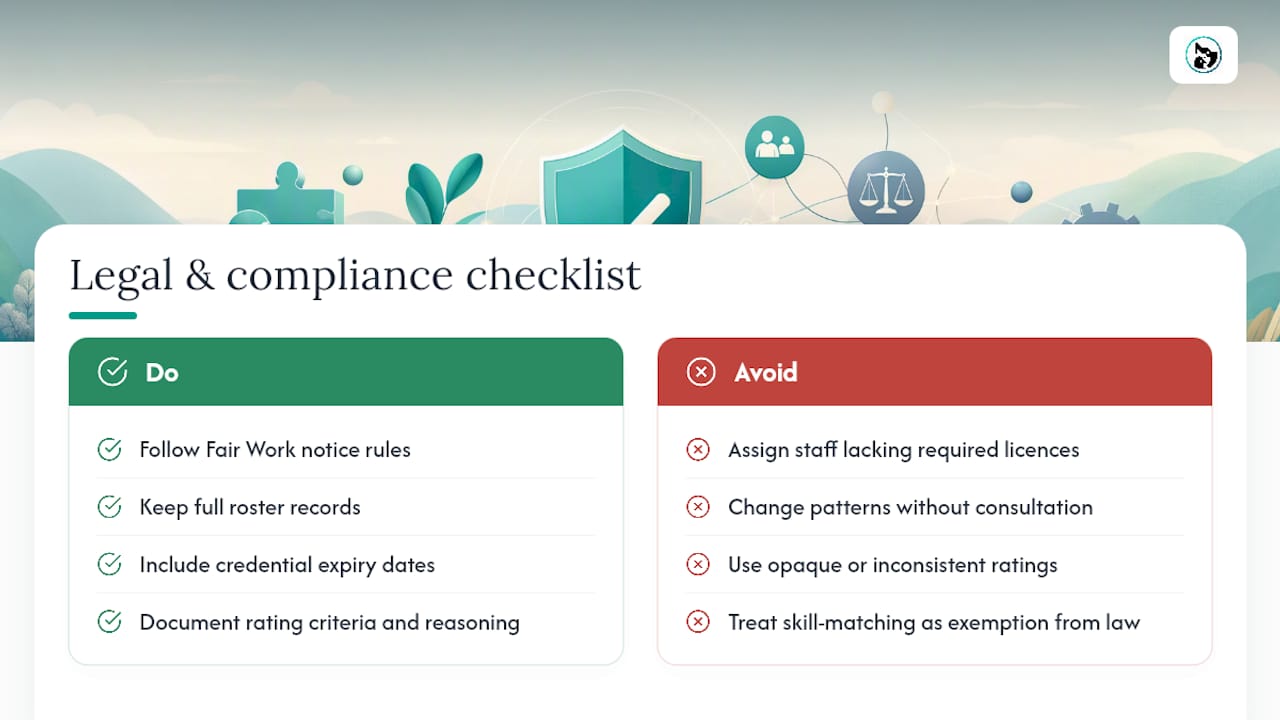
Rostering practices in Australia sit under Fair Work Ombudsman guidance, which sets expectations around notice periods for roster changes and the record-keeping obligations that apply regardless of how sophisticated your matching system becomes. If you're shifting someone's usual pattern because a skill-matched roster now favours a different assignment, the same notice and consultation obligations still apply as they would for any other roster change.
Skill requirements themselves can carry legal weight, particularly where they relate to licensing or certification, such as veterinary staff needing current registration or handlers needing a specific animal-restraint qualification. Scheduling someone into a role that requires a credential they don't hold isn't just a matching failure, it's a compliance exposure. Build credential expiry dates directly into your skills matrix so an assignment can't proceed on an expired certification.
Fairness and discrimination considerations also apply to how skill ratings are assigned and used. A rating system that consistently disadvantages a particular group, intentionally or not, needs review. Keep the criteria transparent and apply them consistently across the team, and document the reasoning behind ratings so decisions can be explained if ever questioned.
How Animal Booking approaches skill and client data in pet services rostering
Pet service work maps cleanly onto skill tags: behavioural handling for anxious animals, medical checks for boarding, route familiarity for mobile groomers. What actually reduces friction is connecting those tags to booking history, so a repeat client's dog gets the same handler who already knows it doesn't like the dryer. That link between client records and staff assignment is what cuts reassignments, not the roster software alone.
— AnimalBooking
How Animal Booking supports skills-aware rostering
Animal Booking gives multi-staff pet businesses the pieces this playbook needs without forcing you to bolt together separate systems. The smart calendar lets you build staff profiles with the skills and specialities that matter to your business, so recurring bookings can route to the same trusted handler automatically instead of whoever's free.

Automated reminders and deposit collection through the platform work alongside that matching to cut down the no-shows and last-minute gaps that undo a carefully built roster, part of why providers using the system report meaningfully fewer missed appointments. Combine that with the bookings dashboard for day-to-day reassignments and hand-offs, and you've got the operational backbone the earlier sections describe, minus the manual spreadsheet juggling. If you're running a multi-staff grooming, boarding, or mobile service and want to see how the pricing tiers line up with your team size, check the provider pricing page and set up a profile this week.
Sources
- Skills-based routing | NICE glossary
- Workforce scheduling | Google OR-Tools documentation
- Overview of skill work distribution | Microsoft Learn
- Rosters | Fair Work Ombudsman