

A single SMS holds 160 GSM-7 characters or 70 Unicode characters. Go over either limit and your message splits into multiple segments, each billed as a separate text. That distinction, GSM-7 versus Unicode, decides whether a booking reminder costs you one credit or three, and it hinges on encoding standards laid out in 3GPP TS 23.040, the User Data Header (UDH) that manages concatenation, and encoding rules published by providers like Telnyx.
- 160 characters: maximum for a single GSM-7 (standard Latin alphabet) message.
- 70 characters: maximum for a single Unicode message, triggered by emoji, accented letters, or non-Latin scripts.
- Segments are billed individually: a 300-character text isn't one message, it's two or three, each charged separately by your provider.
Key Takeaways
Understanding sms character limit rules means knowing that 160 GSM-7 or 70 Unicode characters is the single-message ceiling, and every character beyond it triggers per-segment billing.
| Point | Details |
|---|---|
| Know your two numbers | 160 characters for GSM-7, 70 for Unicode; crossing either splits your message into billed segments. |
| Watch the concatenation drop | Multipart messages usable space falls to 153 (GSM-7) and 67 (Unicode) per segment due to UDH overhead. |
| One emoji changes everything | A single non-GSM character forces the whole message into Unicode, halving your character budget instantly. |
| Test real templates | Merge fields with accented names or long addresses can silently push a clean template into extra segments. |
| Cap your parts | Keep automated reminders to two segments or fewer for predictable cost and reliable delivery across carriers. |
Table of Contents
- What are the exact SMS character limits by encoding?
- Why does encoding change the character count so drastically?
- How do you calculate how many segments a message will use?
- How do carriers and platforms actually bill for long texts?
- Which tools help you check character count before sending?
- What practical steps cut down your segment count?
- Managing message costs without the guesswork
- Frequently asked questions
- Sources
What are the exact SMS character limits by encoding?
Here's the quick reference every business sending SMS reminders should have pinned somewhere. Once a message needs more than one segment, the maths changes because a concatenation header eats into your usable space.
| Encoding | Single message limit | Per-segment limit (multipart) |
|---|---|---|
| GSM-7 | 160 characters | 153 characters |
| Unicode | 70 characters | 67 characters |
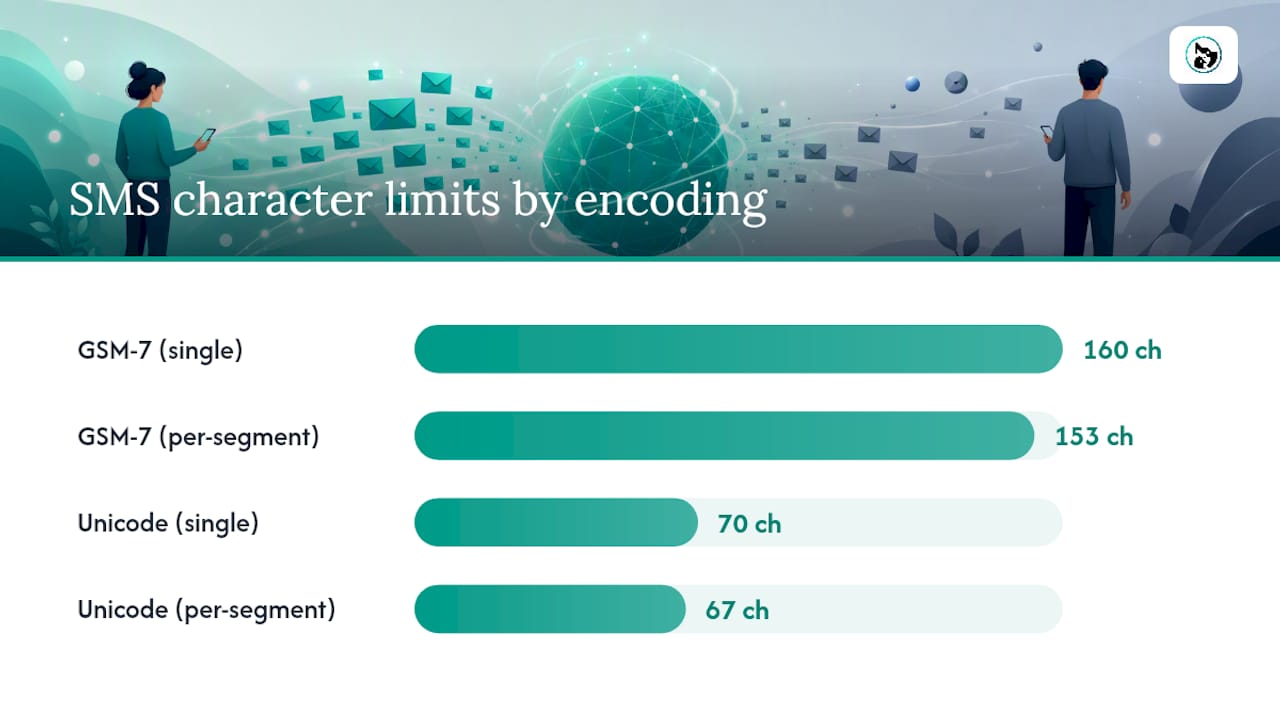
A 161-character GSM-7 message doesn't round up to one big segment. It splits into two segments of 153 and 8 characters, and you're billed for both, according to Telnyx's encoding documentation. A 320-character message needs three segments. Some providers also cap how many segments they'll concatenate at all, so pushing a message to 10 or more parts can get rejected outright rather than delivered in pieces.
Why does encoding change the character count so drastically?
GSM-7 is the default alphabet for SMS, and it's tighter than you'd think. It covers standard Latin letters, numbers, and common punctuation, but the moment your message includes something outside that set, the entire text switches to Unicode, dropping your capacity from 160 characters to 70.
Common Unicode triggers include:
- Emoji of any kind, including the ones that look plain like ✓ or ★
- Accented characters such as é, ñ, or ü (relevant for names)
- Curly quotes and smart apostrophes, often pasted in from Word or an email client
- Em dashes and en dashes
- Non-Latin scripts like Arabic, Chinese, or Cyrillic
GSM-7 also has an "extension table" for characters like the euro sign or square brackets. These aren't in the base alphabet, so each one consumes two characters instead of one, quietly eating into your 160-character budget even while staying in GSM-7 territory, a detail explained in Infobip's language documentation.
Some messaging platforms run smart encoding or transliteration automatically, swapping a curly apostrophe for a straight one or converting an em dash to a hyphen before sending, which keeps the message in GSM-7 and avoids the Unicode penalty entirely, according to Bandwidth's support documentation.
Pro Tip: Check your template source. Text copied straight from Word or Outlook almost always carries smart quotes, and that single character can flip an entire clean 155-character GSM-7 message into a Unicode message billed as two segments.
How do you calculate how many segments a message will use?
The maths isn't complicated once you know the payload basis. A single SMS carries 140 bytes, which works out to 160 GSM-7 characters or 70 Unicode characters at 2 bytes per character. Once a message needs splitting, a 6-byte UDH header gets added to every segment to manage reassembly, which is what drops the usable space from 160 to 153 and from 70 to 67, per Bandwidth's technical notes.
The formulas:
- GSM-7, over 160 characters: segments = ceiling(total characters ÷ 153)
- Unicode, over 70 characters: segments = ceiling(total characters ÷ 67)
Three worked examples:
- A 155-character GSM-7 appointment reminder stays under 160, so it's one segment, one billable message.
- A 200-character GSM-7 confirmation exceeds 160, so it splits: ceiling(200 ÷ 153) = 2 segments.
- A 90-character message with a single emoji forces Unicode encoding. Even though 90 characters would easily fit in one GSM-7 segment, Unicode's 70-character single-message cap kicks in, and ceiling(90 ÷ 67) = 2 segments.
That last example is the one that catches people out. A single tick emoji or a customer's accented surname can push an otherwise short, cheap message into Unicode territory and double the cost. Watch for this in booking templates that pull in customer names dynamically. A name with an accent, inserted via a merge field, can silently change the encoding of the whole message even if you wrote the template in plain GSM-7 text.
How do carriers and platforms actually bill for long texts?
Most providers, including ClickSend, Twilio, and Messente, bill per segment, not per message. A three-segment text costs the same as sending three separate 160-character messages. That's the mechanic that makes encoding awareness a genuine cost lever rather than a technical curiosity.
Platform behaviour varies more than most people expect. Vonage's messaging API accepts message bodies up to 3,200 characters, while other platforms cap concatenation at around 1,600 GSM-7 characters or roughly 700 Unicode characters, according to AustraliaBulkSMS. Carriers on the receiving end don't always reassemble long concatenated strings reliably, especially on older handsets, which introduces delivery risk on top of the extra cost.
- Bill per segment: a 3-segment message is 3 billable SMS units, no exceptions.
- Platform caps differ: some accept 3,200 characters, others cut off far earlier.
- Reassembly isn't guaranteed on every device once you're past four or five parts.
Pro Tip: Keep automated messages, especially reminders and confirmations, to a maximum of two segments. Beyond that, deliverability risk climbs faster than most senders realise, and the cost difference between two and six segments adds up quickly across thousands of sends.
Which tools help you check character count before sending?
Three tool categories cover most needs: standalone online character counters, provider SDK or API calculators built into platforms like Twilio and Messente, and the live counter inside your sending platform's compose screen. A decent tool tells you four things at once: which encoding is active, total characters used, how many segments that produces, and how many characters remain in the current segment.
- Online counters: quick one-off checks for a single message or template.
- Provider calculators: built into ClickSend, Twilio, and Messente dashboards for testing before a campaign send.
- Live compose counters: catch encoding shifts as you type, useful for spotting a rogue emoji or smart quote.
Test with real data, not placeholder text. A template that reads clean at 140 characters can blow out once a variable like a long business name or an address gets merged in, and that's exactly the scenario that turns a one-segment message into two without anyone noticing until the invoice arrives.
What practical steps cut down your segment count?
Front-load the essential information (date, time, action needed) so the message still makes sense if a customer only reads the first line. Cut filler phrases like "we just wanted to let you know that" ruthlessly.
- Replace smart quotes and em dashes with straight quotes and hyphens, or let smart encoding handle it automatically.
- Use short links instead of full URLs, but keep in mind tracking parameters can quietly add characters back.
- For anything image-heavy or long-form, switch to MMS, RCS, or an app notification instead of forcing it into SMS.
- Test every template with the longest realistic variable values, not your shortest example customer name.
For appointment-heavy businesses, two tweaks pay off immediately. First, standardise date and time formats (10:00 AM beats "ten o'clock in the morning") to shave characters without losing clarity. Second, route confirmations through automated reminders rather than manually typed texts, since templates get tested once and then reused safely.
Pro Tip: If your booking confirmations regularly hover near 155 to 160 characters, trim five words permanently. That buffer protects you from tipping into a second segment the moment a customer's name or service type runs a little longer than usual.

A practical note for booking and reminder businesses
Predictability is the real prize here, not just the per-message saving. A pet grooming business sending 500 reminders a month at one segment instead of two isn't just cutter costs, it's avoiding the compounding effect of Unicode creeping into templates unnoticed. Building character checks into your booking workflow once, rather than checking every send by hand, is what actually keeps this under control long term.
Managing message costs without the guesswork
A structured booking platform removes most of this arithmetic from your day. Animalbooking's auto reminders run on tested templates, so you're not manually re-checking character counts every time a customer's name or appointment detail changes. Pair that with the smart calendar to cut down on the back-and-forth texts that come from double-bookings and manual rescheduling, and your total SMS volume drops before encoding even becomes a factor. If message costs and no-shows are eating into margins, check Animalbooking's pricing to see which plan tier includes automated, segment-optimised reminders for your business size.
Frequently asked questions
How many characters fit in one SMS? A single SMS fits 160 GSM-7 characters or 70 Unicode characters. Which limit applies depends entirely on whether your message contains any non-standard characters like emoji or accented letters.
Why does my text message get billed as two messages? Once your message exceeds the single-segment limit, it's automatically split into concatenated parts, each billed separately by your provider. A 200-character GSM-7 message becomes two segments and two charges.
Does using an emoji really change the character limit? Yes. A single emoji shifts the entire message from GSM-7 to Unicode encoding, dropping your single-message capacity from 160 characters down to 70, even if the rest of the text is plain English.
What's the maximum number of segments a message can have? There's no universal legal cap, but practical limits vary by provider and carrier, commonly around 1,600 GSM-7 characters or 700 Unicode characters in total. Reliability drops on older devices well before you reach that ceiling.
Can I check my message's character count before sending? Yes. Most SMS platforms, including provider dashboards from ClickSend, Twilio, and Messente, include live counters showing encoding type, character total, and segment count as you type.
Sources
- Telnyx — message encoding and character limits
- Bandwidth support — SMS character limits and concatenation practices
- Vonage developer docs — concatenation and encoding
- AustraliaBulkSMS — SMS character limits guide