
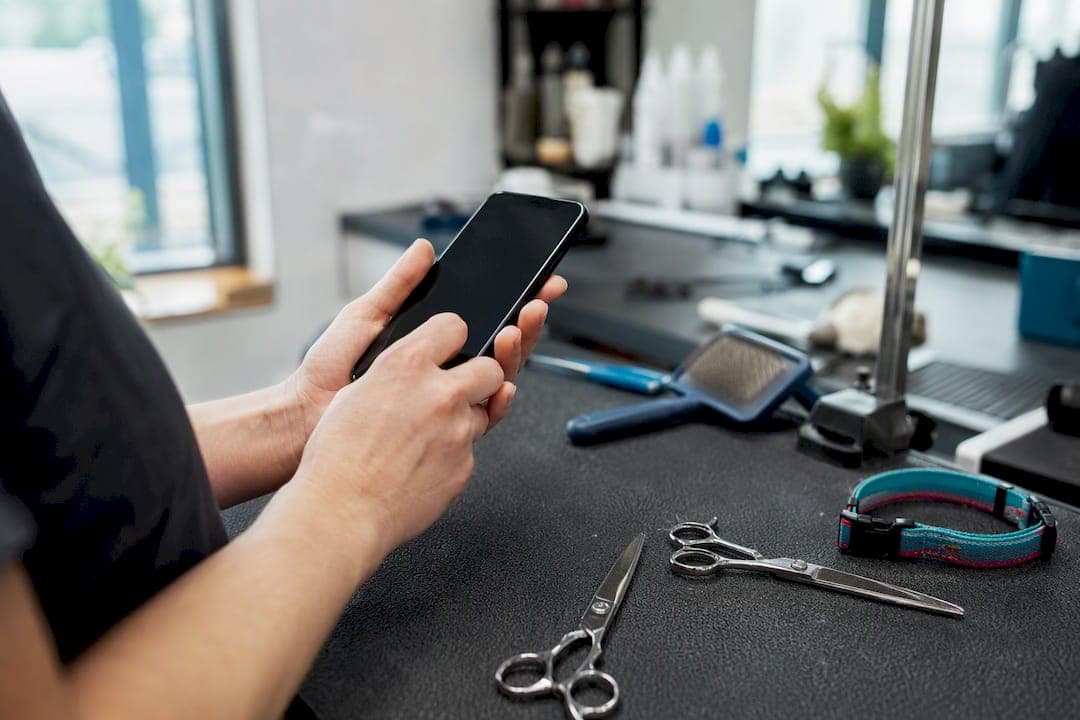
The most effective review request message is short, personal, and sent straight after service completion with a direct one-tap link. Not a paragraph. Not a discount code. Just a name, a thank you, and a link.
Here are three templates you can paste and send right now.
SMS (under 160 characters):
Hi [Name], thanks for choosing us! Got 30 seconds to leave a quick review? [link] It really helps small businesses like ours.
Email: Subject: Quick favour, [Name]?
Hi [Name], thanks for booking with us this week. If you had a good experience, a short Google review would mean a lot to our team. [Review link] Takes under a minute.
WhatsApp:
Hey [Name]! Hope everything went well today. If you've got a spare minute, we'd love a quick review here: [link] Thanks heaps!
The rule behind all three: trigger the message when the service or delivery is actually finished, not when the invoice was raised, and send exactly one follow-up 3 to 5 days later if there's no response. Two follow-ups and you're not asking anymore, you're nagging.
A few things make these work where longer, generic asks fail:
- They name the person
- They link directly to the review page, not the homepage
- They arrive within a day or two of the actual experience, while it's still fresh
Key takeaways
A short, personal review request sent within 48 hours of service completion, with a direct link and exactly one follow-up, consistently outperforms longer or more frequent messaging.
| Point | Details |
|---|---|
| Match channel to urgency | Use SMS or WhatsApp for time-sensitive asks, email when visuals or context matter more. |
| Trigger on completion, not purchase | Send 24 to 48 hours after service, 3 to 7 days after delivery for goods. |
| One follow-up only | Send a single gentle reminder 3 to 5 days later, then stop. |
| Personalise every template | Add the customer's name and a specific product or service reference before sending. |
| Automate the trigger, not the tone | Use booking or delivery events to fire requests, then keep the wording human. |
Table of Contents
- What's the best channel for a review request message?
- When should you send a review request?
- Ready-to-send templates for every scenario
- How do you reduce friction so people actually click?
- What are the compliance rules for review requests?
- How do you automate review requests without losing the personal touch?
- How AnimalBooking automates review requests for pet businesses
- What tone actually gets people to leave positive reviews?
- How should you handle a negative review inside your own message?
- What privacy rules apply to sending review requests?
- What separates a review request that works from one that gets ignored?
- The gap between review advice and review results
- Frequently asked questions
- Sources
What's the best channel for a review request message?
SMS and messaging apps like WhatsApp get read almost immediately, which makes them the strongest choice when the moment matters, straight after a haircut, a delivery, or a support call gets resolved. Gartner's analysis of follow-up channels points to SMS as an increasingly important channel for exactly this kind of time-sensitive outreach, and industry benchmarks consistently show SMS open rates outperforming email for quick, immediate asks.
Email still has a job to do. It's the better format when you want to include a logo, a photo of the finished job, or a bit more context, and it works well for ecommerce brands who already send order confirmations and shipping updates through the same inbox. The trade off is speed: emails sit unread for hours or days, so they suit situations where the ask isn't urgent.
Here's a rough breakdown of where each channel earns its place:
| Channel | Strength | Watch out for |
|---|---|---|
| SMS | Fast opens, high response for urgent asks | 160 character limit, needs opt-in consent |
| Room for visuals, good for ecommerce | Slower opens, can land in promotions tab | |
| WhatsApp/messaging apps | Conversational, feels personal | Only works if the customer already messages you there |
| In-person/QR code | Zero typing needed at point of service | Easy to feel forced if staff push too hard |
Match the channel to the business type, not just the message; for example, veterinary clinics benefit from tailored veterinary services timing and messaging strategies. Appointment-based businesses, groomers, vets, trainers, get the best results texting straight after the booking closes, because the client is still standing in the car park thinking about the appointment. Ecommerce brands do better waiting for delivery confirmation and using email, since there's a natural gap between purchase and product-in-hand. Support teams should fire off a request the moment a ticket closes, while the relief of a solved problem is still fresh. Returning customers respond well to a slightly warmer, more familiar tone, since you've already got history with them.
QR codes on receipts or at an exit point work, but treat them carefully: a code taped to the counter with "leave us 5 stars" written next to it edges into review gating, which most platforms explicitly ban. A neutral QR code that says "share your feedback" and links to an open review page is fine.
When should you send a review request?
Timing decides more than the wording does. Send too early and the customer hasn't formed an opinion yet. Send too late and they've forgotten the specifics that would have made a five-star review detailed and convincing.
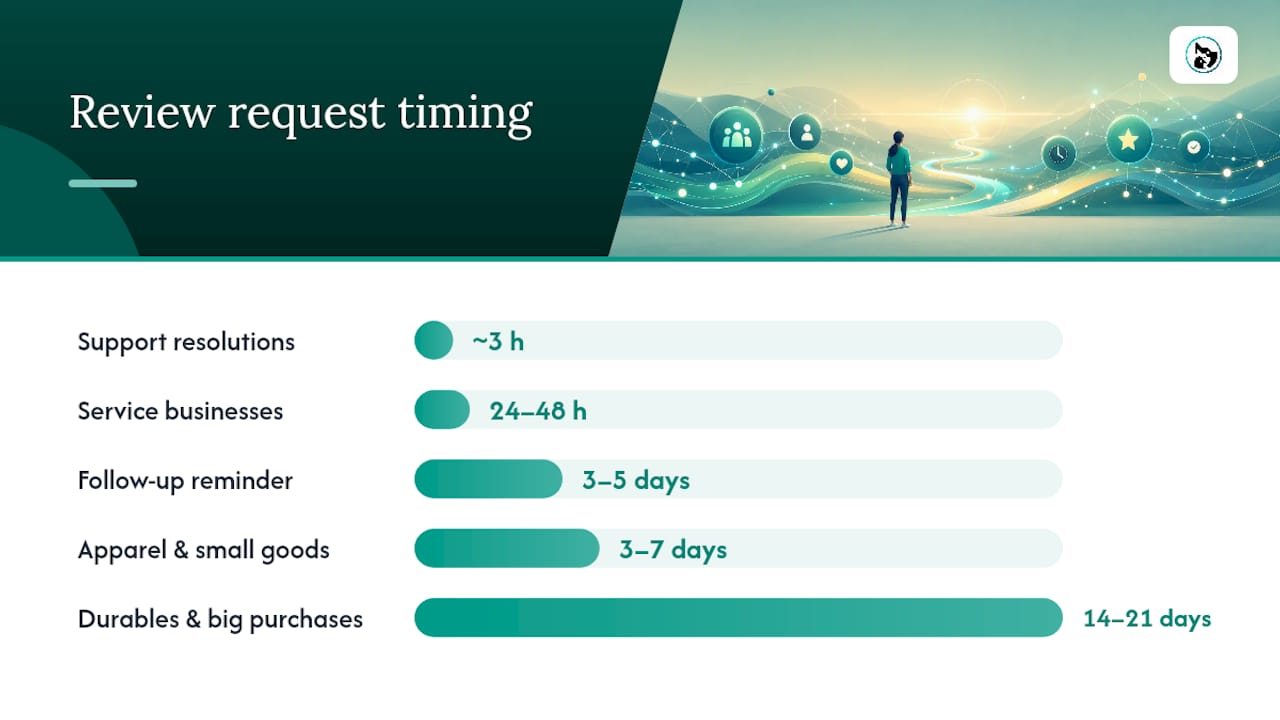
- Service businesses (grooming, vet visits, trades): send 24 to 48 hours after the appointment finishes. Long enough for the outcome to be visible, short enough that details are still sharp.
- Apparel and small goods: send 3 to 7 days after delivery, once the customer has actually worn or used the item.
- Durables and bigger purchases (furniture, appliances, equipment): wait 14 to 21 days, giving the customer time to properly test the product before judging it.
- Support resolutions: send within a few hours of the ticket closing, while the relief is still front of mind.
One follow-up only, sent 3 to 5 days after the first message, and nothing more. Standard practice across review template guides backs a single reminder, not a drip campaign. Keep the follow-up shorter than the original and lower pressure: "No worries if you're busy, just a gentle nudge on that review whenever you get a sec."
Delay the whole sequence for long onboarding periods or free trials. Asking someone to review a service they've used twice is asking for a thin, unhelpful review. Most booking and CRM tools let you schedule a delay so the request only fires after a real usage milestone, not the sign-up date.
Pro Tip: If your business has a natural "second visit" (a follow-up grooming session, a repeat vet check), hold the review request until after that second interaction. First impressions are often kinder in hindsight once a customer has decided to come back.
Ready-to-send templates for every scenario
Copy these, swap in the bracketed details, and send. Keep SMS under 160 characters and email bodies to two or three short sentences, longer copy consistently underperforms in review request testing.
SMS templates
- Simple ask: "Hi [Name], thanks for visiting us! Mind leaving a quick review? [link] Means a lot."
- Post-purchase: "Hey [Name], hope you're loving your [product]! A quick review would help other customers decide. [link]"
- After an appointment: "Hi [Name], thanks for coming in today. If [Pet's name] had a good time, a review would really help us out: [link]"
- After support resolution: "Glad we sorted that out, [Name]! If you've got a minute, a review on how we handled it would help: [link]"
- Returning customer: "Great seeing you again, [Name]! You've been with us a while now, would you mind sharing a review? [link]"
- Follow-up (send once, 3 to 5 days later): "No pressure, [Name], just floating this back up if you have a spare minute: [link]"
Email templates
Subject: How did we do, [Name]?
Thanks for booking [service] with us this week. If you were happy with how it went, a short review would help other pet owners find us. [Review link]
Subject: Loving your [product] so far?
Hi [Name], your [product] should have arrived by now. If it's living up to expectations, we'd love a quick review. [link] Takes about a minute.
Subject: A small favour, [Name]
We know your time's limited, so we'll keep this short: if [pet's name]'s [service] went well, a review would genuinely help our small business grow. [link] Thank you.
Subject: Still keen for that review?
Just a gentle follow-up, no rush at all. If you've got 60 seconds, we'd appreciate your thoughts here: [link]
WhatsApp and in-person scripts
WhatsApp works best when it reads like a real message, not a broadcast. "Hey [Name], thanks again for bringing [pet's name] in today! If you've got a sec, we'd love a review here: [link] Hope to see you both again soon."
In-person, keep it light and low-pressure. A groomer handing back a leash might say: "If you get a chance, we'd really appreciate a review, there's a QR code on the receipt if that's easier than typing." No follow-up needed if they don't act on it there and then, that's what the SMS or email does later.
The only edits that matter across every template: the customer's first name, a specific reference to the product, pet, or service (not "your purchase"), and, where relevant, an order number or appointment date. Generic templates read as generic. A groomer who mentions the dog by name gets noticeably better response rates than one who writes "your recent visit."
How do you reduce friction so people actually click?
Every extra step between "I want to leave a review" and "review submitted" loses you respondents. Direct review links and in-mail review forms substantially outperform multi-step flows that make the customer search for your business or create an account first.
Build the direct link once, from your Google Business Profile, and shorten it for SMS using any standard URL shortener so it doesn't eat your character count. Test it yourself on a phone before it goes out. Broken links are the single most avoidable reason a review request gets ignored.
- Use a direct link that opens straight to the review box, not the business homepage
- Put a QR code on receipts, invoices, or an exit-facing sign for in-person businesses
- Consider an in-mail review form for email requests, so customers can write and submit without leaving the inbox
- Keep the CTA short: "Leave a quick review", "Share your thoughts", "Tell us how we did"
Rewards are risky territory. A general thank-you gift sent to everyone who books, unrelated to whether they leave a review, is fine. Offering a discount specifically in exchange for a review is a bribe, and it breaches most platform policies.
Pro Tip: Test your review link from a different phone and a different network before your first campaign goes out. A link that works on office Wi-Fi doesn't always resolve the same way on mobile data.
What are the compliance rules for review requests?
Platform policies are stricter than most business owners assume, and a violation can get reviews removed or an account flagged. Google's own guidance, along with compliance explainers, makes three things clear: no incentivising reviews, no gating (only asking happy customers and filtering out unhappy ones), and no steering people toward specific star ratings or wording.
SMS carries its own legal layer on top of platform rules. You need consent before texting a customer commercially in most jurisdictions, every message should include a clear opt-out ("Reply STOP to unsubscribe"), and sending outside reasonable hours annoys recipients even where it isn't explicitly banned.
Run every campaign through this five-point check before you hit send:
- Did the customer consent to receive messages from your business?
- Is the request open-ended, not asking only for positive feedback or five stars specifically?
- Does the message avoid any reward tied directly to leaving a review?
- Is there a clear opt-out for SMS, and is it going out at a reasonable hour?
- Does the link lead to a genuine, unfiltered review platform rather than a private feedback form dressed up as a public review?
How do you automate review requests without losing the personal touch?
Manual sending doesn't scale past a handful of customers a week, and it's the first thing that gets skipped when a business gets busy. Automation triggered by real customer events, delivery confirmation, appointment completion, ticket resolution, consistently outperforms calendar-based sending because the timing lines up with the customer's actual experience rather than an arbitrary date.
Segmenting your customer list before you send improves conversion further. First-time customers respond well to a warmer, more explanatory message; repeat customers can handle a shorter, more familiar tone. High-value bookings might justify a slightly more personal note from the owner rather than a templated blast.
Three numbers worth tracking on every campaign:
| Metric | What it tells you |
|---|---|
| Requests sent | Volume baseline for comparing campaigns over time |
| Click rate | Whether the message itself is compelling enough to act on |
| Review conversion rate | Whether the landing experience (the link, the form) is frictionless enough to finish |
A simple A/B test, running two subject lines or two CTA phrasings against similar customer batches, tells you more in two weeks than months of guessing. Test one variable at a time: subject line this month, CTA wording next month.
How AnimalBooking automates review requests for pet businesses
Manual review chasing is one of the first tasks that slips once a grooming salon or vet clinic gets busy. AnimalBooking's auto reminder system fires review requests automatically once a booking is marked complete, no spreadsheet, no staff member remembering to text.
The trigger flow is straightforward: booking completes in the system, an automated thank-you and review request SMS goes out 24 to 48 hours later, and the response gets logged against that customer's profile in the customer CRM.
For a pet boarding business juggling dozens of check-ins a week, that kind of automation replaces a job nobody has time for anyway.
What tone actually gets people to leave positive reviews?
Warm and slightly informal beats polished and corporate, almost every time. Customers can tell the difference between a template that sounds like a person and one that sounds like a legal notice.
Use contractions. Write "thanks" instead of "we would like to express our gratitude." Keep sentences short enough to read on a phone screen while walking to the car. A message that takes ten seconds to read gets a much higher response than one that takes forty five.
Gratitude works better than a sales pitch. "Thanks for choosing us" lands better than "We strive for excellence in every interaction." The second phrase says nothing specific and reads like it was written by a committee.
Specificity matters more than most businesses realise. Mentioning the pet's name, the exact service, or the day of the appointment signals that a real person, not a bot, sent the message. "Hope Biscuit enjoyed his groom today" beats "Thank you for your recent visit" every time.
Avoid anything that implies the review has to be positive. "We'd love a 5 star review" crosses into steering, which platforms discourage and customers can smell from a mile away. "We'd love your honest feedback" achieves the same goal without the pressure.
End on a low-stakes note. "No worries if you're busy" or "totally optional, just appreciated" removes the guilt that makes people ignore a message entirely rather than politely decline.
How should you handle a negative review inside your own message?
The review request message itself isn't the place to pre-empt criticism, but the way you word it shapes what happens if a bad review does land. Never write a message that only invites happy customers to respond and quietly filters out unhappy ones, that's textbook review gating and it breaches platform policy on top of being dishonest.
Instead, build a safety valve into the message itself. A line like "If anything wasn't quite right, reply here first, we'd rather fix it than see you unhappy" gives a frustrated customer somewhere to vent privately before they consider a public review. This isn't about suppressing criticism. It's about giving a genuine service issue a chance to get resolved before it becomes a permanent one-star post.
If a negative review does appear despite that, respond publicly, briefly, and without defensiveness. Acknowledge the specific issue, state what you're doing about it, and invite the person to get in touch directly. Avoid generic damage control language like "we take all feedback seriously," it reads as hollow because every business says it.

What you should never do is offer a discount or refund publicly in exchange for changing or removing the review. That's a direct incentive violation, and it's usually visible to everyone else reading the review thread, which does more damage than the original complaint.
What privacy rules apply to sending review requests?
Collecting a phone number or email address to send a review request means you're handling personal information, and that comes with obligations under Australia's Privacy Act, particularly around consent and purpose.
Customers should know, at the point they hand over their contact details, that you might use them to follow up about their experience. This doesn't need a lengthy legal clause. A simple line at booking, "We'll text you a reminder and, afterwards, a quick review request," covers the disclosure without slowing down the booking process.
Consent for marketing-style SMS is a separate legal question from consent to receive service related texts like appointment reminders. A review request sits closer to the marketing end of that spectrum in most interpretations, so include an opt-out on every message and honour it immediately, not at the end of a billing cycle.
Store customer contact data only as long as you need it for that purpose, and avoid handing review request lists to third parties without the customer's knowledge. If you use a booking platform to manage this, check that the platform itself handles data storage and consent tracking properly rather than assuming it's covered automatically.
None of this needs a lawyer for a small grooming business or mobile vet. It needs a clear opt-in line at booking and a working opt-out on every text.
What separates a review request that works from one that gets ignored?
A message that works: "Hi Sarah, thanks for bringing Max in today! If he had a good groom, we'd love a quick review: [link]" It's short, it names the pet, it's specific, and it links directly to the review page.
A message that fails: "Dear Valued Customer, We hope our services met your expectations. Please take a moment out of your busy schedule to visit our website and navigate to the reviews section to share your experience with us and other potential customers." Nobody reads past the second line. It's generic, it's long, and it doesn't tell the reader what to click.
A working follow-up: "No worries if you're busy, Sarah, just a gentle nudge on that review if you get a sec: [link]" Low pressure, references the original ask, doesn't demand anything.
A failing follow-up: Sending the exact same message three times in a week. This doesn't just fail to convert, it actively pushes customers toward unsubscribing or blocking the number entirely.
The pattern across every successful example: a name, a specific detail, a direct link, and a tone that sounds like a person typed it in thirty seconds. The pattern across failures is almost always the opposite: generic phrasing, multiple steps before the actual review box, or a follow-up cadence that tips into pestering.
The gap between review advice and review results
Most guides to review requests spend more time on wording than on timing, and that's backwards. A perfectly written message sent eight days after a haircut gets a worse response than a clumsy one sent within the hour. Timing is the lever that actually moves the number; tone just decides whether the response is warm or lukewarm.
The other overrated piece of advice is volume. Businesses assume more follow-ups mean more reviews, when the research on this is fairly blunt: a second or third reminder tends to cost you goodwill faster than it buys you extra responses. One ask, one reminder, then let it go.
If you're setting this up for the first time, prioritise the trigger before the template. Get the "send immediately after completion" mechanism working, even with a rough message, before you spend an afternoon perfecting the wording. A good message sent at the wrong time still underperforms a mediocre one sent at the right time.
Frequently asked questions
What's the ideal length for a review request text message? Keep SMS review requests under 160 characters so they don't split into multiple messages. Include the customer's name, a brief thank you, and the direct review link, nothing more.
How soon after a purchase should you send a review request email? For services, send within 24 to 48 hours of completion. For physical products, wait 3 to 7 days after delivery so the customer has actually used the item.
Can you offer a discount for leaving a review? No. Offering any reward specifically tied to leaving a review breaches most platform policies, including Google's. A general thank-you gift given to all customers regardless of whether they review you is fine.
How many times should you follow up if someone doesn't respond? Send one follow-up only, 3 to 5 days after the original request. A second or third reminder tends to increase opt-outs rather than reviews.
Is it legal to text customers asking for reviews? It depends on consent. Customers need to know their number may be used for this purpose, and every message should include a clear opt-out such as "Reply STOP to unsubscribe."
Sources
- Review request email examples — Yotpo
- How to Ask for Google Reviews: Compliant Templates & Scripts — Elfsight