
Yes, you can add a booking link to your Instagram profile today. Instagram's native "Book Now" action button requires a professional Business or Creator account and an approved scheduling partner connected through action buttons. If your scheduling tool isn't on that approved list, paste your booking page URL into the Website field on your profile and back it up with a clear call-to-action.
Your first move, right now:
- Switch your account to Business or Creator (Settings → Account type)
- Decide if your scheduler is an approved partner or if you'll use the bio link fallback
- Either way, have a single booking URL ready to paste in within the next ten minutes
Key Takeaways
The most reliable way to book more clients from Instagram is a single, mobile-first booking URL placed in your bio and reinforced through Stories, Highlights, and the native Book Now button where it's available.
| Point | Details |
|---|---|
| Native button needs a partner | Book Now only works with a Business/Creator account and an approved scheduling partner. |
| Bio link is the fallback that works | Paste one booking URL into the Website field if your scheduler isn't on the approved list. |
| Highlights make links permanent | Save booking Story stickers into a pinned Highlight so new visitors always find the link. |
| UTM tags reveal what's working | Tag your booking URL to see which posts or Reels actually generate confirmed bookings. |
| AnimalBooking suits pet providers | Its mobile booking page, reminders, and payments plug straight into a bio link or link sticker. |
Table of Contents
- How to enable the native Book Now button through a scheduling partner
- What to do if your scheduler isn't an approved Book Now partner
- Should you use Story link stickers to drive bookings?
- How do you get more people to actually click your booking link?
- Why isn't my Book Now button showing up?
- How AnimalBooking fits into this Instagram workflow
- What most guides get wrong about Instagram booking links
- Get bookings flowing from Instagram in minutes, not weeks
- Frequently asked questions
- Sources
How to enable the native Book Now button through a scheduling partner
Instagram's Book Now button only appears for professional accounts. You need a Business or Creator profile, and in most cases a connected Facebook Page, before the option shows up at all.
Here's the setup sequence:
- Open your profile and tap Edit Profile
- Under contact options, find Add Action Button
- Select Book Now from the list of button types
- Choose your scheduling partner from the approved list and authenticate the connection
- Follow any Meta prompts to link an ad account or Meta Pixel, if the partner requests it
- Save the changes and view your public profile to confirm the button appears
Square Appointments and Setmore are two examples of partners that plug straight into this flow. Square's integration places a Book button directly on the profile so customers book without leaving Instagram, and Setmore routes tapped users to a real-time availability page where they can pick a slot immediately.
The button is mobile-only. It won't show on the desktop version of Instagram, so don't panic if you check from a browser and see nothing.
Pro Tip: Test the button from a completely separate device, logged out of your own account. Owners sometimes see cached menu options that visitors never will.
What to do if your scheduler isn't an approved Book Now partner
Plenty of solid booking tools sit outside Instagram's approved partner list, and that's fine. The fix is straightforward: paste your booking page link into the Website field under Edit Profile, and write one line of text right above it that tells people exactly what to do.
- Go to Edit Profile → Website and drop in your booking URL
- Keep the destination page mobile-first with one clear action, not a menu of five options
- If you run several links (booking, socials, reviews), use a link-in-bio tool, but make the booking option the top item, not buried third
- Shorten the URL where you can. Long strings look untrustworthy in a bio
Vendor guides consistently point to this bio-link approach as the standard workaround when a native partner integration isn't available.
Pro Tip: Above the link, try something like "Book your pet's groom ↓" or "Reserve a consult, link below." Specific beats generic every time.
Should you use Story link stickers to drive bookings?
Yes, and Highlights make that link permanent rather than something that vanishes after 24 hours. Story link stickers let you drop a clickable booking URL straight into a Story, and saving those Stories into a pinned Highlight means new followers can find "Book Now" months later without you lifting a finger.
Here's the process:
- Create a Story and tap the sticker icon, then select Link
- Paste your booking URL and edit the label text to something like "Book now" or "See available times"
- Post the Story, then tap Highlight to save it before it expires
- Name that Highlight "Book" or "Appointments" so it's the first thing profile visitors notice
- Place the sticker somewhere it won't get covered by your profile picture or captions when viewed
Good Story ideas for this: opening-slot announcements, last-minute cancellations, limited-time promos. Every single one should carry the link sticker. Story stickers and Highlights work together to convert casual viewers into repeat visitors to your booking page, which a single bio link alone can't always do.
How do you get more people to actually click your booking link?
A visible link is only half the job. Getting people to tap it takes deliberate, repeated prompting across every format Instagram offers.
- In captions, use short, direct phrasing: "3 spots left this week, link in bio"
- In Reels, add on-screen text pointing at the bio link in the first three seconds, when attention is highest
- Pin a comment with the booking CTA under high-performing posts
- Send the booking link directly through DMs, and consider automated DM sequences triggered from ad campaigns to walk cold leads toward a confirmed booking, a tactic detailed in guidance on converting Instagram visitors into customers
- Add UTM parameters to your booking URL so you can see in your analytics which post, Reel, or Story actually produced a booking, not just a click
Reservio's research on link placement found the bio is the single highest-impact spot for a booking URL, ahead of Google Business Profile and email signature. If you only optimise one thing, optimise that.
Why isn't my Book Now button showing up?
Most Book Now problems trace back to one of a handful of causes, and they're usually quick to fix.
- Account type wrong: personal accounts never show action buttons; confirm you're on Business or Creator
- Partner not supported: some scheduling tools aren't approved everywhere, so check the partner list again or switch to the bio-link fallback
- Facebook connection broken: re-authorise the link between your Instagram profile and the Facebook Page tied to it
- App out of date: update Instagram, since older versions sometimes hide newer profile features
- Wrong account selected: if you manage multiple pages or profiles, double check which one is actually connected
If none of that resolves it, test from a public, logged-out view on a second device. This isolates whether the button is genuinely missing or just cached on your own phone. When the partner route is a dead end, the bio link and Highlight combination covers you completely.
How AnimalBooking fits into this Instagram workflow
If you run a grooming, boarding, training, or mobile pet service, you don't need a booking partner from Instagram's approved list to make this work well. AnimalBooking gives you a mobile-friendly booking page with a short, clean URL that drops straight into your bio, your link-in-bio tool, or a Story link sticker with no clutter around it.
The feature set is built for exactly this kind of Instagram-driven traffic:
- A smart calendar that shows real-time availability, so a follower tapping your link at 9pm sees actual open slots
- Auto reminders that follow up automatically once someone books
- Built-in payments so deposits or full payment happen at the point of booking, not over DM
- A customer CRM that keeps every Instagram-sourced client's history in one place
Providers using structured booking and reminder systems report cutting no-shows by up to 80% and lifting revenue by roughly 30% per booking, largely because automated confirmations and deposits close the gap between "interested" and "actually shows up."
A simple workflow: create your booking page in AnimalBooking, paste the link into your bio, pin a "Book" Highlight pointing at it, then promote it through Stories and Reels using the CTA tactics above. Groomers and dog walkers running mobile schedules find this particularly useful, since clients can book and pay before the provider even leaves the last appointment.
What most guides get wrong about Instagram booking links

Most advice on this topic treats the native Book Now button as the finish line. It isn't. Plenty of service providers, especially in pet care, run scheduling tools that will never appear on Instagram's approved partner list, and waiting around for that to change wastes time you don't have.
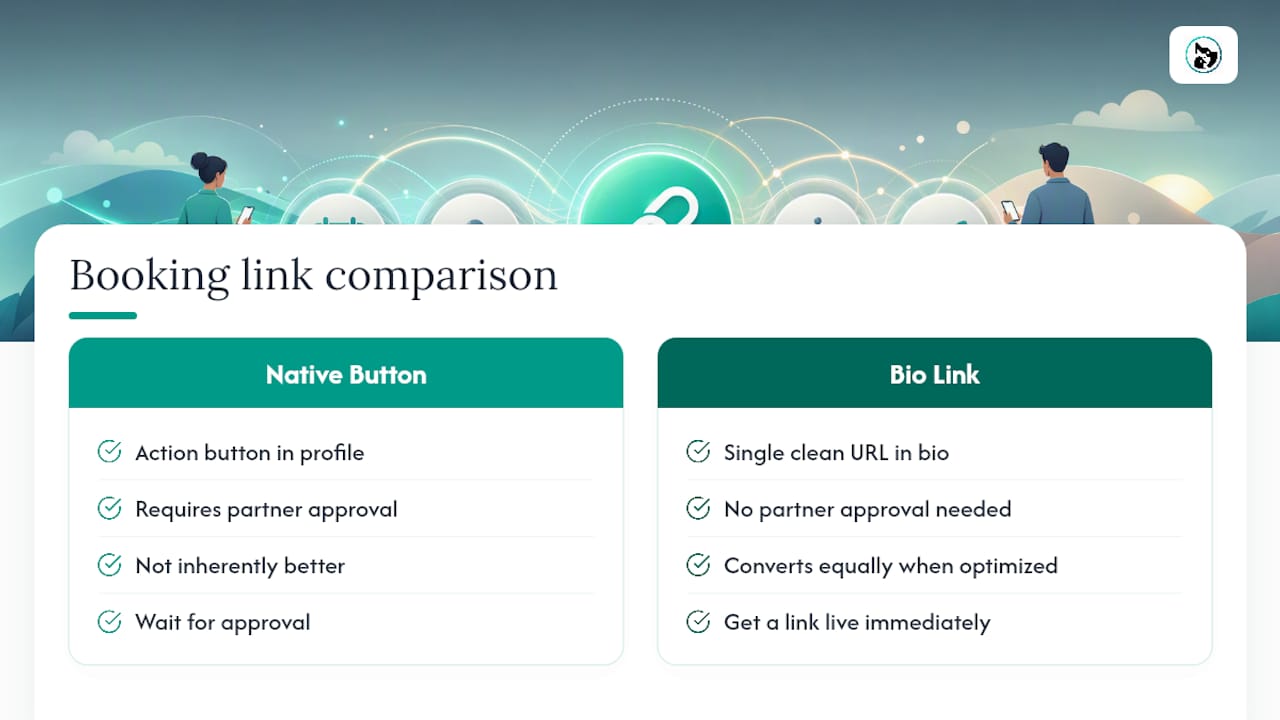
The bio link isn't a downgrade from the action button. Treated properly, with one clean URL and a mobile-first landing page, it converts just as well. What actually separates providers who fill their calendars from Instagram from those who don't isn't which button they use. It's whether they treat the bio link as prime real estate rather than an afterthought, and whether they keep reminding Story viewers it exists.
If you take one thing from this: don't wait on partner approval status to start booking clients from Instagram. Get a single, working link live first. Layer in the native button later if your platform ever gets approved.
Get bookings flowing from Instagram in minutes, not weeks
Setting up a booking system shouldn't be the bottleneck between an Instagram follower and a confirmed appointment. AnimalBooking gets your booking page live in a few minutes, with a link built specifically to sit cleanly in a bio, a link-in-bio tool, or a Story sticker, so you're not stuck waiting on Instagram's approved partner list to start taking bookings.

Because it's purpose-built for pet service providers, from groomers to pet boarding operators to mobile trainers, the calendar, reminders, and payments are already set up to handle the exact kind of impulse booking Instagram traffic generates. No spreadsheet juggling, no chasing deposits over DM.
Head to the provider sign-up page and create your booking page now, then paste the link straight into your Instagram bio today.
Frequently asked questions
Do I need a business account to add a booking link to Instagram? You need a personal account only for the bio link fallback. The native Book Now action button, however, requires a Business or Creator profile.
Can I use any scheduling tool with the native Book Now button? No. Only approved partners appear in that menu. If yours isn't listed, use the bio link and Story sticker approach instead.
Why does my Book Now button only show on mobile? Instagram's action buttons are a mobile-app feature and don't render on the desktop site, so always check from a phone before assuming something's broken.
How many links can I add to my Instagram profile? Instagram allows one clickable link in the Website field, plus whatever the Book Now action button provides. That's why most providers use a link-in-bio tool or a single dedicated booking page instead of trying to cram in multiple destinations.
Sources
- About action buttons for Instagram Business profiles
- How to book more customers on Instagram
- How to Add a Book Now Button on Instagram: Step-by-Step
- Booking link checklist: Instagram, Google, and email | Reservio Blog