

Yes, most modern booking systems let you create and run promo codes directly inside the platform. Open your software's Marketing, Financials, or Settings menu, look for a Discounts or Promotions module, and create a new code. That's the starting point.
For pet service businesses specifically, booking discount codes do more than attract new clients; see the full range of veterinary services that can be targeted with promo codes. Used well, they fill slow days, reward loyal clients, and reduce no-shows. Platforms like Animalbooking pair promo tools with payments, CRM, and automated reminders, which is why providers using the platform report reductions in no-shows of up to 80% and revenue increases of around 30% per booking.
Before you build your first code, here's what you need in place:
- A booking platform with a Discounts or Promotions module (most modern systems have one)
- A clear goal: new client acquisition, repeat visits, or slow-day fill
- A service list so you can target the code correctly
- A payment or deposit rule active on the booking, since many platforms only show the promo field at checkout when a payment step is configured
Key takeaways
Running booking promo codes effectively requires the right setup, clear rules, targeted promotion, and consistent measurement to turn discounts into long-term client relationships.
| Point | Details |
|---|---|
| Enable the right toggles | Always activate both 'Active' and 'Allow in online booking' or the code won't appear at checkout. |
| Set usage limits and expiry | Every code needs a global cap, a per-client limit, and an end date to prevent uncontrolled revenue loss. |
| Use unique codes per channel | Assign a different code to email, SMS, and social so redemption data shows which channel actually converts. |
| Test before launch | Run a sandbox booking as a new client to confirm the discount calculates correctly and appears on the payment screen. |
| Animalbooking | Combines promo code tools with payments, CRM, and analytics so redemption tracking and revenue reporting stay in one place. |
Table of Contents
- How do you set up booking promo codes in your software?
- Which promo types actually work for pet businesses?
- What rules and eligibility options should you configure?
- How do promo codes interact with payments, deposits, and bookkeeping?
- How do you promote your codes and measure what's working?
- What mistakes should you avoid when launching a promo code?
- How do you set up a promo code in Animalbooking?
- Where do promo codes actually fit in your marketing mix?
- Animalbooking makes running promo codes straightforward
- Sources
How do you set up booking promo codes in your software?
Most platforms follow the same basic sequence. The module usually lives under Financials, Marketing, or Settings → Discounts or Promotions. Standard promo code fields across booking systems include the code string, discount type, service targeting, and an active toggle.
- Open the Discounts or Promotions module in your platform's settings.
- Enter the code string. Keep it short and memorable: FIRSTGROOM, BOARDJAN, REFER25.
- Choose the discount type: percentage off (e.g. 15%) or a fixed dollar amount (e.g. $10 off).
- Name the promotion so it appears clearly on client receipts and your own reports.
- Target specific services or appointment types. A first-groom code should apply to grooming only, not boarding or training.
- Set client eligibility. New clients only, existing clients, or all clients.
- Assign staff or location restrictions if the offer applies to a specific groomer or clinic location.
- Set expiry and usage limits. Both a global cap (e.g. 50 uses total) and a per-client cap (e.g. 1 use per client) matter.
- Set a minimum spend if you want to protect low-margin appointments.
- Toggle 'Active' and 'Allow in online booking' so the field appears at checkout.
Quick test before you go live: create a sandbox booking as a test client, apply the code, and confirm the discount calculates correctly and appears on the payment screen.
- If the promo field doesn't appear at checkout, check that a payment or deposit rule is active on the service.
- If the code applies to the wrong services, revisit the service-targeting field.
Pro Tip: Use unique codes per channel (e.g. FBGROOM for Facebook, EMAILGROOM for your newsletter) rather than one shared code. You'll know exactly which channel drove each redemption.
Which promo types actually work for pet businesses?
The right promo type depends on your goal. Steep, indefinite discounts erode perceived value; modest, targeted offers build habits. Tie offers to staff specialities where you can, such as a "senior groomer" package, to protect your margins while still attracting clients.
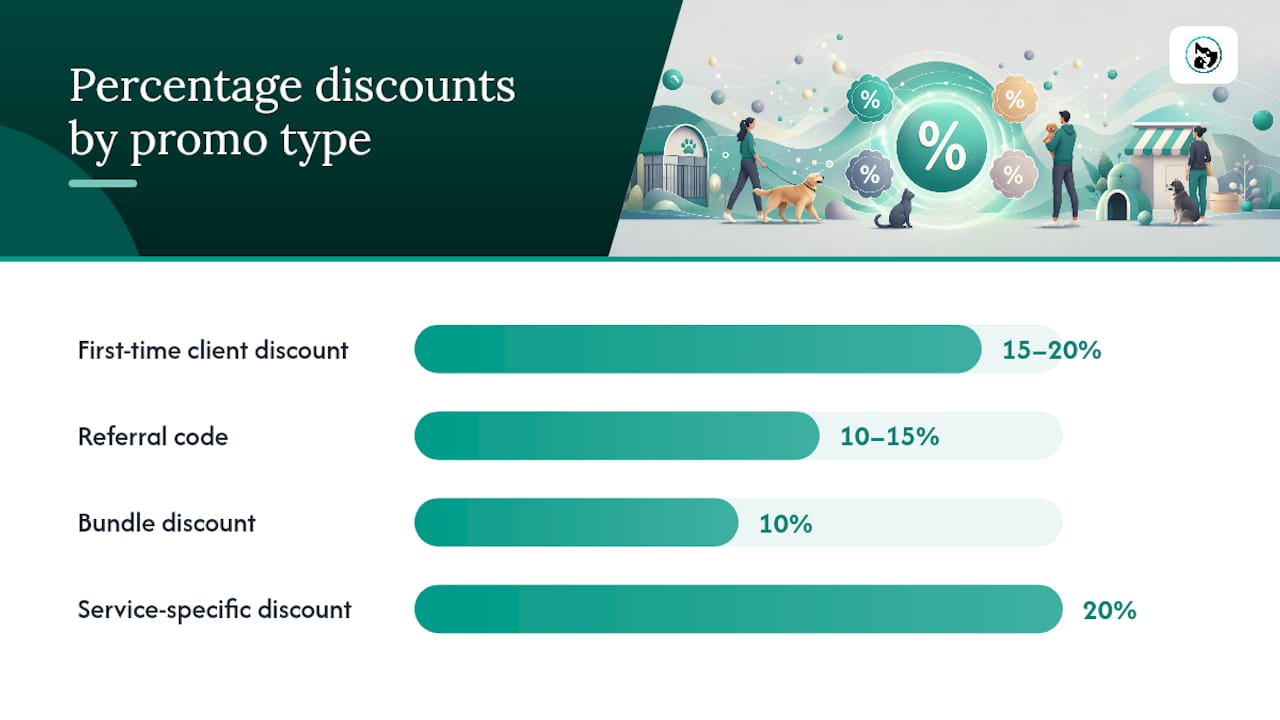
- First-time client discount: 15–20% off a first groom or consult. Set a 30-day expiry and a per-client limit of one use. Target new-client tags only.
- Repeat-visit reward: $10 off a fifth visit. No expiry needed; limit to one redemption per client per quarter. Works well for groomers and trainers.
- Referral code: 10–15% off for the referring client when a new booking is made. Assign unique codes per referrer so you can track who's sending clients your way.
- Package or bundle discount: 10% off a five-session training block or a week's boarding. No per-use limit needed; set a global cap to control total exposure.
- Seasonal or slow-day discount: $15 off Tuesday grooming appointments in July. Restrict by day or time window; set a tight expiry (2–4 weeks).
- Service-specific or staff-specific discount: 20% off equine physiotherapy with a named practitioner. Useful for introducing a new staff member or a new service.
| Business goal | Promo type | Suggested parameters |
|---|---|---|
| New client acquisition | First-time discount | moderate percentage off, limited expiry, single use per client |
| Repeat visit retention | Loyalty reward | set discount amount off milestone visit, limited use per client per period |
| Word-of-mouth growth | Referral code | moderate percentage off, unique code per referrer |
| Upsell or package sales | Bundle discount | moderate percentage off, global redemption cap set |
| Fill slow days | Seasonal/day discount | $15 off, 2–4 week expiry, day/time restriction |
For dog groomers, first-time and referral codes tend to outperform seasonal discounts because grooming is a recurring need. For pet boarding providers, package discounts on multi-night stays convert well because clients are already planning ahead.
What rules and eligibility options should you configure?
Getting the rules right prevents revenue leakage and client disputes. Coupon settings typically cover usage limits, appointment type restrictions, and checkout visibility.
- Expiry windows: Set a booking-created window (the code must be used within X days of issue) rather than a booking-start window where possible. It's easier to communicate to clients.
- Usage limits: Always set both a global cap and a per-client cap. A code with no global cap on a social media post can cost you far more than intended.
- Minimum spend: Useful for protecting low-margin services. A $10-off code on a $25 nail trim hurts; a $10-off code on a $90 full groom is fine.
- Service exclusions: Exclude add-ons, products, or already-discounted packages from the promo's scope.
- Staff and location restrictions: If the offer is tied to one groomer or one clinic, lock it at the staff or location level, not just the service level.
- Combining rules: Most platforms apply rules in a fixed order of precedence. Test combined rules (e.g. minimum spend + service exclusion + per-client limit) before launch to confirm they interact as expected.
- Deposits vs final payment: Clarify in your T&Cs whether the discount applies to the deposit, the final balance, or the total. Many platforms apply the discount to the checkout total, not the deposit alone.
Simple T&Cs to include in any promo communication: one code per booking, not valid with other offers, valid on listed services only, expires on [date].
How do promo codes interact with payments, deposits, and bookkeeping?
Confirm this behaviour in your platform before communicating deposit amounts to clients.
- Autopays and contract billing: Some platforms apply promo codes to recurring autopays; others exclude them by default. Check your platform's settings before running a promo against clients on a recurring plan.
- Refunds and voids: Refund the amount the client actually paid, not the pre-discount total. Record the discount as a separate line item in your accounting software so it doesn't appear as a revenue shortfall.
- Bookkeeping practice: Tag discounts to a dedicated revenue category or discount line item. This keeps your gross revenue figures clean and makes it easy to calculate the true cost of each campaign.
Animalbooking's integrated payments handle checkout visibility for promos and connect with automated reminders, which reduces the manual follow-up that typically causes reconciliation errors.
How do you promote your codes and measure what's working?
Promotion and measurement go together. Assign a unique code to each channel so redemption data tells you where paying clients actually come from, not just where they saw your post.
Channels that work for pet services:
- Email newsletter with a clear subject line ("15% off your first groom this month")
- SMS reminder to existing clients (high open rates for appointment-based services)
- Website booking widget with the code pre-filled in a banner
- Social media posts with a channel-specific code (e.g. IGBOARD for Instagram)
- Front-desk handouts or referral cards for in-person clients
- Booking confirmation emails with a referral code embedded
Metrics to track after launch:
- Redemption rate (codes used / codes distributed)
- Bookings generated from the campaign
- Client acquisition cost for new-client promos
- Repeat-booking lift: did first-time promo clients return within 60 days?
- Average transaction value before and after the promo period
- No-show rate change during the promo window
Tracking redemptions by code and channel is the single most useful metric for small pet businesses because it shows which channels deliver paying clients, not just impressions. Use your platform's CRM to tag clients by acquisition source.
Pro Tip: Run two versions of the same offer with different code strings (e.g. GROOM15A and GROOM15B) across two channels simultaneously. After two weeks, you'll know which channel converts better for that offer type.

What mistakes should you avoid when launching a promo code?
Most promo code failures come down to a missed toggle or a rule that wasn't tested.
- Forgetting to enable 'Allow in online booking'. The code exists in the system but never appears at checkout. Always check this toggle last.
- Mismatched service targeting. A grooming code that accidentally applies to boarding appointments can cost you significantly before anyone notices.
- Payment or deposit rules hiding the promo field. If no payment step is configured on the service, many platforms suppress the promo field entirely.
- Conflicting rules that cancel the code. A minimum spend rule combined with a service exclusion can make a code unredeemable. Test every combination.
- No expiry or usage cap. A code shared on social media with no limits can run indefinitely. Set both.
Pre-launch checklist:
- Create a test booking as a new client profile and apply the code
- Test with a client profile that should NOT be eligible (e.g. an existing client on a new-client code)
- Test with and without a deposit to confirm checkout behaviour
- Check that the discount amount on the receipt matches your intended calculation
- Confirm the code appears in your reporting dashboard after redemption
If a code isn't calculating correctly, check the order of rule precedence in your platform settings. If the promo field doesn't appear at all, verify that a payment method is active on the service and that the 'Active' toggle is on.
How do you set up a promo code in Animalbooking?
Animalbooking's setup takes only a few minutes. Providers can go live quickly with the platform's tiered plans, and the promo module is accessible from the provider dashboard.
- Log in to your Animalbooking provider dashboard.
- Navigate to Settings or Financials → Discounts or Promotions.
- Click 'Create new promo code' and enter your code string.
- Select the discount type: percentage or fixed dollar amount.
- Choose the target services, staff members, or locations the code applies to.
- Set expiry date, global usage cap, and per-client usage limit.
- Toggle 'Active' to on and enable 'Allow in online booking'.
- Save and run a test booking to confirm the code appears at checkout.
Key notes for Animalbooking users:
- The promo field at checkout is tied to your payment settings. If it's not appearing, check that a deposit or full-payment rule is active on the service via the payments feature.
- Animalbooking's provider tools include CRM and analytics, so redemption data is visible in your dashboard alongside booking and revenue metrics.
Pro Tip: In Animalbooking, create a separate code for each marketing channel (email, SMS, social) and check the bookings dashboard weekly. Within a fortnight, you'll see clearly which channel is driving real bookings versus engagement.
Where do promo codes actually fit in your marketing mix?
The most common mistake pet service owners make is treating a promo code as a standalone tactic rather than one part of a broader client lifecycle. A first-groom discount that converts a new client is only valuable if that client returns at full price. That means the promo needs to be paired with a follow-up: an automated reminder, a loyalty prompt, or a referral ask at the second visit.
Keep expiry windows short (30 days) and usage caps tight. Measure redemption and repeat-visit rate after 60 days before adding more complexity.
Packages tend to outperform steep short-term discounts for retention. The trade-off is real: higher volume from deep discounts, lower average spend and weaker retention. For most pet businesses, modest discounts tied to a second or third visit protect margins better than acquisition-only offers.
Animalbooking makes running promo codes straightforward
Animalbooking gives pet service providers a complete toolkit: built-in promo code creation, integrated payments, automated client reminders, CRM for tagging and tracking, and a bookings dashboard where redemption data sits alongside revenue and no-show metrics. That means you're not stitching together a discount code in one tool and tracking results in a spreadsheet.

Providers who combine promo codes with Animalbooking's automated reminders see the sharpest drop in no-shows, because clients who've committed a deposit against a discounted booking are far less likely to ghost. The platform's provider pricing includes a free tier to get started, so you can create a test promo code and run it through a real checkout before committing to a paid plan. Head to the bookings dashboard to create your first code or check redemption data from an existing campaign.
Sources
- Smart Coupon & Discount Strategies for Pet Grooming Salons