

A blackout date is a rule that stops new bookings, or blocks promo redemptions, for a set date range. If you manage a calendar, whether for a grooming salon, boarding kennel or mobile vet run, you need blackout dates reviewed before your next peak period, not during it.
Two distinctions matter more than anything else:
- Booking-date vs service-date rules — does the restriction apply to when someone books, or to the date they're actually booked for?
- New vs existing bookings — a blackout stops fresh reservations coming in, but it won't touch appointments already on the books.
Get those two wrong and you'll either turn away good customers or, worse, think you're covered for Christmas week when you're not.
Key Takeaways
Blackout dates work because they combine a clear scope decision (organisation vs resource) with the right date field (service date vs booking date), backed by early customer communication.
| Point | Details |
|---|---|
| Choose the right date field | Apply blackouts to the service date to protect peak days without cancelling earlier valid bookings. |
| Set scope deliberately | Decide organisation-wide, location or resource-level restriction before adding any blackout rule. |
| Existing bookings need manual handling | Blackout rules block new bookings only; review and manage confirmed reservations separately. |
| Verify across every view | Check monthly and list calendar views, and test as a customer, to catch sync delays. |
| Animalbooking centralises the setup | The Smart Calendar and Bookings Dashboard handle scope, existing bookings and customer notices in one workflow. |
Table of Contents
- What are booking blackout dates, exactly?
- Why do pet businesses use blackout dates?
- How do you add and verify blackout dates step by step?
- Why do blackout dates sometimes fail to work?
- Staff leave rules aren't the same as customer booking blackouts
- What's the best way to plan and communicate blackout periods?
- How Animal Booking handles blackout scheduling in practice
- What operators get wrong about blackout dates
- Managing blackout dates without the manual cleanup
- Sources
What are booking blackout dates, exactly?
Blackout dates come in three flavours, and mixing them up is the most common setup mistake pet businesses make.
- Promotional blackout — blocks discount codes or loyalty redemptions on chosen dates, but customers can still book at full price.
- Closed or stop-sell — no bookings of any kind, full stop. Used for public holidays, staff training days or facility closures.
- Availability blackout — restricts specific services or resources (say, a single groomer or one boarding suite) while everything else stays open.
The behaviour also depends on whether the rule reads the booking date or the travel or service date. A service-date blackout stops anyone being scheduled for that day, no matter when they book. A booking-date blackout only stops new reservations made during a window, which means someone who booked three weeks ago keeps their spot.
Most platforms tuck these controls under Settings → Blackout Dates or a Calendar → Restrictions menu, and you'll usually get a choice between applying a rule to the whole organisation or to a single resource, a specific groomer's diary, one boarding run, or a mobile vet's route. That org-versus-resource split is the setup decision that trips up more than a few first-time users.
Why do pet businesses use blackout dates?
Blackout dates exist to protect revenue and sanity, in roughly that order.
- Protect peak-period income. Discounted grooming packages or loyalty perks redeemed the week before Easter or Christmas eat into your busiest, highest-margin days.
- Reserve capacity for planned closures. Staff leave, equipment servicing, or a facility shutdown all need inventory pulled from sale in advance, not cancelled in a scramble.
- Control staffing load. Boarding kennels over long weekends, or grooming salons the week before a dog show season, often need a hard cap on new intake so existing staff aren't stretched thin.
- Avoid the trap of overuse. Block too aggressively, or communicate poorly, and customers abandon the booking flow entirely rather than come back later. Sprintlaw's guidance on Australian blackout periods points to early, clear communication as the difference between a blackout that protects revenue and one that just annoys people.
Used well, blackout dates are a scheduling tool. Used carelessly, they're a customer-service problem you've built yourself.
How do you add and verify blackout dates step by step?
Most reservation systems, including pet-specific ones, follow a similar workflow. Here's the order that avoids the usual mistakes.
- Decide the scope first. Is this blackout organisation-wide (the whole business closes), location-specific (one boarding site), or resource-specific (a single groomer, van or treatment room)?
- Choose the blackout type. New-booking block, promo-redemption block, or a full inventory withdrawal. These aren't interchangeable, and picking the wrong one either under-restricts or over-restricts your calendar.
- Add the dates. Select the range in your calendar tool, confirm whether it reads booking date or service date, then save.
- Verify in both views. Check the monthly calendar and the list view separately. A rule that looks correct in one view has, more than once, turned out half-applied in the other, a known pattern flagged in Booking.com's partner help documentation on restriction management.
- Handle existing bookings manually. Blackout rules stop new bookings; they do not touch reservations already confirmed. You'll need to review and, if necessary, cancel or reschedule those separately, a limitation confirmed by scheduling platforms like CoachIQ's help documentation.
- Notify affected customers. Anyone with an existing booking inside a newly blacked-out window needs a direct message, not a hope that they'll notice a calendar change.
If your business runs recurring availability (a groomer who's booked every second Tuesday, say), a blackout needs to override that recurrence for the specified dates without cancelling the whole pattern. And if more than one person manages the calendar, confirm who applied what. Two schedulers working from memory instead of a shared checklist is how double-bookings sneak through blackout periods.
Pro Tip: Set a recurring calendar reminder two to three months before your known peak season (long weekends, school holidays, Christmas) to review and apply blackout dates, rather than reacting once bookings start piling up.

Why do blackout dates sometimes fail to work?
Blackout rules can be entered correctly and still fail in practice, usually because of sync timing rather than user error.
- Channel sync delay. If your booking system pushes availability to a website widget, a marketplace listing, or a third-party partner, that sync isn't always instant. A blackout applied at 9am might not reach every channel until later that day.
- Symptoms to watch for: customers still seeing "available" on a blacked-out date, bookings slipping through after the rule was saved, or one location showing the restriction while a sister location doesn't.
- Verify like a customer would. Log out, open the public booking page, and try to book the blacked-out date yourself. It's the fastest way to catch a sync gap before a customer does.
- Remedy: reapply the rule across every connected scheduler, confirm partner or channel settings match, and build in a buffer window (an hour or two) for sync delay rather than assuming instant enforcement.
Multiple schedulers compound this risk. If two staff members can edit availability, a blackout one person applies can be quietly overwritten by another working from an older calendar view.
Staff leave rules aren't the same as customer booking blackouts
These two get confused constantly, and the confusion causes real problems.
- Employee blackout dates restrict when staff can request leave, usually during known busy periods.
- Customer booking blackouts restrict when clients can make or redeem a booking.
- They solve different problems and live in different systems, but they need to be planned together, particularly around public holidays and major local events.
- One legal caveat worth knowing: blackout policies on staff leave can't override protected leave entitlements under Australian employment law, so a busy-season staffing blackout is a guideline, not an absolute block on legitimate leave requests.
What's the best way to plan and communicate blackout periods?
The businesses that get the most value from blackout dates treat them as a planned policy, not a last-minute lever.
- Base blackout windows on history, not guesswork. Look at last year's occupancy data and your local events calendar (agricultural shows, long weekends, school holiday blocks) rather than picking dates reactively.
- Announce early and everywhere. Email your customer list, post a notice on your booking page, and flag it again at the confirmation step if someone's booking near the edge of a blackout window.
- Layer in other rules where it makes sense. A minimum two-night stay or a deposit requirement during a blackout-adjacent period lets you keep higher-value bookings while still filtering out low-value single-day requests, an approach Mews recommends for hospitality operators managing peak periods.
- Give loyalty customers an alternative, not just a locked door. A blanket block on loyalty redemptions during your busiest fortnight reads as a slap in the face; offering an adjacent date or a different perk keeps goodwill intact.
Pro Tip: Apply blackouts against the service date, not the booking date, whenever your goal is protecting a specific peak day. It keeps earlier, already-confirmed bookings honoured while still shutting the door on new ones.
How Animal Booking handles blackout scheduling in practice
Animal Booking's Smart Calendar lets you set blackout rules at organisation level (the whole business) or drop them onto a single provider, room or mobile route, matching the org-versus-resource pattern most operators need.
- Applying a blackout stops new bookings immediately across every connected view.
- Existing bookings stay untouched, exactly as they should, and you manage them separately through the Bookings Dashboard if a cancellation or reschedule is needed.
- Auto reminders notify affected customers without you drafting individual messages.
- Deposit rules and calendar sync run alongside blackout settings, so a busy season closure and a payment requirement can sit in the same workflow rather than two separate systems.
What operators get wrong about blackout dates
Most advice on blackout dates treats them as a set-and-forget switch. That's the wrong mental model. A blackout rule is closer to a staffing roster than a light switch: it needs regular review, it interacts with other rules (deposits, minimum stays, loyalty perks), and it fails quietly if nobody checks the calendar view after applying it.
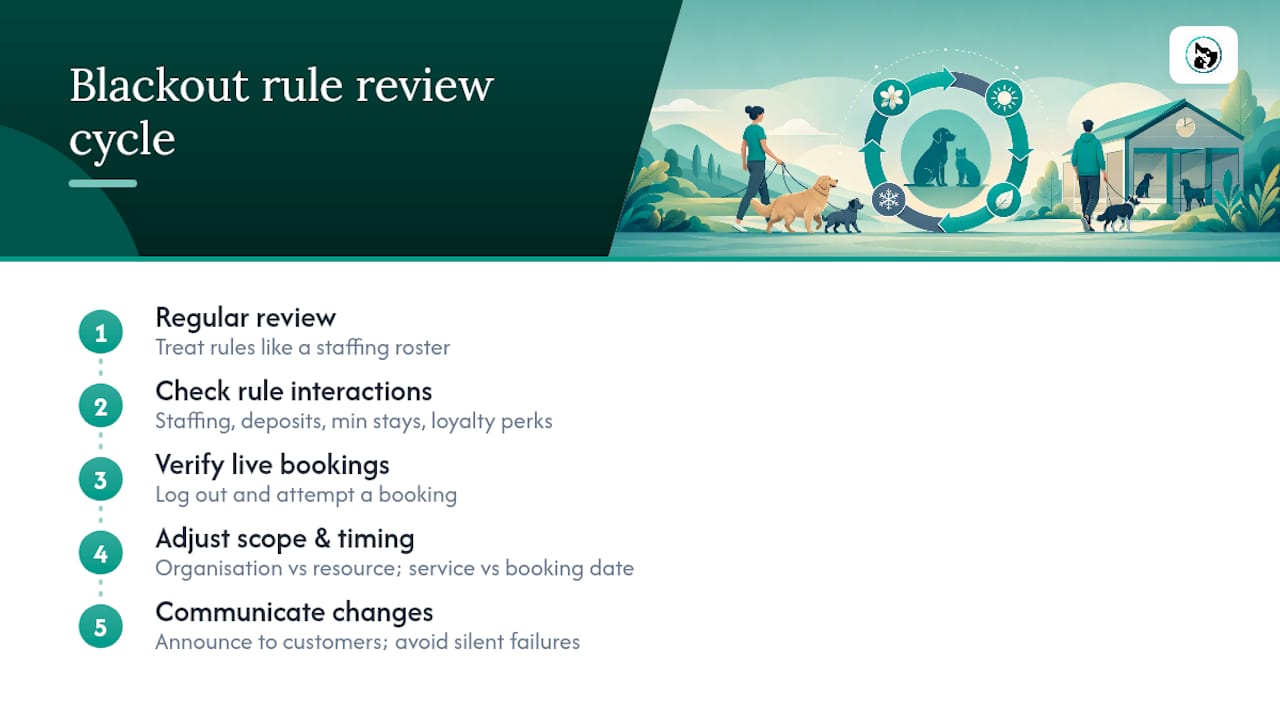
The overrated idea is that blocking dates protects revenue by itself. It doesn't. A blackout with no communication plan just moves frustrated customers to a competitor's booking page. The underrated idea is verification. Most operators set a blackout once and trust it. Few log out and try to book the date themselves to confirm it actually stuck across every channel.
If there's one thing this article's research points to consistently, it's that the businesses getting genuine value from blackout dates are the ones treating scope (organisation vs resource) and timing (service date vs booking date) as deliberate choices, not defaults left on whatever the software ships with. Get those two settings right, and most of the customer-service headaches around blackout dates disappear before they start.
— AnimalBooking
Managing blackout dates without the manual cleanup
Spreadsheets and text-message reminders make blackout rules hard to enforce consistently, especially once more than one staff member touches the calendar. Animalbooking's Smart Calendar handles the scope decision (organisation-wide or single provider) and the service-date versus booking-date choice in the same setup screen, so a blackout applied to a boarding suite over a long weekend doesn't accidentally block your entire grooming roster.

Existing bookings stay visible and manageable through the Bookings Dashboard, and auto reminders handle the customer notification step automatically once a blackout goes live, which is usually the part operators forget under pressure. If you're setting up blackout rules for the first time or reviewing your plan ahead of a busy season, check the Smart Calendar features and see which pricing plan matches how many providers or locations you need to cover.
Sources
- Blackout periods in Australia: when to use them and legal setup | Sprintlaw
- Hotel blackout dates: Maximising peak revenue smartly | Mews
- What are blackout dates? | Uniqodo glossary
- Adding and managing restrictions | Booking.com for partners